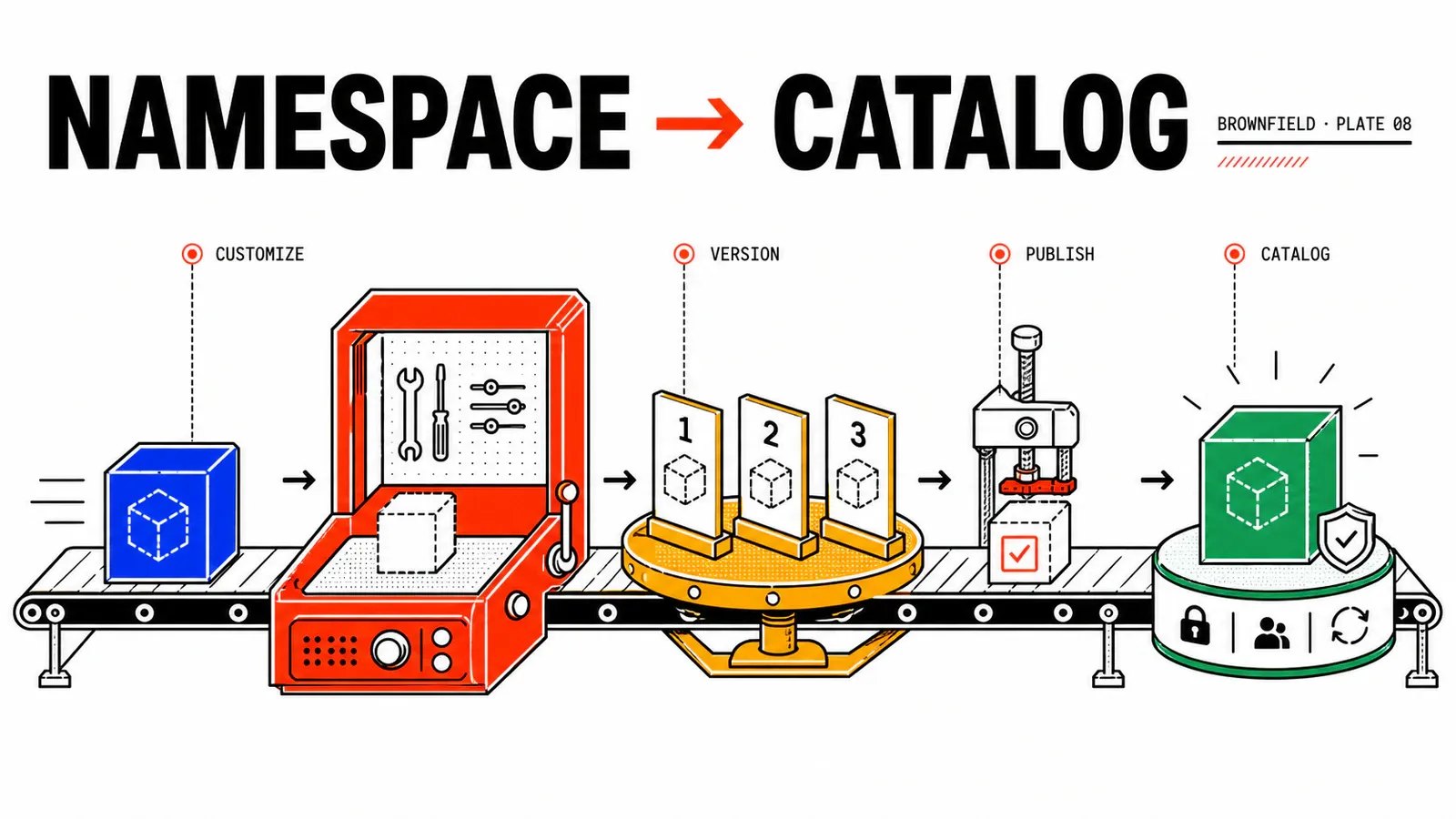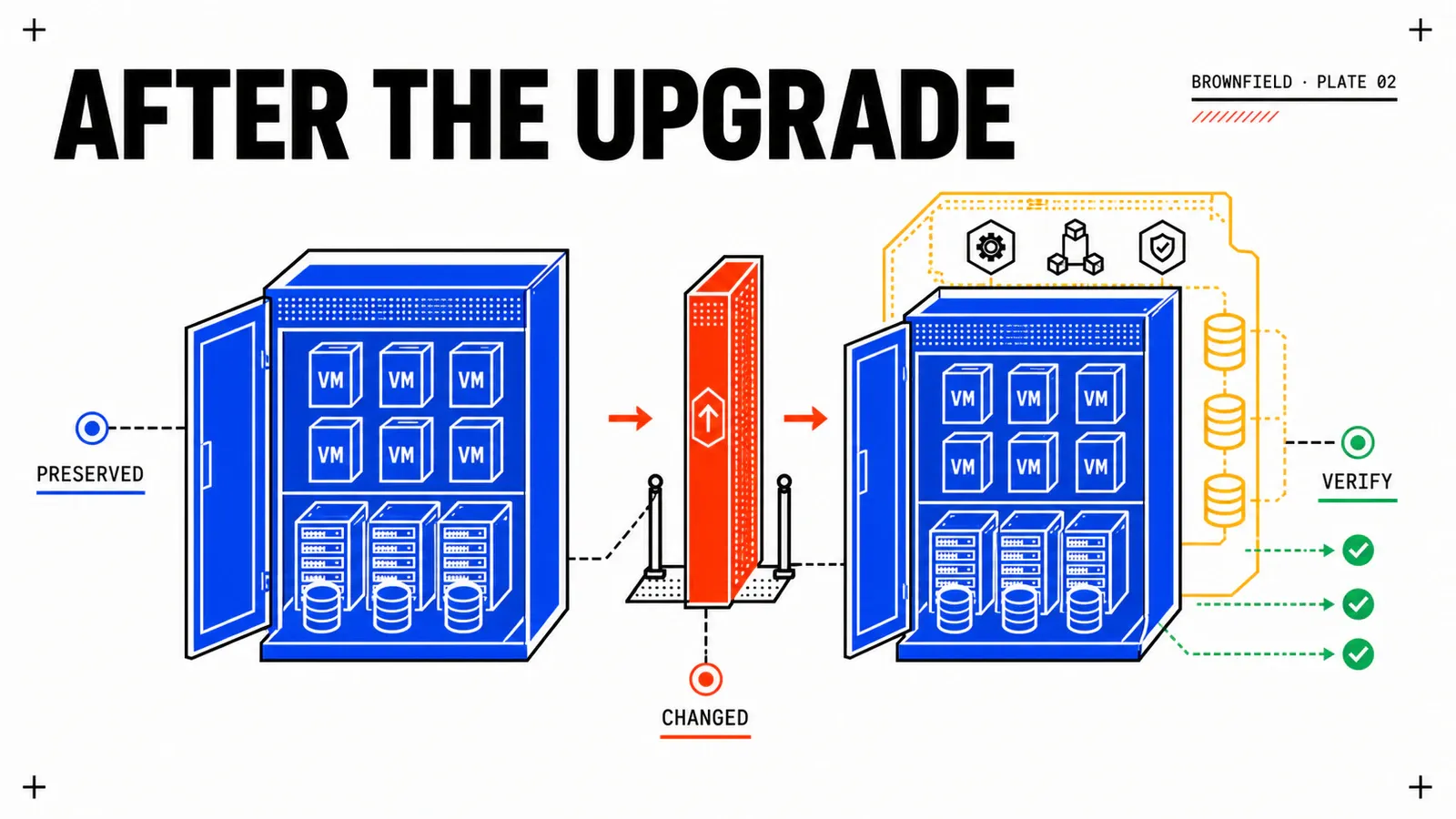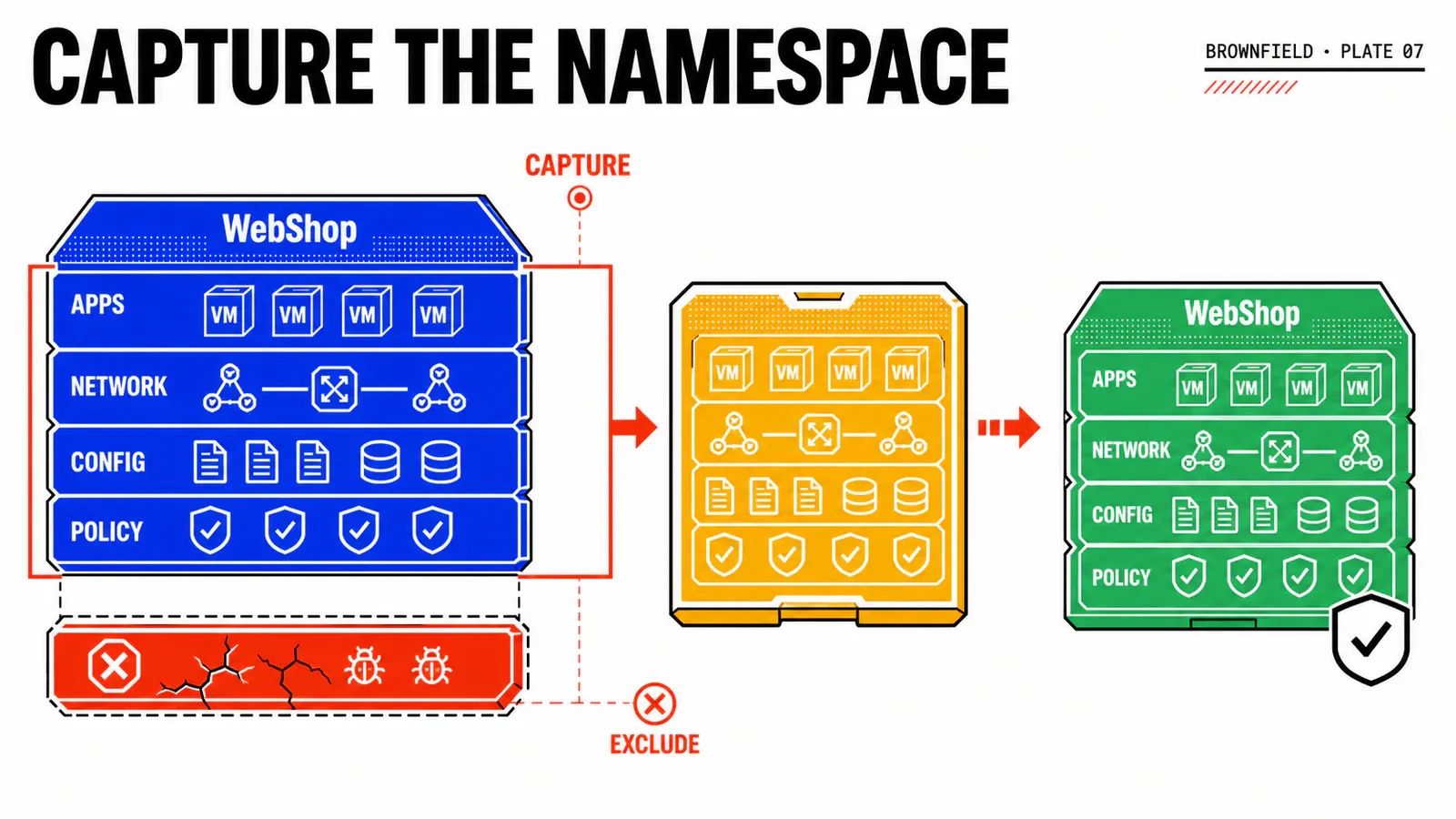
Capturing too early is an efficient way to industrialize a mistake. A diagnostic VM left in scope, a hard-coded address, or a database copied while writes continue will appear in every future clone. App Stack Formation does not automatically turn an application into a clean product; it serializes what the team gives it.
In our running example, WebShop has already left VM Apps: all three tiers run in ns-webshop-prod, and the previous cutover has been accepted. That is an essential boundary. App Stack Formation 9.1 captures an eligible All Apps Namespace as a Stateful Blueprint; it is not a VM Apps deployment converter. The path below is an unexecuted reconstruction based on the 9.1 TechDocs. UI labels, exact artifact contents, and application consistency must be verified on the build in use.
TL;DR
- Run App Stack Formation only after the service is fully stable in All Apps; the function does not directly capture the VM Apps legacy estate.
- For a repeatable catalog product, prefer customized capture and regenerate identities, secrets, and data; identical mode should remain isolated.
- On Monday, build the single complete VM Group, prepare the project Content Library and required VM Classes, and schedule the controlled shutdown needed for documented preflight.
What App Stack Formation actually captures
Broadcom’s Stateful Blueprint documentation describes the general path: an active self-service Namespace, exactly one VM Group containing every Namespace VM, initialized and powered-off VMs, the required VM Classes, at least one project-associated Content Library, a preflight, and then identical or customized capture. The result is a Blueprint and artifacts that still need to be deployed and tested.
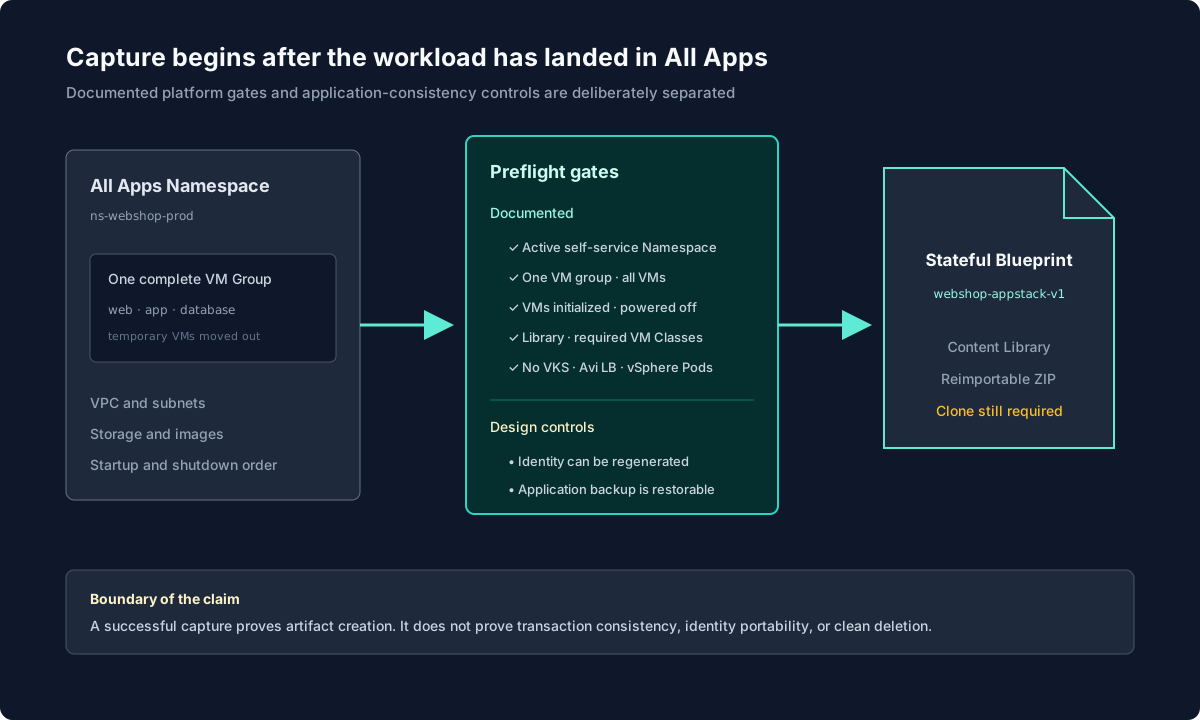
The documented scope is not a selective filter inside the Namespace: every Namespace VM must belong to that single VM Group. Capture does not by itself guarantee application-level transactional consistency, portability of a machine-bound license, absence of hostname collisions, or validity in another Region. The TechDocs also list blockers: a Namespace containing a VKS cluster, Avi Load Balancer, or vSphere Pods is not eligible for the documented path.
App Stack Formation comes after migration
The capture source is ns-webshop-prod, not webshop-prod-042. If WebShop still depends on webshop-db-01 in VM Apps, the application is not autonomous in All Apps and its scope is not ready to become an App Stack.
The VM Group is your first product decision
For WebShop, vg-webshop-core contains webshop-web-aa-01, webshop-app-aa-01, and webshop-db-aa-01 because those are all the VMs remaining in ns-webshop-prod. A migration-helper, diagnostic VM, or temporary restore must be removed from or moved out of the Namespace before capture. Leaving it outside the VM Group does not satisfy the documented prerequisite.
capture_scope:
  namespace: ns-webshop-prod
  namespace_vm_inventory:
    - webshop-web-aa-01
    - webshop-app-aa-01
    - webshop-db-aa-01
  vm_group:
    name: vg-webshop-core
    members:
      - webshop-web-aa-01
      - webshop-app-aa-01
      - webshop-db-aa-01
  namespace_vm_group_count: 1
  ungrouped_namespace_vms: []
Group review must start from application behavior. A forgotten VM may host an essential scheduler, license agent, or file relay. Conversely, a temporary machine left in the Namespace becomes permanent debt and consumes capacity, licensing, and attack surface in every clone. The application team explains each member; the platform team verifies portability and confirms that no Namespace VM remains ungrouped.
Identical or customized?
| Mode | What it attempts to preserve | Main risk | Recommended use |
|---|---|---|---|
| identical | more machine, network, and guest properties | collisions and weak portability | controlled isolated copy |
| customized | adjustable classes, hostnames, passwords, scripts/bootstrap, and Windows domain join | more parameters and tests | catalog, multiple projects, repeated clones |
The documented identical mode requires an active Namespace associated with a dedicated VPC. That is coherent: the more network identity a copy preserves, the more isolation it needs. For WebShop Environment, customized mode is the design default. It can produce unique hostnames, select project-approved classes, define or generate passwords, apply bootstrap scripts, and configure Windows domain join. Identical mode may support a protected topology rehearsal; it is neither a forensic image nor a disaster-recovery strategy.
For an identical capture, Broadcom states that the VM bootstrap field is cleared and Secret resources referenced by Guest OS customization are not recreated. Secrets stored inside captured disks remain a separate review and rotation concern.
Build a two-stage preflight
The first stage reflects platform prerequisites: active self-service Namespace, exactly one complete VM Group, all Namespace VMs initialized and powered off, required VM Classes available, and at least one project-associated Content Library. The VKS, Avi Load Balancer, and vSphere Pods blockers must be absent. The second stage belongs to application design: consistent and restorable backup, regenerable identity, cloneable license, renewable certificates, and controlled external dependencies.
app_stack_preflight:
  namespace: ns-webshop-prod
  documented_gates:
    namespace_active: pass
    self_service_namespace: pass
    project_content_library: pass
    namespace_vm_group_count: 1
    all_namespace_vms_in_single_group: pass
    all_namespace_vms_initialized: pass
    all_namespace_vms_powered_off: pass
    required_vm_classes_available: pass
    vks_cluster_present: false
    avi_load_balancer_present: false
    vsphere_pods_present: false
  application_controls:
    restore_rehearsal: lab-required
    machine_identity_regeneration: design-approved
    hard_coded_addresses: none-detected
    license_clone_right: owner-approved
  execution_status: not-performed
This distinction prevents a misleading claim. The engine may report the platform as capturable without guaranteeing that PostgreSQL is transactionally consistent or that the license contract permits ten copies. A control added by your team must remain identified as such, even when it matters as much as a native blocker.
Find identities that must not travel
For every VM, inspect hostname, FQDN, AD computer account, IP, MAC, static route, certificate, private key, machine-id, SID, software activation, service accounts, monitoring and backup agents, CMDB CI, and secrets stored on disk. Assign each item a strategy: preserve in an isolated target, regenerate, parameterize, rotate, or exclude.
A secret absent from YAML can still reside in the captured disk. Review therefore cannot stop at the generated Blueprint. It also examines disks, startup scripts, configuration history, and each agent’s destination. This is where security, application, and platform teams must work together.
Protect data and model lifecycle order
For the running example’s PostgreSQL database, use a supported application method to reach a consistent state, take a backup, and verify restoration. Then stop Web, Application, and database in that order, and verify that every Namespace VM is initialized and powered off before capture. This documented power-state prerequisite rules out a live-VM capture path; the exact database quiesce and backup sequence remains an application design control that requires data-owner approval and lab validation.
The proposed startup order is database, application, then Web; shutdown reverses it. An order is useful only if it waits for real conditions. webshop-app-aa-01 should not simply start thirty seconds after PostgreSQL; it should wait for a readiness check. Likewise, the Web tier waits for the application’s /readyz before /healthz can make the service eligible for traffic.
stack_lifecycle:
  startup:
    - component: database
      ready_when: postgresql-accepts-connections
    - component: application
      ready_when: http-200-readyz
    - component: web
      ready_when: http-200-healthz
  shutdown:
    - web
    - application
    - database
The exact mechanism for expressing or observing these conditions must be verified on the target VCF Automation 9.1 build. This code describes the expected contract, not guaranteed product syntax.
Capture, review, export
The reconstructed operational path is: complete the application backup, perform the controlled shutdown, verify all Namespace VMs are initialized and powered off, select the Namespace and its single complete vg-webshop-core, run preflight, resolve every blocker, choose the mode, define customizations and order, select cl-prj-webshop-modern, and launch a capture called webshop-appstack-v1. Retain the task identifier, events, observed duration, and artifact list. Exact UI wording remains subject to verification; a synthetic illustration must not be presented as a product screenshot.
Treat the generated Blueprint as code that requires review. Confirm it contains no unintended source address, clear-text secret, or helper VM, and that its VM Classes, Storage Classes, VPC, subnets, permissions, inputs, and outputs match the target project. Add version metadata, owner, date, and source Namespace identifier. Platform generation does not remove the need for code review.
The import and export documentation distinguishes both directions. Import accepts .OVA, .OVF, or .YAML; an OVA containing ISO media is unsupported during import. Exporting a valid Blueprint, its images, and dependencies creates a reimportable ZIP, but VM images that are ISO files are skipped during export. Archive that ZIP with a checksum, task ID, Content Library IDs, and known limitations. Export transports the artifact, not the history of the deployment from which it originated.
Useful failures to induce before release
The capture action is absent
Preflight blocks on an address
A temporary VM appears in the Blueprint
The image does not reach the Content Library
The future clone starts with inconsistent data
Exit gate: the artifact exists, the product does not yet
| Control | Nature | Expected evidence |
|---|---|---|
| active self-service Namespace; one group containing every VM | documented | configuration, inventory, and members |
| initialized and powered-off VMs; required VM Classes | documented | preflight and class inventory |
| project Content Library | documented | state, capacity, and rights |
| no VKS/Avi/vSphere Pods | documented | Namespace inventory |
| dedicated VPC for identical mode | documented | network association |
| restorable application backup | design control | isolated restore |
| preflight without blockers | expected result | report and task |
| versioned Blueprint and ZIP | expected result | artifact, IDs, and checksum |
| functional consistency | validate in lab | first independent clone |
If capture fails after shutdown, preserve events and return WebShop through its normal database → Application → Web startup sequence when the approved change plan calls for service restoration. Remove only clearly identified incomplete artifacts, correct the Namespace inventory, group, or library, and launch a new version. Capture never authorizes deletion of the All Apps source.
Conclusion
App Stack Formation reduces the work required to turn an existing stack into a Blueprint, but it replaces neither architecture, security, nor data protection. A sound capture begins with a stable Namespace, one complete VM Group, powered-off VMs, and explicitly portable identities. Its result remains a hypothesis until an autonomous clone can live and then disappear cleanly.
All Apps first
Capture starts after redeployment and acceptance in a Namespace; it does not convert VM Apps.
Two gates
Platform preflight and application consistency complement each other without attributing an undocumented guarantee to the product.
Artifact, not product yet
Blueprint, images, and ZIP still need to pass a clone, Day-2 operations, and complete deletion.
The WebShop cutover explains how to reach this stable Namespace. The next article shows how to customize the clone and promote the App Stack into the catalog.
Official sources: Working with Stateful Blueprints · Import or Export a Stateful Blueprint · Capture a Namespace as a Blueprint · App Stack Formation 9.1 overview.
Get the next one by email
New articles and series, sent when they are published. No other mail.