The last migrated VM does not finish the program. A forgotten token, cleanup subscription, dashboard pointing at the old CI, or team still opening incidents against VM Apps is enough to preserve dependency. Counting workloads therefore creates a false sense of closure.
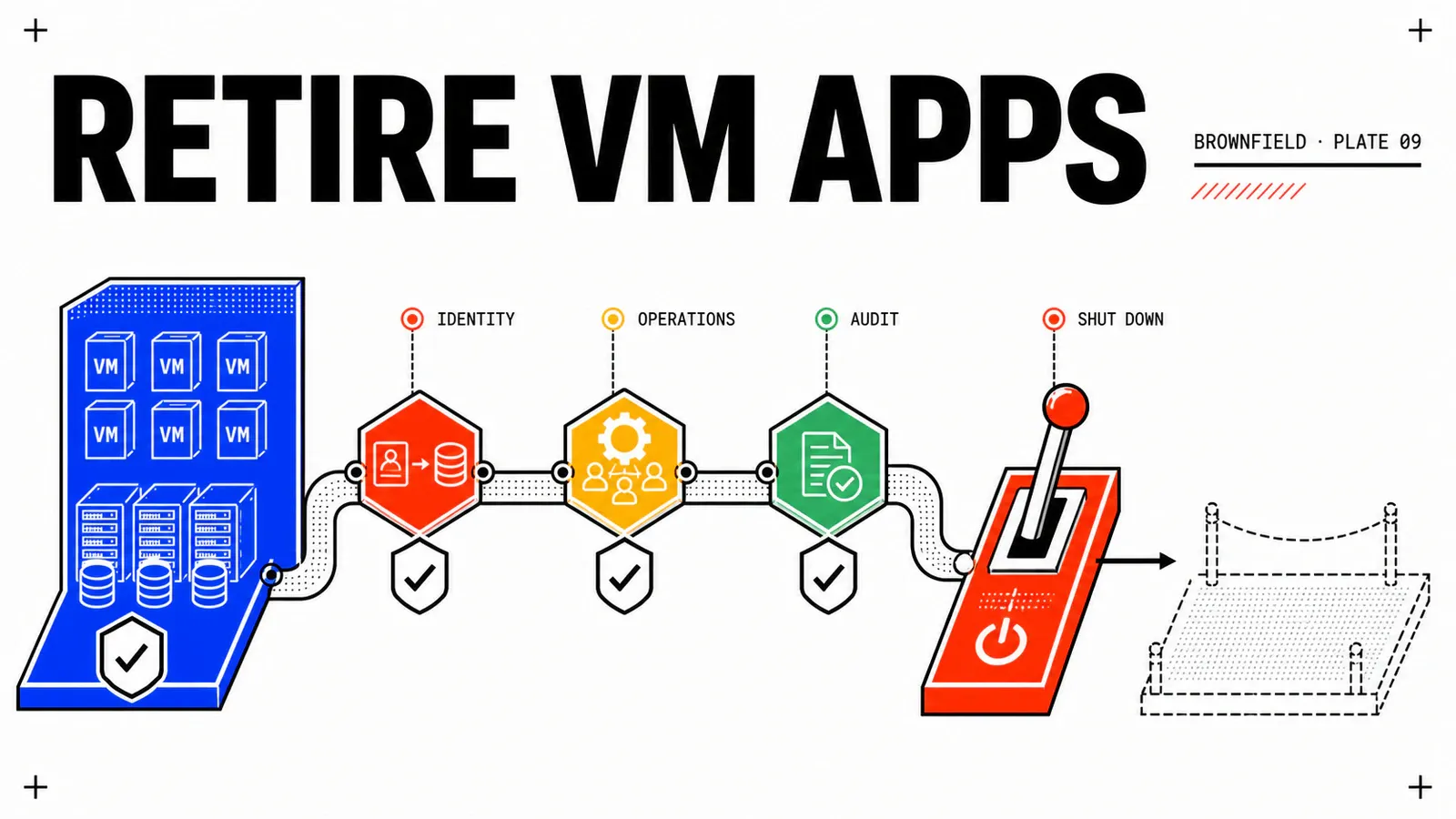
This final chapter handles the platform as a whole: identity, API clients, support, cost, archives, external writers, and the legacy organization. Retirement follows four states: open → frozen → disabled → optionally deleted. The controls are an unexecuted reconstruction. Adapt them to the VCF Automation 9.1 build, retention contract, and GSS answers obtained for the environment.
TL;DR
- Freeze new requests, drain deployments, and stop legacy writers before disabling; zero VMs does not prove zero dependency.
- Disablement is the observation gate: users lose access while the Provider Administrator retains documented management capability. Deletion is permanent.
- On Monday, build a “zero unaccepted dependencies” matrix spanning workload, data, network, identity, API, extensions, operations, and audit, with an owner for every exception.
Four states, one irreversible point
The activation and deactivation TechDocs state that disabling an organization prevents users from logging in and ends their sessions. The Provider Administrator can still manage its resources and networks. That behavior makes Disabled a useful gate: observe what breaks without having deleted the organization.
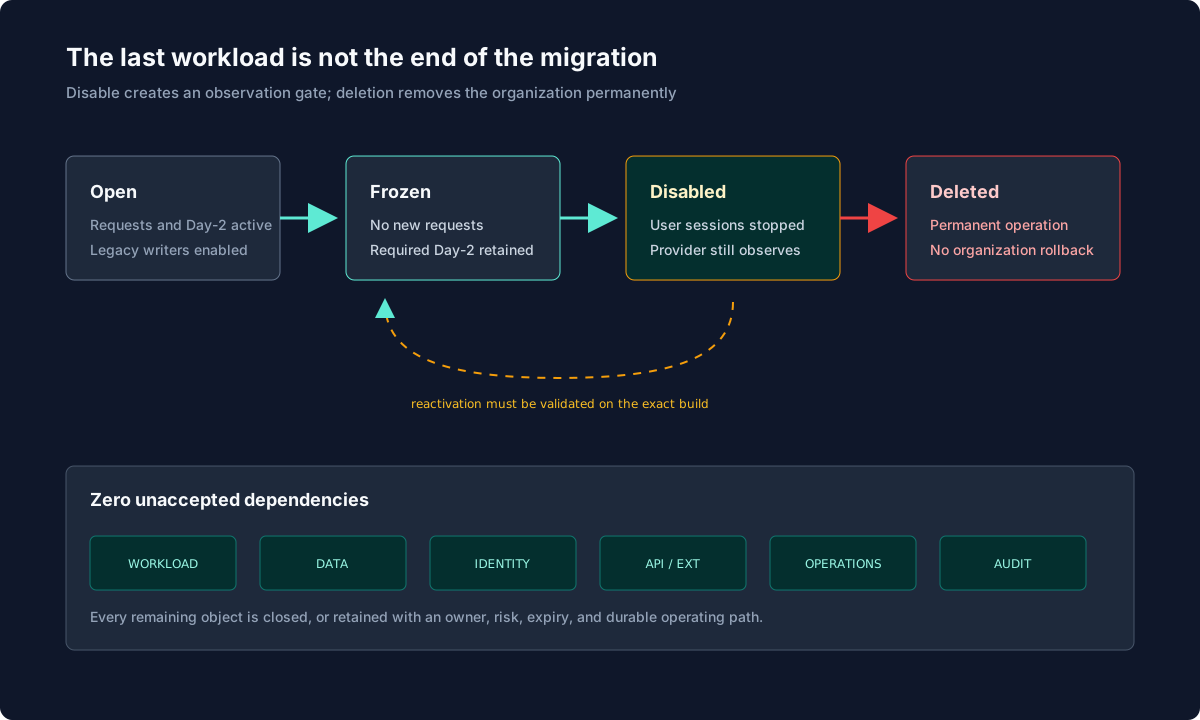
Frozen is a proposed operating convention, not a Broadcom organization type. New catalog requests are blocked while Day-2 actions and subscriptions required by living resources remain available. The return from Disabled to an operable state must be verified on the exact build before being promised. Organization deletion is documented as permanent and must never be used as a test.
Deletion is not a rollback mechanism
After deletion, no restoration of the organization is promised. Reconstruction would depend on archives, backups, external systems, and supported procedures. Every deletion decision must follow observation, never attempt to create it.
Leave legacy identity without losing users
After upgrade, vIDM may continue providing compatibility for the VM Apps rail. The target separates planes: Provider Management migrates to VCF Identity Broker and VCF SSO, while the All Apps organization uses a supported IdP and group mappings. Broadcom KB 440245, whose declared environment is VCF Automation 9.0.x, documents the incompatibility of vIDM as an All Apps IdP. For 9.1, confirm this against the 9.1 IdP TechDocs and the exact build.
The safe sequence begins with a tested break-glass account, followed by target IdP connection. Import groups rather than a hand-maintained user list, map Organization Admin, Project Admin, and Project User roles, and test every persona: allowed login, expected visibility, allowed action, and intended denial. One successful administrator does not prove consumer mappings.
Service accounts and machine clients need their own inventory. Give them a target endpoint, supported token flow, organization and project context, minimum scopes, and rotated secret. Observe authentication logs before revoking the old rail. The SSO migration to VCF Identity Broker provides the product procedure; your register links every source group and client to its target equivalent.
Requalify APIs and extensions
VM Apps and All Apps do not expose the same functional contract. A client receiving HTTP 200 but an empty catalog may use the wrong tenant, scope, or project. Test a useful operation end to end, not merely token acquisition.
| Element | VM Apps rail | All Apps rail | Closure evidence |
|---|---|---|---|
| endpoint | inventoried legacy URL | approved target URL | useful request succeeds |
| token | old flow | supported flow | expiry and rotation tested |
| context | VM Apps organization | All Apps organization + project | expected objects visible |
| payload | historical types | All Apps model | contract and error validated |
| scopes | inherited | least privilege | negative denial tested |
KB 427076 notes that Embedded Orchestrator does not support Basic Authentication in the documented context. Do not re-enable a weak mechanism to avoid adapting a client. Migrate packages, endpoints, certificates, and token flows, then revoke legacy credentials.
Order matters for subscriptions and Custom Resources. Disable create or update subscriptions once no service should write to DNS, IPAM, AD, or CMDB. Keep delete/cleanup paths until the final object is handled; otherwise the platform loses the ability to clean what it created. Then archive package, version, topic, observed payload, workflow, technical account, and relation to external IDs.
client_migration_record_template:
  evidence_status: expected-result
  validation_requirements:
    - useful-operation-succeeds
    - least-privilege-negative-test
    - legacy-secret-revoked-after-observation
  client: webshop-release-pipeline
  target_context: acme-all-apps/prj-webshop-modern
  authentication: supported-token-flow
  useful_test: catalog-query-and-deployment-read
  least_privilege_negative_test: required
  old_secret_revocation: after-observation
  execution_status: not-performed
Operate two rails without two truths
During coexistence, Service Desk, NOC, and SecOps must know which rail owns each service. For every All Apps target, publish runbook, on-call team, dashboards, alerts, log correlation by organization/project/Namespace/deployment, backup and restore, rotation rules, Day-2 actions, and provider-versus-organization escalation route.
Create a mapping between old and new CIs. Without it, incidents may open against the retired VM Apps object, target alerts may route to the previous team, and audit can lose the link between source request and target deployment. Technical coexistence is simpler than the ownership discipline it requires.
Cost reporting also needs correction. KB 435125 says VM Apps organizations are not visible under Capacity > Cost > ShowBack > Organization, unlike All Apps organizations. An apparent decrease in that view does not prove legacy drainage. Build a transitional report from other supported views or exports and show dual-run cost separately. Do not promise historical showback continuity across both models.
Freeze, drain, archive
Classify every VM Apps catalog item as replace, retain, retire, or unknown. replace hides or unpublishes the legacy item for new requests and points consumers to the target. retain describes an exception with owner and review date. retire closes after proof. unknown blocks retirement and immediately receives an investigation owner.
Every remaining deployment gets an explicit disposition:
deployment_disposition_example:
  evidence_status: design-hypothesis
  execution_status: not-performed
  source_id: webshop-prod-042
  service: webshop-prod
  owner: ecommerce-operations
  decision: migrated
  target_id: webshop-modern-118
  data_disposition: reconciled-and-accepted
  external_objects: [dns-record, cmdb-ci, ad-computer-accounts]
  audit_reference: CHG-2026-1842
  delete_authorized: false
An ownerless deployment is not a good deletion candidate. It is a blocker. For retired objects, the archive retains organization, project, catalog item, template, and version identifiers; requests, deployments, and resources; owners, leases, and approvals; useful event history; Custom Forms; Orchestrator packages; Custom Resource instances; old ID → new ID relationships; cutover decisions; and cleanup evidence.
Test the archive by searching for an old identifier from a workstation that does not depend on the VM Apps organization. An archive readable only through the platform about to be deleted is not an exit archive.
Stop writers in the right order
Begin by preventing new requests. Verify no deployment requires an external create/update, run final cleanups, disable create/update subscriptions, keep delete until the end, and then revoke legacy accounts and workflows. Finally confirm that All Apps writers are the only active owners.
This sequence prevents a late action from modifying a CI, address, or AD account during observation. It also prevents the opposite trap: removing cleanup too early and leaving external objects without lifecycle.
The “zero unaccepted dependencies” review
| Domain | Closure question |
|---|---|
| workload | does every deployment have a disposition and owner? |
| data | does every volume, backup, and archive have decided retention? |
| network | are legacy rules, VIPs, DNS, and IPAM handled? |
| identity | are groups, accounts, tokens, and certificates migrated or revoked? |
| extensions | are subscriptions, workflows, and Custom Resources stopped or archived? |
| operations | are target monitoring, backup, incident, and cost processes operational? |
| audit | can every old ID be found outside VM Apps? |
| support | do blocking GSS questions have written answers? |
“Accepted” allows a legitimate exception but never an invisible one. It has an owner, risk, expiry, cost, and durable operating platform. The gate does not necessarily seek zero objects; it requires zero dependencies whose disposition remains unknown.
Disable, observe, decide
After approval, disable acme-vmapps-legacy from Provider Management. Retain task ID, timestamp, approvers, pre-action state, user-denial test, and All Apps control results. During observation, monitor rejected authentication, API calls, scheduled tasks, alerts, and user tickets.
If a legitimate dependency appears, Provider Management presents the organization control as “Enable or Disable,” but reactivation behavior and state preservation must be validated on the exact build. If reactivation is required and validated, re-enable the organization under an approved change, expose only the minimum catalog or Day-2 capability needed to handle the dependency, return to frozen state, and restart observation. Do not reopen the entire catalog by reflex.
Permanent deletion requires at least: completed observation, no untreated workload or external object, tested archive, revoked credentials, compliant backups, application/data/platform/security/audit signatures, and approved irreversible change. Delete prerequisites vary by organization type; apply the build-specific procedure to the VM Apps source rather than extrapolating All Apps prerequisites.
A script fails after disablement
The API catalog is empty
VM Apps cost is absent from showback
Cleanup no longer starts
A dependency appears after deletion
Leave Mixed Tenancy too
After VM Apps and its shared dependencies disappear, reassess the feature flag, residual visibility, vCenter/NSX capacity, temporary network rules, legacy accounts, and transition infrastructure. The exact flag-removal sequence and prechecks need lab validation and, for production, GSS confirmation. Do not disable shared capability merely because the last deployment is gone; first verify what still consumes it.
Conclusion
Migration completion is a demonstration, not opportunistic cleanup. Prove target identity works, clients act in the right tenant, operations own on-call responsibility, archives survive the legacy platform, and each writer stopped at the right time. Only then does disablement observe the expected silence; deletion remains a separate irreversible decision.
Zero unknowns
An exception may remain, but its owner, risk, expiry, and operating path are explicit.
Disable before deletion
The gate ends sessions and reveals late dependencies while preserving documented provider management capability.
Audit survives
Old and new IDs remain linked in an archive readable without bringing the source organization back online.
The target product built in the previous App Stack Formation article gives consumers a real replacement path. To revisit the whole decision, return to the VM Apps to All Apps migration study.
Official sources: SSO migration to Identity Broker · Identity Provider management · KB 440245 — vIDM and All Apps · KB 427076 — Orchestrator Authentication · KB 435125 — Showback · Deactivate an organization · Delete an organization.
Get the next one by email
New articles and series, sent when they are published. No other mail.