

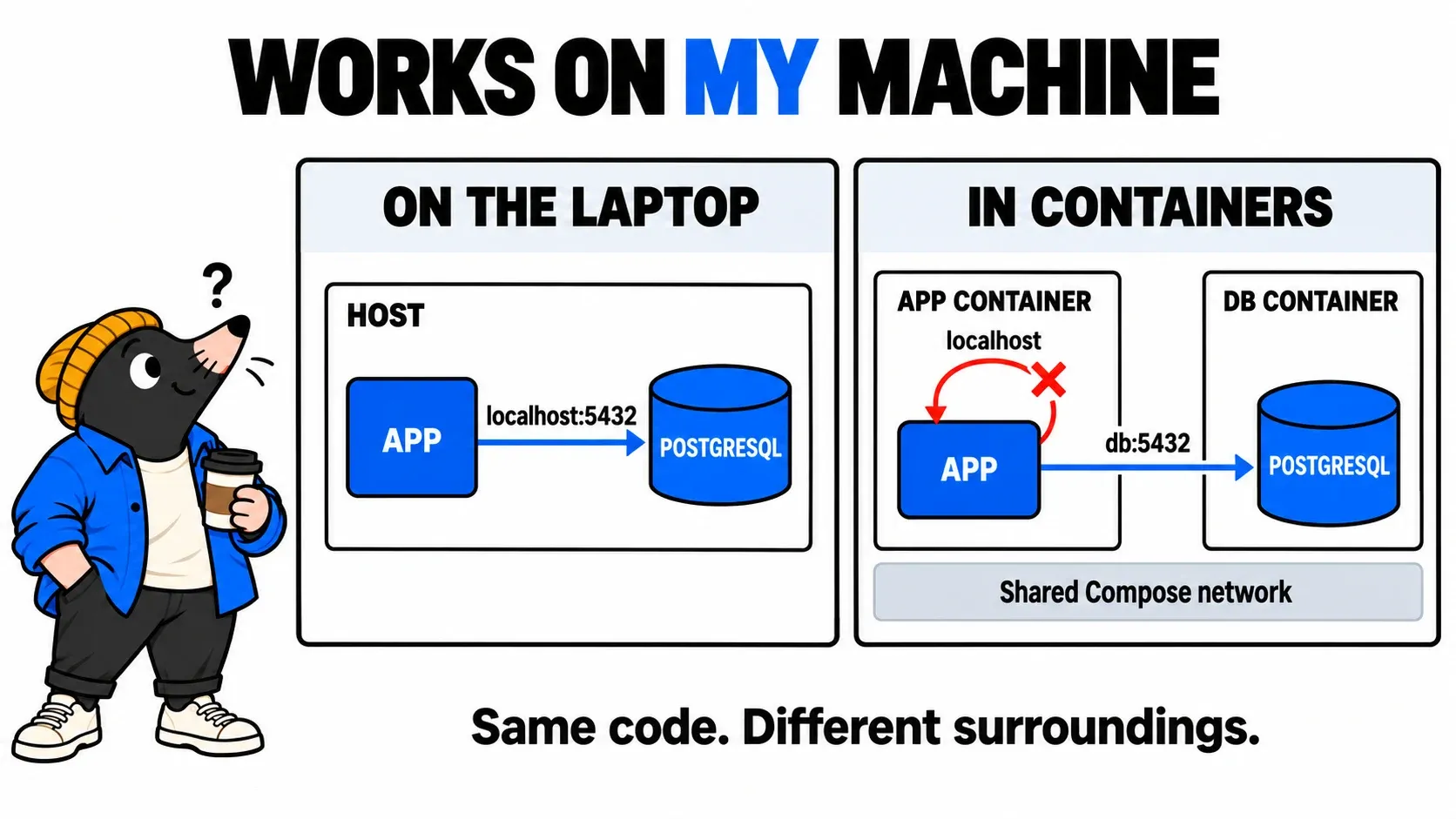
The developer shows you an inventory application: two devices, their names, everything works. You deploy the same code in a container. The process starts. The HTTP port responds. But as soon as you request the list, the application returns an error.
“Yet it works on my machine.”
The logs offer a first clue: the connection to localhost:5432 is refused. PostgreSQL is running, though. Before opening a firewall rule or changing a password, we need to understand who is trying to reach what, from where, and under which identity.
In this first TOP Dev article, we will follow that application all the way to a real database read. Familiar infrastructure concepts — DNS, routing and filtering — will help uncover the assumptions the code makes about its environment. A small lab then lets you break and repair the connection without developing an entire application.
The path we need to check
- DestinationWhich server is the app looking for?
- TransportDoes the connection reach PostgreSQL?
- IdentityWhich service account signs in?
- ActionCan that account read the devices?
The browser talks to the application over HTTP. The application opens the PostgreSQL connection, using its own account. The traffic we need to inspect originates in its execution environment, not in your browser or administration workstation.
First trap: localhost has a different neighbourhood
On the developer’s laptop, the application and PostgreSQL may run directly on the same operating system. localhost can then reach the local database. Move the application into a container with an isolated network, and that same address now points to the container’s own loopback interface. No PostgreSQL server is listening there.
The code has not necessarily changed. The meaning of its configuration changed when its execution location changed. In the cover diagram, the arrow looping back into the application container represents that mistaken call to itself. The correct connection leaves for the database service.
With services named app and db on a shared Compose network, the application uses db:5432. Compose supplies service-name resolution; communication between containers uses the destination container’s port. Publishing the database port on the host is unnecessary for that exchange. Compose networking.
This explanation assumes separate network namespaces. Containers explicitly sharing another service’s or the host’s network behave differently. And db is our lab’s chosen service name, not a universal production address.
Here is what the application needs to receive:
PGHOST=db
PGPORT=5432
PGDATABASE=inventory
PGUSER=svc_inventory
PGPASSWORD=… supplied separately
Those names are used by our example. Every application has its own configuration mechanism. Check the value actually read by the process, not merely a file sitting on the server. A change may require recreating the container or restarting the service.
The address is right. Can the traffic get through?
Now consider a database on another VM or a managed service. To establish a connection, the application must resolve the correct name, have a path to the destination and receive the responses. Network controls must allow the required traffic. PostgreSQL must also listen on the intended interface and port: allowing 5432 through a firewall does not make a loopback-only listener remotely accessible. PostgreSQL listening settings.
An actionable firewall request identifies the source as seen by the relevant network control, the destination, protocol and destination port. Here: application environment to PostgreSQL, TCP destination 5432. NAT can change the observed source address. A missing return route or asymmetric filtering can interrupt the exchange. Handling response traffic also depends on whether controls are stateful or stateless: “open 5432 both ways” does not accurately describe every case.
From the application environment, if these tools are available:
getent hosts db
nc -vz -w 3 db 5432
The first helps observe name resolution; the second attempts a TCP connection. Availability and options vary by image. A minimal image may contain neither. A diagnostic container can help, provided you verify that it reproduces the relevant network context.
Read each result without making it prove too much:
| Observation | What it suggests checking |
|---|---|
| Name cannot be resolved | Configured name, DNS and network attachment |
| Connection refused | An active refusal: absent listener, wrong port or explicit rejection are possible |
| Timeout | No timely response: routing, filtering, an unavailable target or saturation are possible |
| TCP connection succeeds | A service accepts the transport; identity and privileges still need checking |
A timeout alone therefore does not prove a firewall block. Correlate the attempt with routes and available logs. Conversely, an explicit PostgreSQL password error shows that the exchange progressed further than a lost packet.
Reaching the database does not grant access to its data
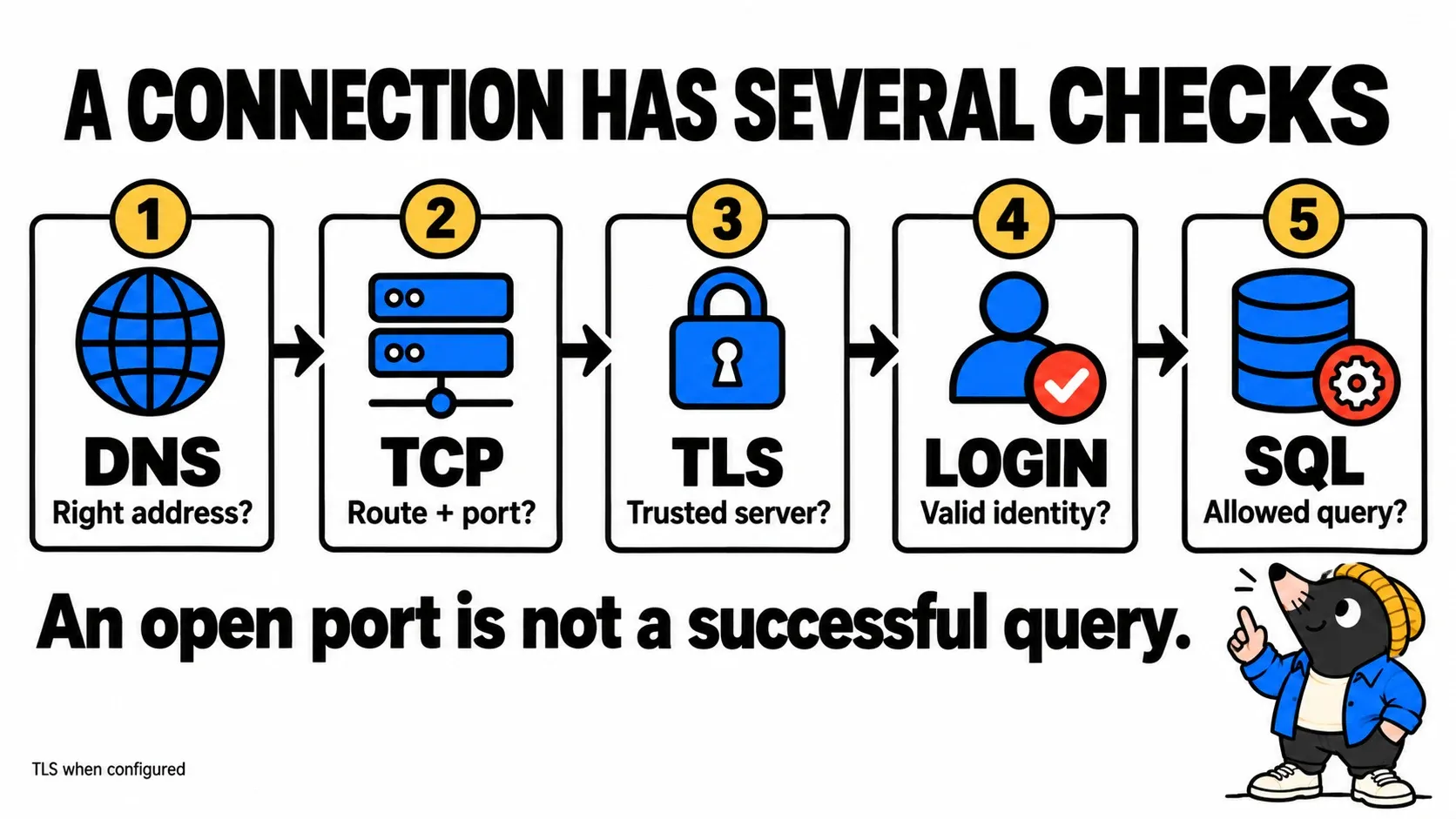
This diagram shows logical checks, not physical topology or a protocol capture. TLS applies when configured. A connection can reach the server and then fail certificate validation. With PostgreSQL’s libpq client, sslmode=verify-full checks the trust chain and server name. Correct the expected name or certificates rather than bypassing validation to hide the error. PostgreSQL TLS support.
Next comes the service account: an identity dedicated to the application, here the PostgreSQL role svc_inventory with LOGIN capability. It is not automatically the container’s Linux user or your personal account. The developer may have used the table owner’s credentials while staging uses a less privileged identity.
PostgreSQL also controls authentication conditions through pg_hba.conf: connection type, origin, requested database and user. It uses the first matching rule; failed authentication does not cause it to try the following rules. A no pg_hba.conf entry message concerns this admission control, not a missing SELECT privilege. pg_hba.conf rules.
Finally, authentication and authorization are separate. The correct password is insufficient to read inventory.devices. In this example, the account needs permission to connect to the database, use the schema and select rows from the table. Privileges may be direct or inherited. PostgreSQL privileges.
GRANT CONNECT ON DATABASE inventory TO svc_inventory;
-- Run the following statements in the inventory database.
GRANT USAGE ON SCHEMA inventory TO svc_inventory;
GRANT SELECT ON TABLE inventory.devices TO svc_inventory;
These statements assume the role already exists and are run by an authorized administrator or owner. They describe our read requirement. They grant neither table creation nor device modification. Schema migrations have a different responsibility; future tables may need their own grants.
Your turn: break and repair the connection
The lab contains a small Bun API and PostgreSQL. The API performs one read using svc_inventory. You do not need Bun or PostgreSQL installed on your workstation: Docker and Compose run them. The initial image downloads require network access. The commands below target macOS or Linux with sh, openssl and unzip.
Download the TOP Dev lab, extract it, then open a terminal in the top-dev-inventory directory:
sh setup.sh
docker compose up -d --wait
The script generates two local passwords in .env. No database port is published; only the API is exposed on 127.0.0.1:18080. This disposable lab does not configure TLS and is not a production deployment template. You can read its files before running them.
1. The process lives, the request fails
Open http://localhost:18080/live, then http://localhost:18080/devices. The first confirms that the process is alive. The second should return HTTP 503 with inventory_unavailable.
docker compose logs appInitially, PGHOST is localhost, so the application looks for PostgreSQL inside its own container. Our API makes failure visible; returning an empty list with HTTP 200 would confuse “no devices” with “inventory unavailable.”
2. Correct destination, wrong identity
Run the same read in a temporary process on the lab network, correcting the hostname but deliberately supplying an incorrect secret:
docker compose run --rm -e PGHOST=db -e PGPASSWORD=wrong app bun app.js --checkAuthentication should fail. The server has been able to reply, so investigating a closed port is no longer the first priority. This uses the same program and image but a new process. It does not change the running HTTP service.
3. Correct account, missing privilege
Run again without replacing the generated password:
docker compose run --rm -e PGHOST=db app bun app.js --checkYou should encounter a permission error on devices. Initialization deliberately grants CONNECT and USAGE, but omits SELECT. The account authenticates, yet the read is refused. Grant only that privilege in the lab database:
docker compose exec db psql -U postgres -d inventory -c 'GRANT SELECT ON inventory.devices TO svc_inventory;'Run the temporary read again. It should return router-paris and switch-lyon. We have finally tested the required action under the application’s account.
4. Repair the service, not just the test
In .env, replace APP_DB_HOST=localhost with APP_DB_HOST=db, then recreate the application so it reads the new value:
docker compose up -d --force-recreate appReload /devices in your browser: both devices should appear. The service account is still not an administrator. Success comes from the correct destination, secret and required privilege.
To stop the lab while keeping its data, run docker compose down. To also delete this lab’s data and start again, use docker compose down -v. Keep .env to restart with the same secrets. SQL initialization only runs against an empty database; editing passwords in the file does not update credentials inside an already initialized volume.
What we hand over for the next deployment
Before concluding “infrastructure issue” or “application issue,” assemble a small execution contract: delivered code version, runtime, dependencies, expected destination, required traffic, service identity and necessary SQL operations. Our lab keeps the same program and images during the investigation. It varies configuration and privileges; image tags are not an immutable version lock, however.
A check such as pg_isready helps wait for a server that accepts connections. It does not validate the service password or permission to read a table. PostgreSQL explicitly documents this limitation. What pg_isready checks. Our decisive check remains the inventory query, executed from the appropriate context under the correct identity.
Next time, replace “the VM is reachable” with a situated observation: this application, from this environment, under this account, succeeds at this operation. That is a practical meeting point for development, infrastructure and database administration. To explore the journey before the application, follow TOP Infra through a URL’s path.
Get the next one by email
New articles and series, sent when they are published. No other mail.