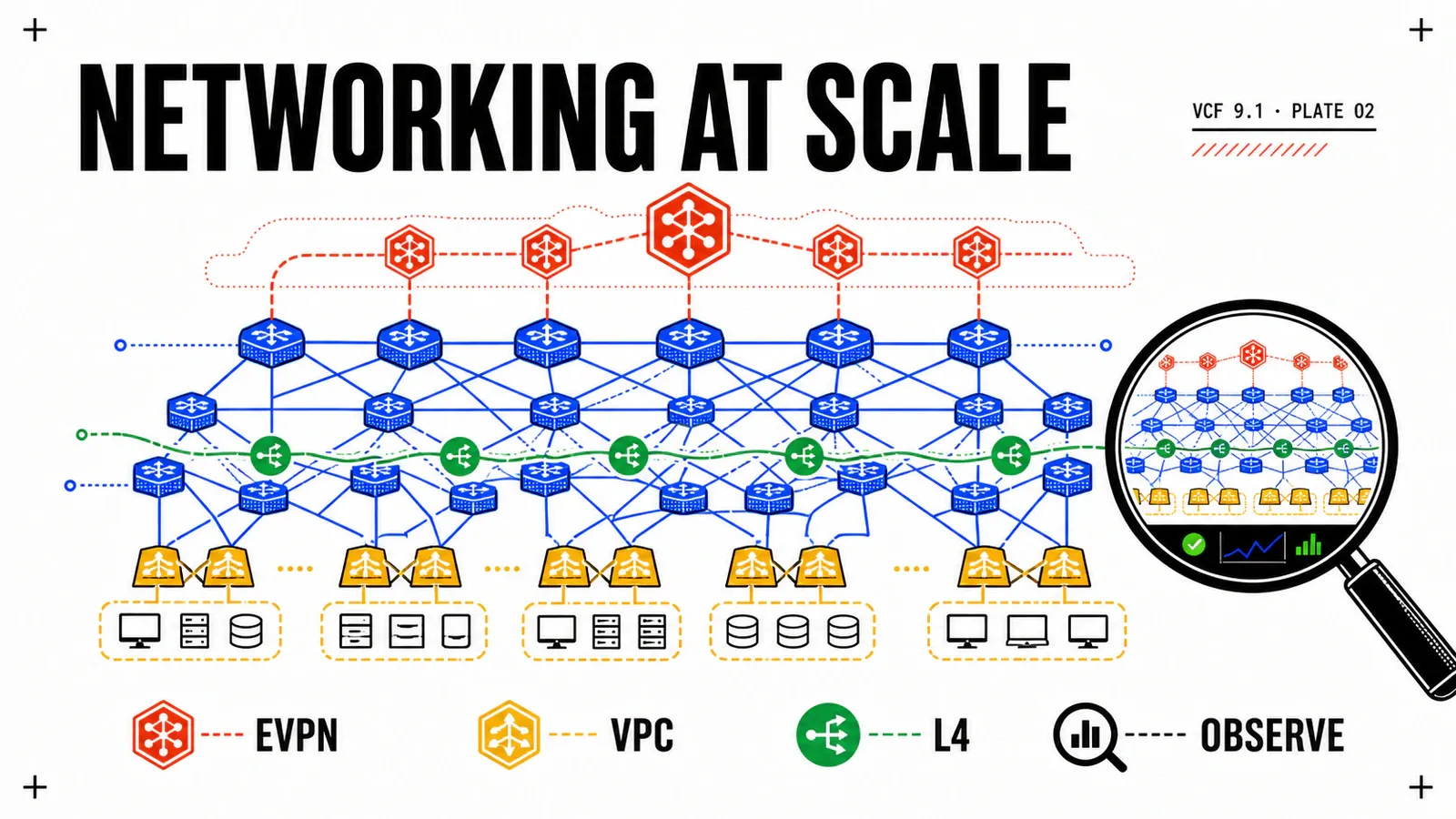
In VCF 9.0, the VPC model democratized networking for application teams — but the boundary with the physical fabric stayed bespoke, and VPC data plane scale was hitting its limits (no native L4 LB, no IPSec, silent config drift). VCF 9.1 doesn’t rewrite NSX: it methodically patches the seams that hurt in production.
This article dissects the networking & scale enhancements of VCF 9.1 from a network architect’s standpoint: what concretely changes between 9.0 and 9.1, what it implies for your topology, and the migration traps the release notes don’t put in bold.
Series 'What's new in VCF 9.1' — 2/4
Mini-series on what’s new in VMware Cloud Foundation 9.1:
- Infrastructure efficiency & TCO
- Networking & scale (this article)
- Kubernetes & self-service
- Security & resilience
Visual credits
Screenshots © Broadcom, taken from the official VCF blog (links at the end of the article). Synthesis and analysis are my own.
EVPN-VXLAN: interoperability with the physical fabric
The most structuring topic of the release. Until 9.0, getting an NSX VPC to talk to the datacenter’s physical fabric was a custom job: static routes, point-to-point BGP, manual redistribution between the Tier-0 and the spine switches. Every tenant that had to touch a physical network (NAS storage, mainframe, legacy non-overlay segment) generated a networking ticket and an architecture exception.
VCF 9.1 standardizes this integration via EVPN-VXLAN. The physical fabric already speaks EVPN on virtually every modern datacenter (Cisco ACI/NX-OS, Arista EOS, Juniper); NSX now joins that control plane instead of inventing it in parallel. Concretely, an EVPN L3 VNI is exposed on the NSX side, VPC and VCF workload prefixes are advertised over BGP-EVPN (the L2VPN/EVPN address family, type-5 routes for L3), and the fabric natively learns VPC subnets without bespoke redistribution.
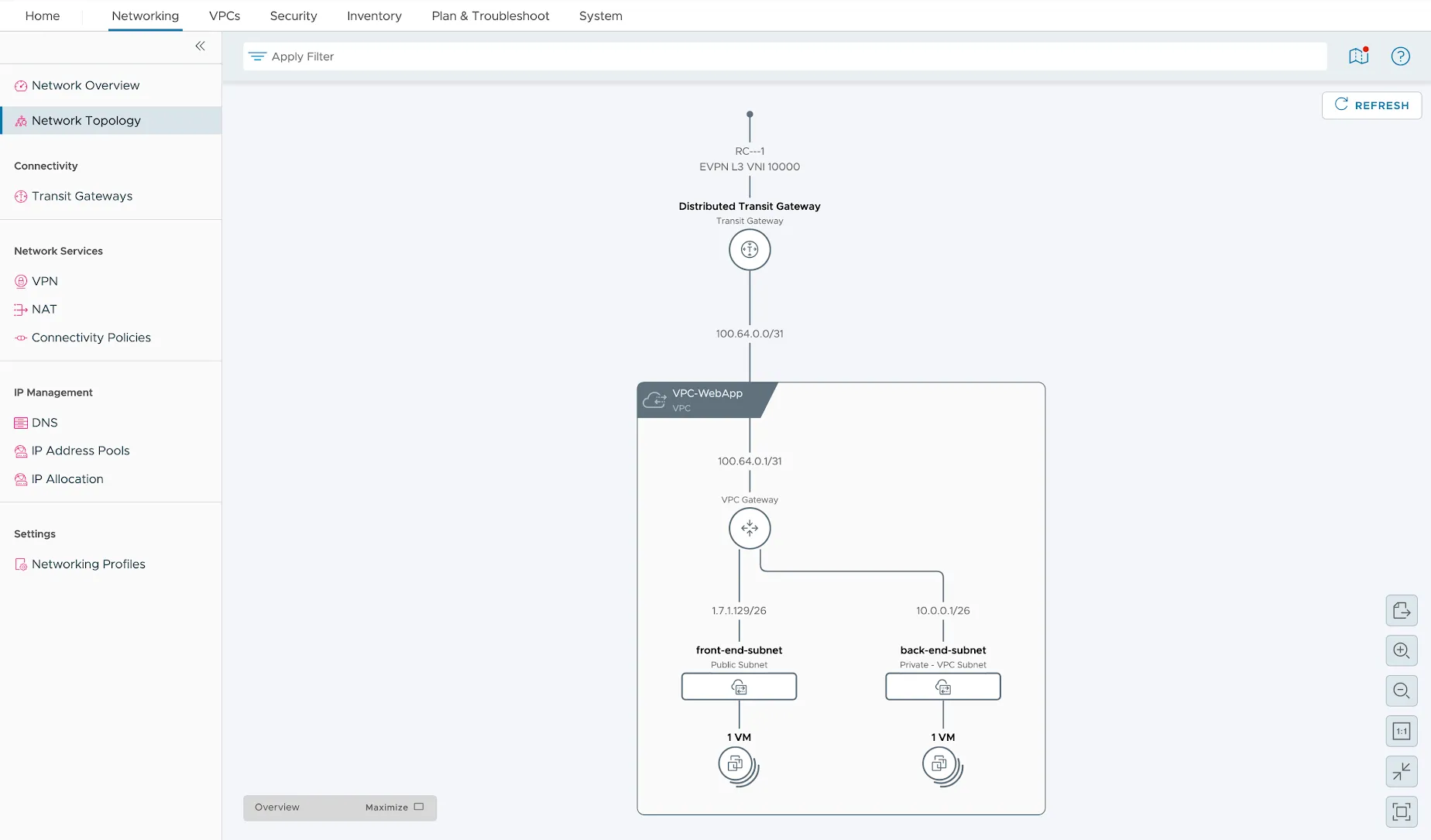
Source : Broadcom — VCF Blog
The NSX Network Topology UI screenshot makes it readable. From top to bottom: an EVPN L3 VNI 10000 that materializes the routing bridge with the physical fabric; a Distributed Transit Gateway that aggregates the VPCs and carries distributed north-south connectivity (routing runs as close to the workload as possible, not centralized on an Edge pair); and below it the VPC-WebApp VPC exposing two subnets — a public front-end-subnet (Internet-facing / DMZ) and a private back-end-subnet (application and data tier, never routed outside the VPC without an explicit policy). It’s the reference three-tier pattern, but here everything is declarative and the EVPN bridge replaces the static routes.
| Aspect | VCF 9.0 | VCF 9.1 |
|---|---|---|
| Physical fabric integration | Manual static routes / point-to-point BGP | Standardized EVPN-VXLAN (type-5 routes) |
| VPC subnet advertisement to fabric | Bespoke per-tenant redistribution | Native via BGP-EVPN |
| VPC north-south routing | Centralized on an Edge pair | Distributed Transit Gateway (closest to workload) |
| Onboarding a new routed VPC | Networking ticket + architecture exception | Declarative policy |
Architect’s note. EVPN-VXLAN is not decided on the NSX side alone: it’s a conversation with the fabric team (AS numbers, route targets, VNI mapping, anti-spoofing on type-5). Align the VNI plan from the design phase — a VNI poorly partitioned between tenants is an L3 leak risk that doesn’t show until the audit.
VPC Load Balancer L4 & IPSec VPN
The two functional gaps of VPC 9.0 that forced you to “break” the model and fall back to direct NSX.
L4 Load Balancer. The VPC now supports L4 (TCP/UDP) load balancing natively, materialized by a solution running on a Virtual Networking Appliance (VNA) — a data plane appliance dedicated to the VPC, distinct from the historical NSX ALB Service Engines. The benefit: a developer exposes an L4 service (database, message broker, gRPC endpoint) without requesting an Avi VirtualService from the networking team. The LB lives within the VPC scope, follows its declarative lifecycle, and stays isolated from other tenants.
IPSec VPN. The VPC now supports site-to-site IPSec VPN, leveraging centralized external connectivity. A VPC can therefore establish an encrypted tunnel to a remote site (public cloud, partner datacenter, legacy on-premise) without going through a shared Tier-0 managed outside the VPC model. This is the feature that makes the VPC viable for real hybrid cases, not just for intra-datacenter isolation.
| Capability | VCF 9.0 (VPC) | VCF 9.1 (VPC) |
|---|---|---|
| Load balancing | L7 via NSX ALB outside the VPC model | Native L4 on VNA, inside the VPC |
| Site-to-site VPN | No — fall back to direct NSX | IPSec VPN via centralized external connectivity |
| Management scope | Mixed VPC + networking tickets | Declarative, within the VPC lifecycle |
Migration note. If you had worked around the missing L4/VPN by exiting the VPC (dedicated Tier-1, Avi outside the VPC), 9.1 opens a re-convergence path back to the VPC model. Don’t migrate for the sake of it: the value shows up when the number of tenants exposing L4/VPN exceeds the threshold where ticket-based management becomes the bottleneck. You’ll recognize the logic from article 1 on TCO — fewer networking tickets is also operational TCO.
SDDC Manager: configuration synchronization
The classic brownfield scenario: an operator applies a network change directly in vCenter or NSX Manager (emergency, habit, working around a too-slow workflow) and the SDDC Manager database doesn’t know about it. At the next remediation or upgrade, SDDC Manager re-applies its “source of truth” view and overwrites the change — or worse, refuses to progress on a drift it doesn’t know how to reconcile.
VCF 9.1 introduces configuration synchronization: network configuration changes made directly in vCenter or NSX Manager now sync back into the SDDC Manager database. Drift is reconciled instead of being ignored and then overwritten. SDDC Manager moves from an “I impose my truth” model to an “I reconcile actual state” model.
| Behavior | VCF 9.0 | VCF 9.1 |
|---|---|---|
| Direct vCenter/NSX network change | Invisible to SDDC Manager | Synced back into the SDDC Manager database |
| Config drift | Overwritten at next remediation | Reconciled (drift reconciliation) |
| Brownfield with manual ops | Source of upgrade blockage | Tolerated and synchronized |
Architect’s note. This feature doesn’t remove the need for discipline: synchronization reconciles, it doesn’t validate. A “wild” change that is technically correct but outside governance will be synchronized and therefore made permanent. Keep a periodic drift review in VCF Operations — sync reduces the blockage risk, not the need for traceability.
NSX bare-metal edge import & non-disruptive certificates
Two enhancements targeting brownfield deployments and industrialization.
Bare-metal edge import. Existing non-VCF NSX deployments equipped with bare-metal Edge nodes (for high north-south throughput, crypto offload, or Edge VM latency constraints) can now be imported into VCF. Previously, a bare-metal Edge was a reason for convergence ineligibility; you had to rebuild as Edge VM or stay outside VCF. In 9.1, the Edge hardware investment is preserved when adopting VCF.
Non-disruptive certificates. NSX-consuming components adopt the standardized non-disruptive certificate architecture. Certificate rotation (renewal, re-issuance after compromise, compliance rotation) no longer requires a data plane outage window. For a platform consuming NSX under SLA, that’s the difference between an off-hours planned certificate rotation and a transparent one.
| Aspect | VCF 9.0 | VCF 9.1 |
|---|---|---|
| Existing bare-metal Edge | Not importable — rebuild as Edge VM | Importable into VCF |
| NSX certificate rotation | Possible outage window | Non-disruptive, standardized architecture |
| NSX brownfield eligibility | Restricted | Broadened (bare-metal included) |
Migration note. Bare-metal Edge import has constraints (supported NSX versions, Edge cluster topology, fabric prerequisites). It’s not a blind lift-and-shift: audit the source NSX version and Edge topology compliance before committing to a convergence timeline.
Multi-NIC secondary networks for VKS pods
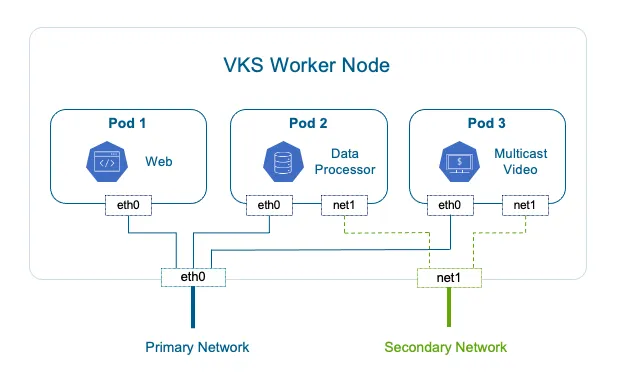
On the Kubernetes side, VCF 9.1 introduces multi-NIC secondary networks for VKS pods. By default, a pod has a single interface (eth0) on the cluster’s primary network. Some network-intensive or regulated workloads need a second interface, on a separate network, with its own rules.
Source : Broadcom — VCF Blog
The diagram shows a VKS worker node hosting three pods. Pod1 (Web) and Pod2 (Data Processor) only use eth0 on the primary network — the standard case, sufficient for 90% of workloads. Pod3 (Multicast Video) additionally carries a net1 interface attached to a secondary network. Typical use cases: multicast traffic (video, market data, legacy service discovery) that doesn’t traverse the primary overlay; data plane / control plane separation for telco VNFs/CNFs; regulatory isolation of a flow (payment, healthcare) on a dedicated segment with its own firewall; or a high-performance storage plane distinct from application traffic.
| Capability | VCF 9.0 | VCF 9.1 |
|---|---|---|
| Interfaces per VKS pod | 1 (eth0, primary network) |
Multi-NIC (eth0 + net1/N secondary networks) |
| Multicast / separate data plane | Not natively supported | Dedicated secondary network |
| Regulatory isolation of a pod flow | Workaround (NetworkPolicy / node pool) | Secondary interface on an isolated segment |
Architect’s note. Multi-NIC moves complexity, it doesn’t remove it: each secondary network is an address plan to manage, an extra firewall matrix, and one more diagnostic point. Reserve it for workloads that genuinely justify it (multicast, telco, regulatory constraint) — don’t generalize it for convenience.
Network observability & planning in VCF Operations
Network scale can’t be managed by sight. VCF 9.1 enriches VCF Operations with two capabilities directly useful to the architect.
Source : Broadcom — VCF Blog
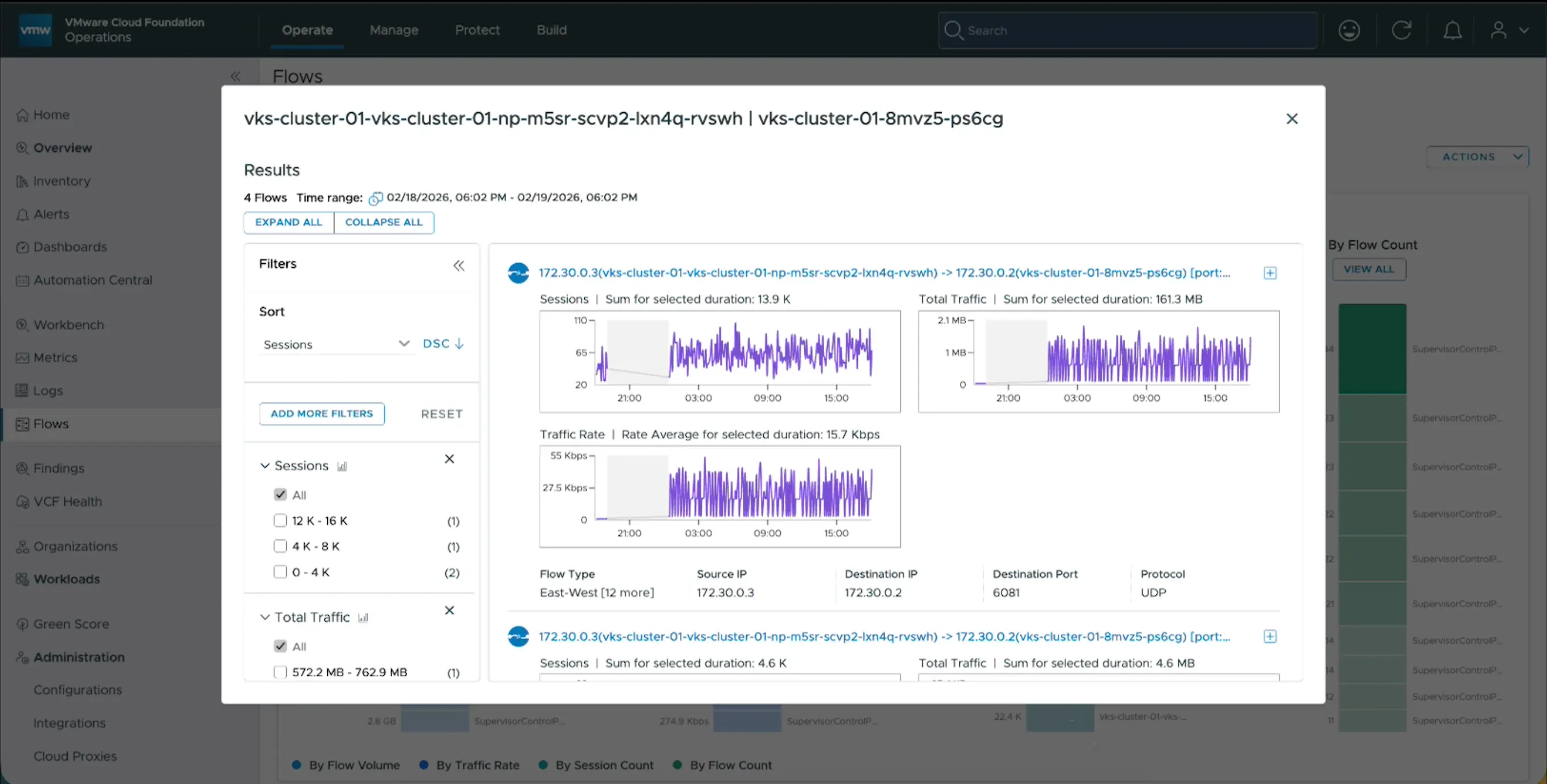
The network Flows for VKS clusters view exposes traffic at the Kubernetes cluster level: number of sessions, traffic volume, and flow types (intra-cluster east-west, north-south, inter-namespace). This is what was missing to size a VPC or a node pool without extrapolating: you observe real per-cluster traffic instead of provisioning “large just in case”.
Source : Broadcom — VCF Blog
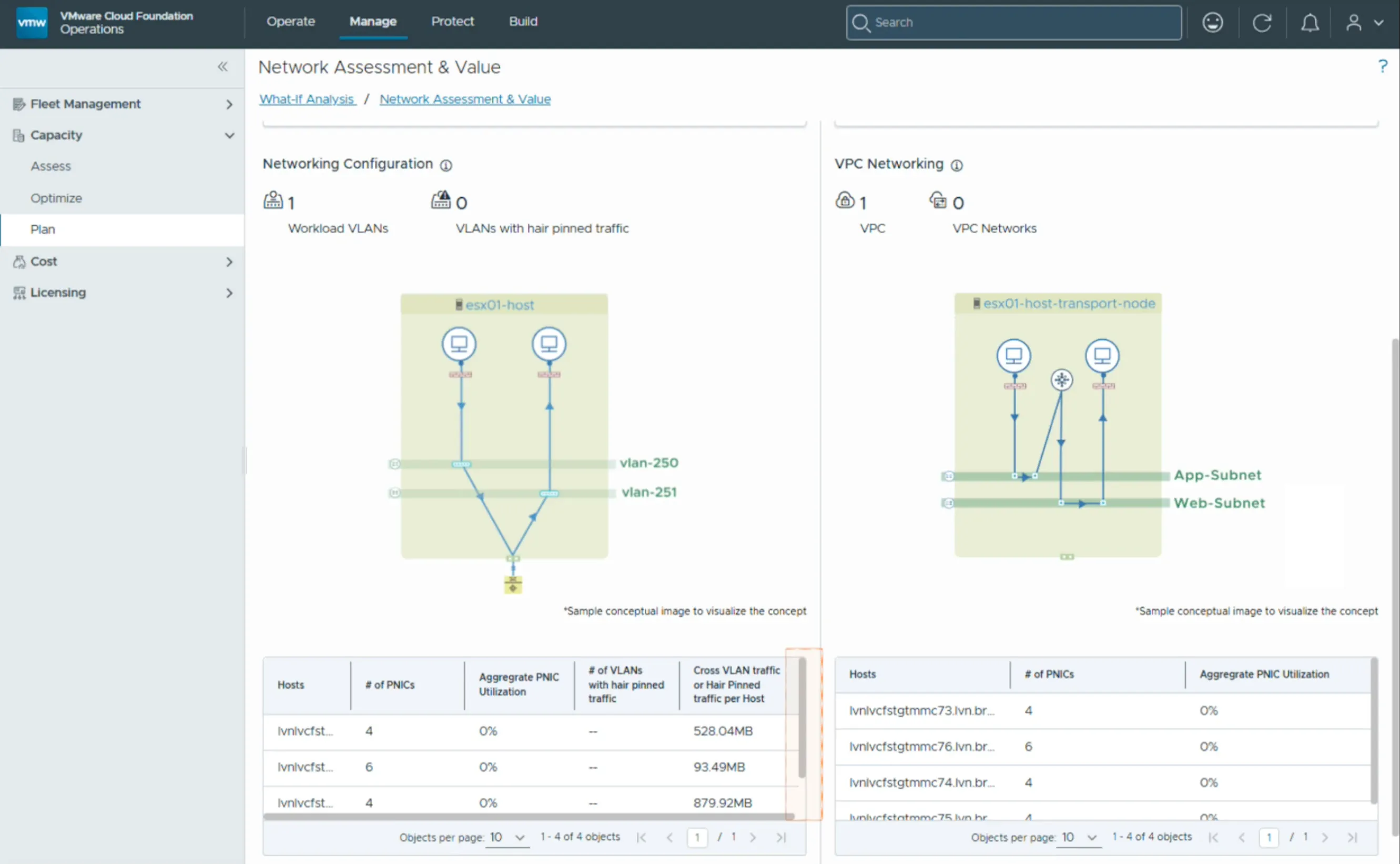
The Network Assessment & Value view goes a step further: VLAN inventory, detection of hair-pinned traffic (flows that leave and come back unnecessarily, a sign of a topology or placement to fix), VPC networking mapping, and physical PNIC utilization. This is the network capacity planning tool: it turns “we think the NIC is saturating” into “here are the PNICs at 85%, here are the hair-pinned flows to eliminate, here is the headroom before the next VPC”.
| Observability capability | VCF 9.0 | VCF 9.1 |
|---|---|---|
| Per-VKS-cluster flow visibility | Limited / external | Native (sessions, traffic, flow types) |
| Hair-pinned traffic detection | Manual | Network Assessment & Value |
| PNIC / VPC capacity planning | Estimation | Measured and mapped |
Tie to scale. Every enhancement in this release (EVPN, VPC L4/VPN, multi-NIC) adds traffic planes. Without this observability, you stack them blindly. The 9.1 discipline: every new VPC or secondary network is justified by a measurement in Network Assessment, not by a hunch.
Traps & watch points
EVPN-VXLAN: MTU and fabric alignment
VPC L4 Load Balancer: VNA sizing
IPSec VPN: centralized external connectivity prerequisite
SDDC Manager synchronization: reconciles but does not validate
Bare-metal Edge import: version and topology constraints
Certificate rotation: non-disruptive does not mean automatic
Conclusion
Seams patched
EVPN-VXLAN standardizes fabric integration; VPC L4 + IPSec close the gaps that forced a fallback to direct NSX.
Broadened brownfield
SDDC Manager sync, bare-metal Edge import and non-disruptive certificates make VCF adoption less destructive.
Measured scale
Multi-NIC VKS for demanding workloads, and VCF Operations network observability to drive scale by data, not intuition.
Next step. The next article covers Kubernetes & self-service in VCF 9.1: what multi-NIC changes on the platform side, VKS self-service, and cluster governance at scale. With networking framed, that’s the next major step toward production.
For further reading.
- Networking & scale VCF 9.1 — VCF Blog — the official announcement and the screenshots in this article
- Release Notes — What’s New in NSX 9.1 — the per-feature NSX detail
- Release Notes — VCF 9.1 — full VCF 9.1 release notes
- William Lam — reference VCF lab walkthroughs and field notes
Get the next one by email
New articles and series, sent when they are published. No other mail.