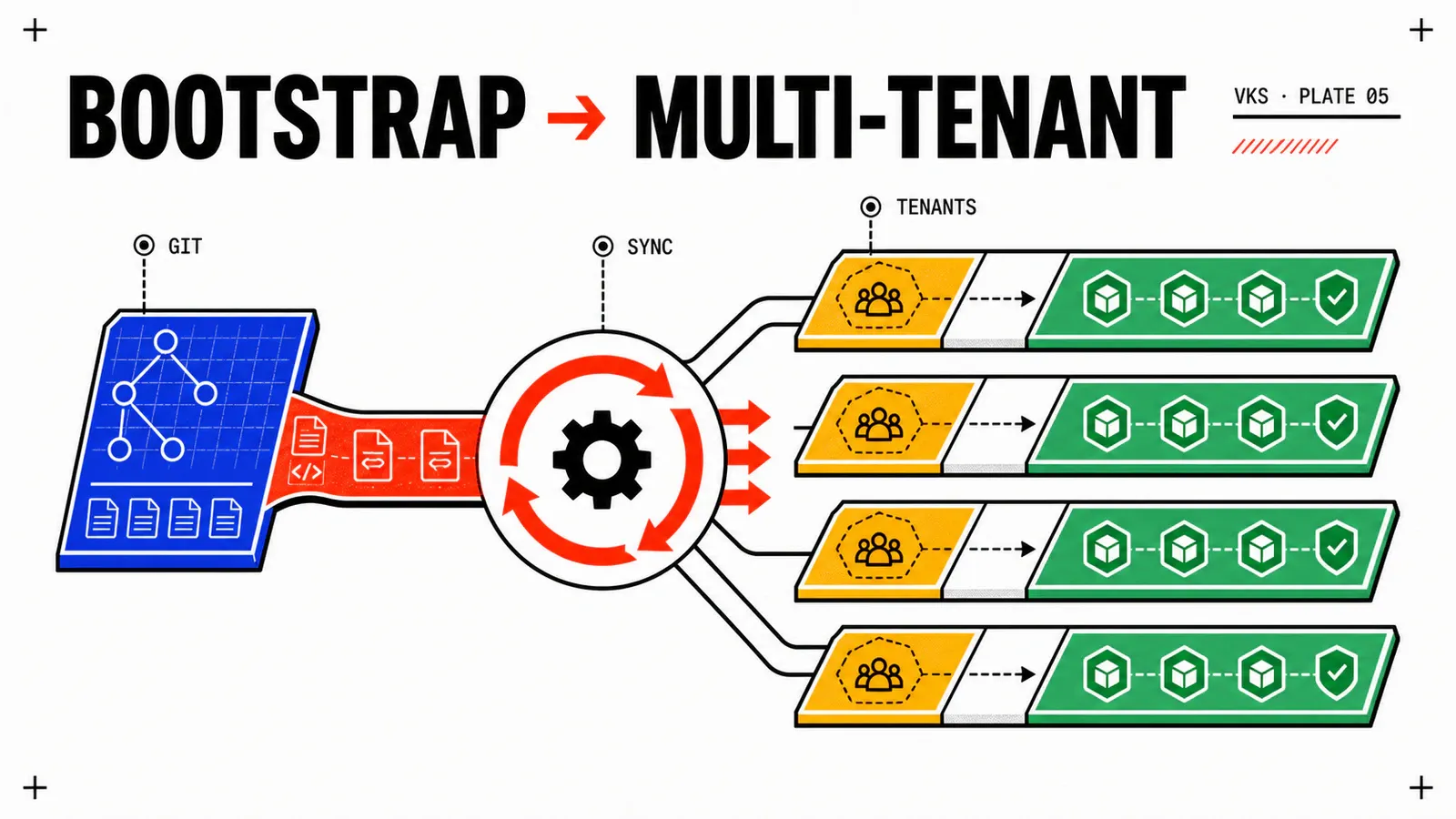
A provisioned and operated VKS cluster only becomes a platform when application teams can deploy without depending on the platform team for every release. GitOps is the pattern that makes this possible — Argo CD is the implementation that has won the field.
This article walks through the setup step by step: bootstrap, App-of-Apps, multi-cluster ApplicationSets, secrets via External Secrets Operator, and multi-tenant patterns. The goal is to lay a foundation that won’t betray itself in six months when scope triples.
Audience: you operate VKS, you know kubectl, you’ve heard of Argo CD or Flux but want a concrete path to start cleanly.
About this article
Patterns tested in production on multi-tenant VKS platforms. Not a complete Argo CD reference — the official docs are excellent. The value is in the structural choices and the traps to avoid.
Why GitOps on VKS
Three concrete reasons, beyond the trend.
Auditability. Every cluster modification goes through a Git commit. git log is the operational source of truth. When an incident asks “who deployed what at what time,” the answer is in the repo, not in team memory.
Multi-cluster consistency. With two clusters (dev + prod), drift is inevitable in manual push mode. With ten clusters (dev + staging + prod × regions), it’s guaranteed. ApplicationSets eliminate drift by syncing a single manifest across N clusters.
Application self-service. Application teams own their repos and namespaces. They trigger deployments without platform-team intervention. The platform team retains framework control — RBAC, policies, security — but exits the critical path of releases.
Argo CD vs Flux: stated choice
Both work. Choosing one or the other commits you for years — repo organization patterns, third-party tools, team skills all build around it.
Strengths — rich UI, native App-of-Apps, powerful ApplicationSets, built-in Sync Waves, broad ecosystem (Notifications, Image Updater, Rollouts).
Limits — many components, CRD learning curve. The UI can give a false impression of simplicity — think GitOps first.
For whom — teams that want a readable UX for developers, or need advanced multi-cluster patterns.
Strengths — more modular design (Source/Kustomize/Helm controllers separated), no default UI (“Git is the UI” philosophy), native CNCF integration.
Limits — no native UI (must compensate with other tools), multi-cluster patterns less explicit than ApplicationSets.
For whom — strongly CLI/code-oriented teams, contexts where the lack of UI is a feature rather than a gap.
Stated recommendation. Argo CD for most VKS platforms. The UI drastically cuts ticket volume to the platform team (application teams debug their own sync errors), and ApplicationSets are the reference multi-cluster pattern. Flux remains an excellent choice for contexts where the “no UI” philosophy is a priority.
Bootstrap: the first time
Starting Argo CD on a VKS cluster takes about twenty minutes. But the structure chosen that day shapes the next six months.
Step 1 — Installation. Via Helm, in a dedicated argocd namespace with baseline parameters.
# Add the repo
helm repo add argo https://argoproj.github.io/argo-helm
helm repo update

# Install Argo CD with HA
helm install argocd argo/argo-cd \
  --namespace argocd \
  --create-namespace \
  --version 7.7.0 \
  --set controller.replicas=2 \
  --set repoServer.replicas=2 \
  --set redis-ha.enabled=true \
  --set server.ingress.enabled=true \
  --set server.ingress.hosts[0]=argocd.platform.example.com
Step 2 — First access. Retrieve the initial admin password and rotate it immediately to a generated secret or SSO integration.
kubectl -n argocd get secret argocd-initial-admin-secret \
  -o jsonpath="{.data.password}" | base64 -d
Step 3 — Connect the Git repo. Argo CD needs access to the configuration repo. Via SSH key (preferred) or personal access token. Store the credential in an argocd-repo typed Secret.
Step 4 — App-of-Apps. Create a first Application that points to a folder in the repo containing… other Applications. This is the founding pattern.
apiVersion: argoproj.io/v1alpha1
kind: Application
metadata:
  name: root
  namespace: argocd
spec:
  project: default
  source:
    repoURL: git@github.com:org/platform-config.git
    targetRevision: main
    path: bootstrap
  destination:
    server: https://kubernetes.default.svc
    namespace: argocd
  syncPolicy:
    automated:
      prune: true
      selfHeal: true
From this root Application, everything else cascades. That’s what makes the ecosystem scalable.
HA from day one
The two replicas of controller and repo-server are the minimum investment for production. With a single replica, an upgrade or a crash interrupts every sync — including those of other teams. The CPU/RAM cost is marginal compared to the resilience gained.
Repo structure: the decision that lasts
A bad repo structure costs months of pain. Three patterns dominate.
Model — a single repo with everything: platform configs + applications + environments.
Strengths — atomicity for cross-cutting changes, single view. Good for small teams.
Limits — complex Git RBAC (who can edit what), slow CI, frequent merge conflicts as teams grow. To abandon past 5 application teams.
Model — one repo per team or application, plus a platform repo.
Strengths — natural RBAC (each team owns its repo), fast CI.
Limits — coordinating cross-cutting changes (changing a policy on N repos = N PRs), drift risk between configs.
Model — a platform-config repo (policies, ApplicationSets, namespaces, RBAC) + one repo per application team for their manifests.
Strengths — separates platform/app responsibilities, clear RBAC, centralized cross-cutting changes. The sweet spot for most platforms.
Limits — must maintain coherence between the two levels via convention (templates, OPA/Kyverno), slightly more initial plumbing.
Stated recommendation. Hybrid pattern. The platform team owns platform-config (the cluster’s source of truth). Each application team owns its app repo. ApplicationSets in platform-config automatically instantiate an Argo CD Application for each discovered app repo. This model scales to dozens of teams without renegotiating the structure.
ApplicationSets: multi-cluster without pain
The component that changes the perspective. Rather than writing 30 Applications by hand for 30 clusters, write one ApplicationSet that generates them.
apiVersion: argoproj.io/v1alpha1
kind: ApplicationSet
metadata:
  name: cert-manager-fleet
  namespace: argocd
spec:
  generators:
    - clusters:
        selector:
          matchLabels:
            env: prod         # all clusters labeled "env=prod"
  template:
    metadata:
      name: 'cert-manager-{{name}}'
    spec:
      project: platform
      source:
        repoURL: git@github.com:org/platform-config.git
        targetRevision: main
        path: platform/cert-manager
      destination:
        server: '{{server}}'  # injected by the generator
        namespace: cert-manager
      syncPolicy:
        automated:
          prune: true
          selfHeal: true
The pattern. Cluster generator + template = N Applications created automatically. Adding a new cluster only requires declaring it as an Argo CD cluster with the right labels. The ApplicationSet detects it and deploys the reference bundle on it.
Useful combinations. Cluster generator + Git generator (one folder per environment) = full matrix. SCM Provider generator to auto-discover all repos in a GitHub org with a specific label. The matrix pattern avoids massive copy-paste.
Sync Waves: don't skip
ApplicationSets generate N Applications, but the order of application matters. cert-manager must be ready before app Applications request TLS certs. ExternalDNS must be ready before Ingresses with DNS annotations. Use Argo CD Sync Waves (annotations argocd.argoproj.io/sync-wave: “-1”) to order. Without Sync Waves, first deployments fail in cascade and create the illusion of an unstable platform.
Secrets: External Secrets Operator
A critical pattern. Argo CD reads Git, and Git must never contain plaintext secrets. ESO solves this by fetching secrets from an external store at deploy time.
# The SecretStore points to Vault (or another)
apiVersion: external-secrets.io/v1beta1
kind: SecretStore
metadata:
  name: vault-backend
  namespace: app-namespace
spec:
  provider:
    vault:
      server: "https://vault.example.com"
      path: "kv-v2"
      version: "v2"
      auth:
        kubernetes:
          mountPath: "kubernetes-prod-cluster"
          role: "app-namespace"

---
# The ExternalSecret materializes a Kubernetes Secret from Vault
apiVersion: external-secrets.io/v1beta1
kind: ExternalSecret
metadata:
  name: db-credentials
  namespace: app-namespace
spec:
  refreshInterval: 5m
  secretStoreRef:
    name: vault-backend
    kind: SecretStore
  target:
    name: db-credentials       # the generated Secret
  data:
    - secretKey: username
      remoteRef:
        key: prod/db
        property: username
    - secretKey: password
      remoteRef:
        key: prod/db
        property: password
The Git manifest only contains the reference. Real values live in Vault (or AWS Secrets Manager, GCP Secret Manager, vSphere Secret Store if ESO connects to it). Argo CD syncs the reference, ESO materializes the Secret. Vault-side rotation propagates automatically after refreshInterval.
Alternatives. Bitnami Sealed Secrets (encryption with cluster key — simple, but the secret stays in-Git, just encrypted). SOPS via the Argo CD plugin (encrypts/decrypts on the fly). ESO is more operationally satisfying in my opinion, but Sealed Secrets remains an excellent starting point for small platforms.
Multi-tenant: RBAC and AppProjects
Argo CD provides the AppProject concept to isolate tenants at the Argo CD level itself.
apiVersion: argoproj.io/v1alpha1
kind: AppProject
metadata:
  name: team-data
  namespace: argocd
spec:
  description: "Data team workloads"
  sourceRepos:
    - 'git@github.com:org/team-data-*.git'   # allowed repos
  destinations:
    - namespace: 'data-*'                     # allowed namespaces
      server: 'https://kubernetes.default.svc'
  clusterResourceWhitelist:
    - group: ''
      kind: Namespace
  namespaceResourceBlacklist:
    - group: ''
      kind: ResourceQuota                     # platform-team-managed
  roles:
    - name: dev
      policies:
        - p, proj:team-data:dev, applications, sync, team-data/*, allow
        - p, proj:team-data:dev, applications, get, team-data/*, allow
      groups:
        - org:team-data-dev                    # SSO group
The pattern. One AppProject per application team. Restricted source repos, restricted namespaces, certain resources forbidden (ResourceQuota, NetworkPolicy managed by the platform team). Roles map to SSO groups. Developers access only their Applications via the UI.
Combine with Kubernetes RBAC. AppProjects control what Argo CD can do on the team’s behalf. Kubernetes RBAC controls what the team can do with direct kubectl. Both must be coherent — a dev who can bypass Argo CD for direct kubectl apply breaks the GitOps model.
Gotchas and patterns to know
Auto-prune in prod = double-edged sword
Wrongly-ordered sync waves = cascading failures
ApplicationSets: drift between clusters
ExternalSecret refresh: rate-limit risk
AppProject permissions too broad
ImageUpdater: enable with discernment
Git webhooks: monitoring required
Conclusion
Key takeaways. Argo CD turns a VKS cluster into a self-service platform under three pillars: hybrid repo structure (platform-config + app repos), ApplicationSets for multi-cluster, External Secrets Operator for secrets. AppProjects and SSO RBAC scope tenants. Sync Waves and auto-prune are levers to use with discernment. Initial bootstrap takes a few hours; the chosen structure commits for years — hence the importance of not improvising it.
What’s next. This three-article series on VCF 9 + VKS ends here. The next cycle will cover Terraform/Pulumi industrialization on the platform and Crossplane patterns to expose VKS services as native Kubernetes resources.
Resources.
Going further:
- Argo CD Documentation — official reference
- Argo CD ApplicationSets — full generator guide
- External Secrets Operator — documentation and supported providers
- Codefresh — Argo CD Best Practices — multi-tenant patterns in production
- GitOps Working Group — formalized GitOps principles
Get the next one by email
New articles and series, sent when they are published. No other mail.