
TOP and a colleague compare the workload manifest with the running replicas on the laptop. The menu fixture is ready; the separate order API and PostgreSQL path are outside this exercise.
We’ll separate two steps: provision the workload cluster through the supported workflow, then deploy the small service inside it. The fixture lets us observe Kubernetes Service selection and configuration delivery. It does not implement the reference app’s order API or its PostgreSQL persistence.
The architecture episode identified two APIs. The network episode identified the Service and its backends. Here we use both distinctions: first obtain a workload cluster through the supported VKS workflow, then deploy a small application fixture inside it.
This episode explains the VKS deployment and selector exercise. The article does not claim a VKS deployment. The static NGINX menu fixture has no database, persistent volume, TLS or external gateway; its v1/v2 responses and probes were checked in a local container, without executing a VKS deployment. The separately tested reference app writes orders to PostgreSQL, but is outside this fixture. Its browser-to-API-to-PostgreSQL flow is documented and tested in the Coffee Break local lab; the workload.yaml fixture and instructions remain the separate, stateless VKS exercise.
Provision the place with the platform team
We call the management allocation team-coffee, its workload cluster coffee-vks, and the later application namespace coffee-demo. These are examples, not names expected to exist on your platform.
Before provisioning, obtain an approved size and topology, address plan, storage capabilities, registry access and identity/trust configuration. Check enough free quota and infrastructure capacity for creation and subsequent replacement. Three control-plane replicas distributed across appropriate failure domains can protect quorum against some failures; a count of three alone does not establish site resilience or application availability.
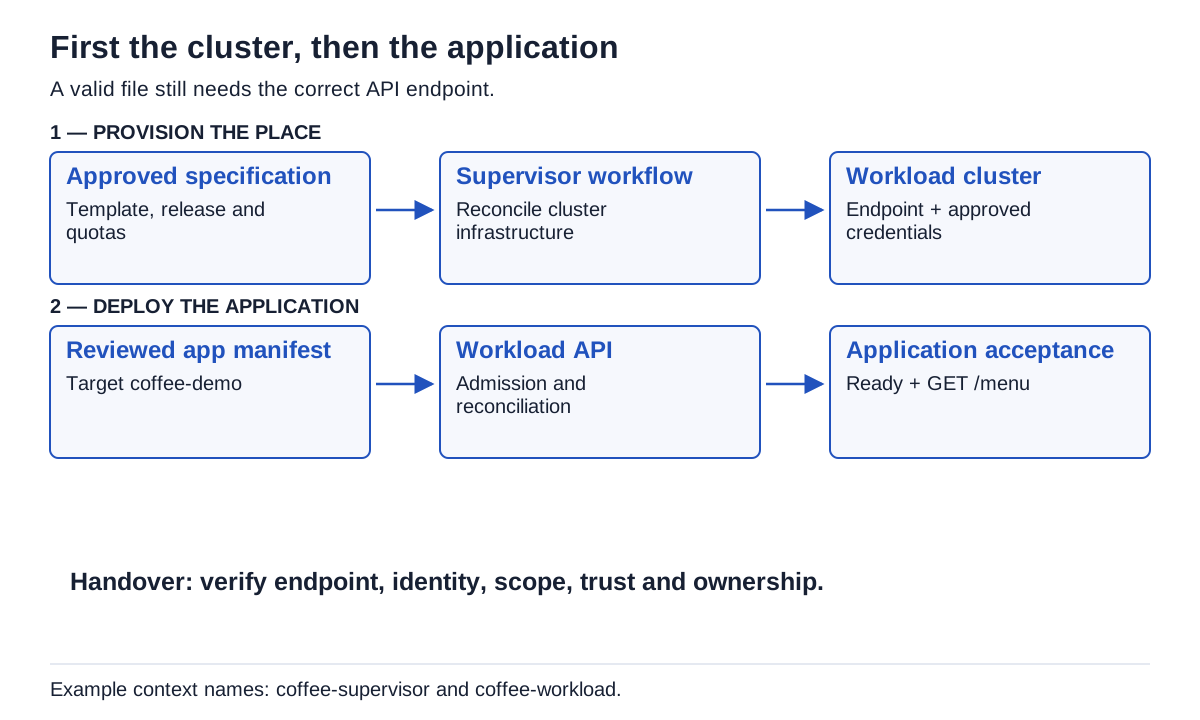
Two submissions to two endpoints, with separate owners and acceptance criteria. No product version is inferred from the VCF label alone.
Follow the platform’s supported portal, catalog or Supervisor/API workflow:
- Record the actual vCenter/Supervisor, VKS service and offered Kubernetes releases. Check their supported combination.
- Select a platform-approved cluster template or ClusterClass and its actual variable schema.
- Review the generated specification: names, topology, VM classes, storage, release and network allocations.
- If your workflow is manifest-driven, validate and submit that specification to the Supervisor with the required authorization. If a portal already submitted it, observe that operation rather than creating a second cluster.
- Follow reconciliation and events until the platform’s readiness criteria are met. Investigate errors at their stated layer.
- Obtain the workload endpoint and approved login/kubeconfig through the supported identity workflow, preserving certificate verification.
An older tanzukubernetescluster v1beta1 example with a fixed sample release is not a universal template. VKS ClusterClasses and variable schemas evolve. KB 404143 documents schema conversion; KB 439754 explains why an existing class may legitimately remain after an upgrade. Do not replace that class merely to make its name match the VKS version.
With permission to inspect the management API, discover the resources actually served:
kubectl --context coffee-supervisor api-resources --api-group=cluster.x-k8s.io
kubectl --context coffee-supervisor -n team-coffee get clusters.cluster.x-k8s.io coffee-vks -o yaml
Here coffee-supervisor is the local kubeconfig context you have verified. A forbidden response may simply reflect your role. Ask the platform owner for the required permission; do not borrow a support/root kubeconfig.
Identify the target before applying the app
Our workload context is named coffee-workload. Inspect the configured cluster endpoint, authenticate using the approved method, and verify namespace access. Avoid printing a raw kubeconfig or token into shared logs.
kubectl config get-contexts
kubectl --context coffee-workload cluster-info
kubectl --context coffee-workload -n coffee-demo auth can-i create deployments.apps
kubectl --context coffee-workload -n coffee-demo get resourcequota,limitrange
The platform team allocates coffee-demo, including its security and network policies. The exercise file deliberately does not create the namespace. An admission rejection deserves investigation against those policies; an example is not a reason to disable them.
Three objects make the small service visible
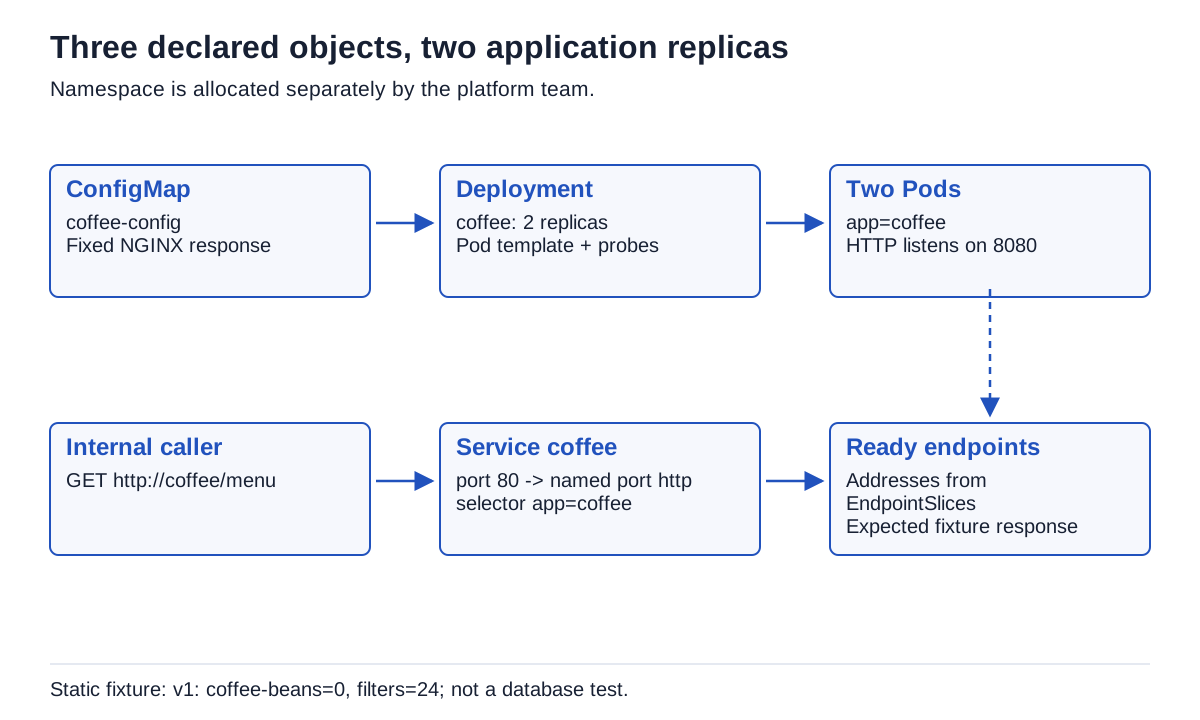
Download and inspect workload.yaml, with its scope and instructions. It creates exactly three namespaced objects:
| Object | Role in this exercise | Observation |
|---|---|---|
coffee-config ConfigMap |
NGINX configuration and fixed response | GET /menu returns a static fixture only; it creates no order and proves no persistence |
coffee Deployment |
Two copies of the HTTP process | Rollout, Pod state, actual image and readiness |
coffee Service |
Stable internal name/port selecting those Pods | Selector and ready EndpointSlices |
The image is pinned by digest, resolved on 26 October 2026; the container and new response were checked again locally on 27 October. The fixture runs as a non-root user, drops capabilities, uses a read-only root filesystem and mounts temporary writable space. Review the image and your registry policy before reuse. The unprivileged NGINX project documents its execution requirements.
The important part of the Deployment is recognizable without learning every field at once:
# Excerpt of workload.yaml; not a standalone manifest.
spec:
  replicas: 2
  selector:
    matchLabels: { app: coffee }
  template:
    metadata:
      labels: { app: coffee }
    spec:
      containers:
        - name: http
          ports:
            - { name: http, containerPort: 8080 }
          readinessProbe:
            httpGet: { path: /ready, port: http }
The template defines what a replica should contain. The labels connect it to selection. The named port connects the Service’s targetPort to port 8080. Readiness controls eligibility for ordinary service traffic. See Deployments and probe behavior.
Our /live and /ready handlers return simple fixed responses. A real application must define checks appropriate to its behavior. Restarting every process because a shared database is temporarily unreachable can make an incident worse; dependency failure and local process failure deserve different handling.
TOP holds two labels side by side. They look almost alike. “Almost is still different to a selector.” He takes time to connect the requested name to the Pods actually selected.

Apply, observe, then read the menu
Run these commands only against the allocated non-production workload target:
kubectl --context coffee-workload -n coffee-demo apply --dry-run=server -f workload.yaml
kubectl --context coffee-workload -n coffee-demo apply -f workload.yaml
kubectl --context coffee-workload -n coffee-demo rollout status deployment/coffee --timeout=120s
kubectl --context coffee-workload -n coffee-demo get pods -l app=coffee -o wide
Server dry-run checks the request against that API and admission path without persisting the objects. It cannot prove that the image will pull or that a request will succeed. If the rollout does not become ready, inspect Pod events and application logs before increasing the timeout indefinitely.
For a local inspection, start this in a terminal:
kubectl --context coffee-workload -n coffee-demo port-forward service/coffee 18080:80In another terminal, curl --fail http://127.0.0.1:18080/menu should return the exact static fixture below. GET /menu only reads this response: it creates no order and proves neither persistent data nor a real VKS integration. Port-forward is bound to local interfaces by default. It reaches a selected Pod through the Kubernetes access path; it does not establish external ingress, TLS or normal ClusterIP forwarding.
{"release":"v1","items":[{"sku":"coffee-beans","stock":0},{"sku":"filters","stock":24}]}To exercise the internal Service from a demo Pod, use the wget command in episode two. Inspect the EndpointSlices too. The returned list is the useful result; the different paths explain the scope of each test.
Break the selector while leaving the processes alive
Stop port-forward with Ctrl-C. Change only the disposable demo Service:
kubectl --context coffee-workload -n coffee-demo patch service coffee --type merge -p '{"spec":{"selector":{"app":"typo"}}}'
kubectl --context coffee-workload -n coffee-demo get pods -l app=coffee
kubectl --context coffee-workload -n coffee-demo get endpointslices -l kubernetes.io/service-name=coffee -o yaml
The Deployment still has its two Pods. After controller convergence, the Service has no matching coffee backends. An internal request cannot reach the fixture through that selection. This reproduces a selection defect, not a firewall or physical cable failure.
Restore the selector explicitly, then repeat the endpoint and request checks:
kubectl --context coffee-workload -n coffee-demo patch service coffee --type merge -p '{"spec":{"selector":{"app":"coffee"}}}'| Observe | Exact command already used here | Proves / does not prove | After selector break → repair |
|---|---|---|---|
| Pod readiness | kubectl --context coffee-workload -n coffee-demo get pods -l app=coffee -o wide |
Read the readiness counts; they do not prove Service routing | Pods stay Ready → stay Ready |
| Service endpoints | kubectl --context coffee-workload -n coffee-demo get endpointslices -l kubernetes.io/service-name=coffee -o yaml |
Matching ready backends; not a successful request | No ready addresses → addresses return |
| Local fixture request | curl --fail http://127.0.0.1:18080/menu after a fresh port-forward service/coffee 18080:80 as above |
A selected Pod answers through the API tunnel; not normal ClusterIP, external access, or persistence | Fresh tunnel cannot select a matching Pod while broken → recreate it after repair, then compare the response |
A failed curl against a stopped tunnel is not evidence of a broken Service. The selection test is establishing a fresh Service port-forward; the internal request in the network episode separately exercises the normal Service path. kubectl documents that port-forward selects a Pod for the session.
Record an observation in the blank service evidence sheet. Fill it from a real run; this article reports no VKS execution.
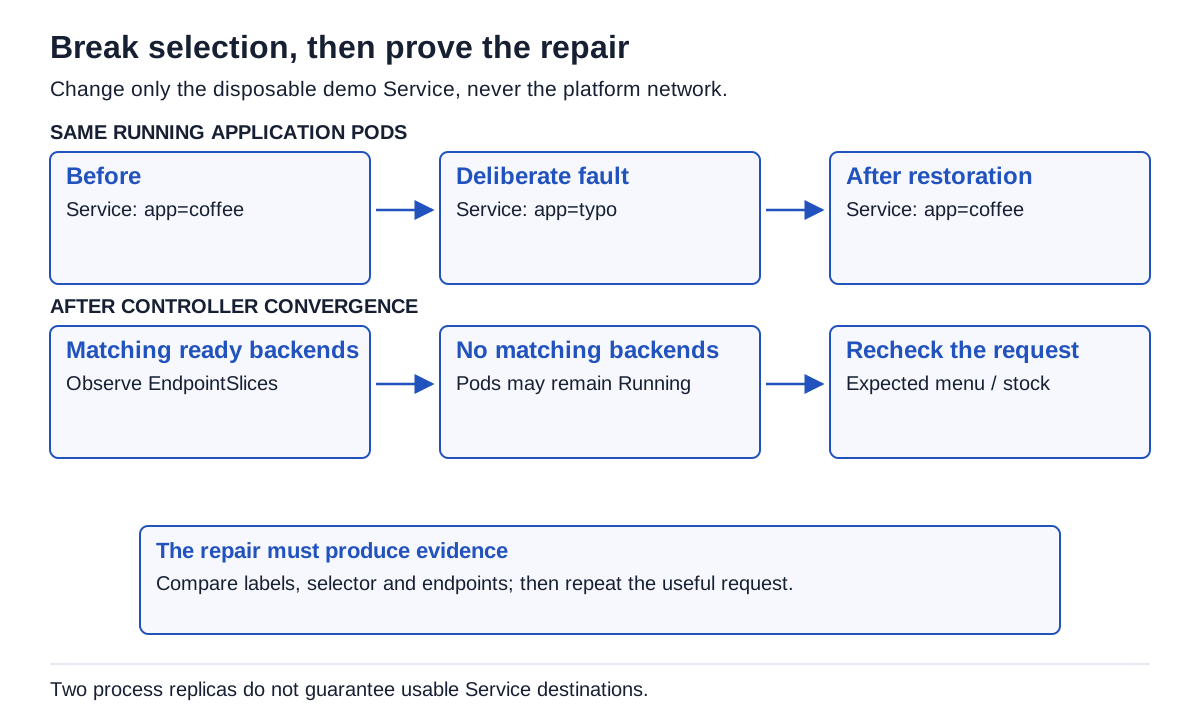
The menu responds again after restoring the selector. TOP stands up to explain the cause to his colleague: healthy Pods kept running, but the Service selected none of them. He records the check that confirmed recovery. This confirms Service selection, not order persistence.

Leave a clear result and a clean namespace
Capture the workload endpoint, approved template/release, actual image digest, ready Pods, matching endpoints and expected response. Record the deliberate fault and its restoration. This is enough evidence to explain what the exercise proved and what remains untested: database access, persistence, external exposure and production resilience.
To remove only these three exercise objects:
kubectl --context coffee-workload -n coffee-demo delete -f workload.yamlThe namespace remains allocated. The fixture has no PVC and contains no business data. If you adapted the file, review exactly what cleanup will delete.
Continue with day-two maintenance and recovery, using the same menu response as a before/after acceptance test. The path runs from network foundations through deployment and day-two operations to GitOps with Argo CD.
Get the next one by email
New articles and series, sent when they are published. No other mail.