The WebShop VM from the networking and cloud-init article is now connected and configured, but enterprise systems still know nothing about it. Adding an Active Directory call directly to the provisioning path looks convenient until AD is unavailable, a retry creates a duplicate, or an operator has to decide whether a healthy VM should be deleted because a CMDB API returned an error.
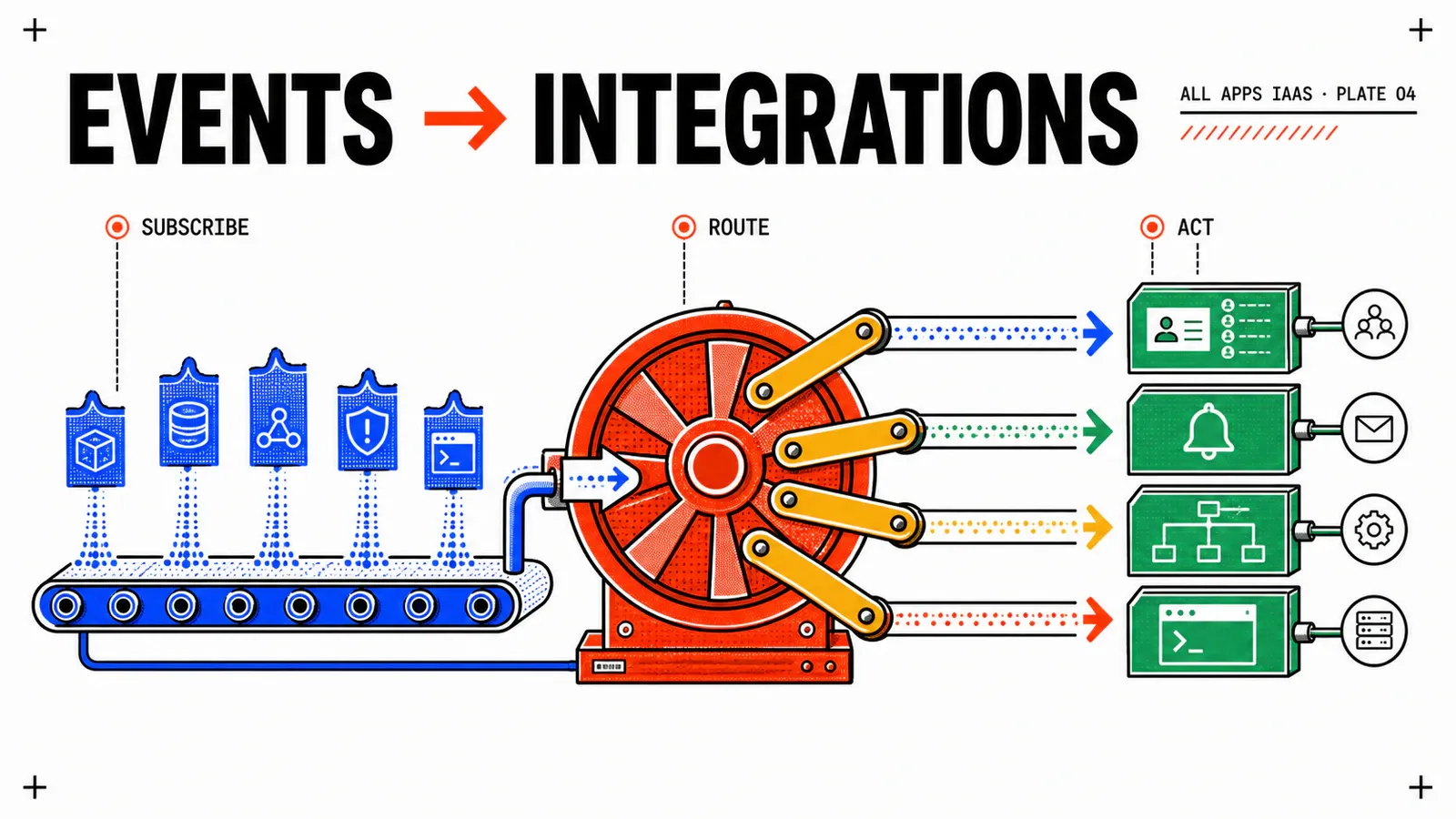
This article chooses an asynchronous contract. An IaaS lifecycle event launches independent VCF Operations Orchestrator workflows that converge an AD computer account and a transitional CMDB CI. Provisioning remains independent, while failures become visible work that can be retried safely.
Study design, not execution evidence
The topology and filters below are based on Broadcom’s VCF Automation 9.1 documentation and AD integration guidance. They have not been executed on a lab. Event payload paths, Orchestrator input mappings, the 9.1 compatibility of the KB package and every external-system result must be validated on the target build before enabling a subscription.
TL;DR
- Use three project-scoped, non-blocking subscriptions: AD create, transitional CMDB create, and guarded external cleanup on delete.
- Capture a real event in Event Log before writing the adapter. The documented event envelope does not guarantee one universal path for every business field.
- Build every workflow around a stable resource identity and a managed marker. A repeated event must converge, and deletion must never search by name alone.
Define the boundary before creating subscriptions
The result of this increment is deliberately limited. On CreateSuccess, one workflow ensures a computer account exists in the project’s allow-listed OU and another ensures a CMDB CI exists with ownerMechanism=event. On DeleteSuccess, a cleanup workflow independently retires the managed AD object and the event-managed CI.
Creating an AD computer account is not proof that the operating system joined the domain. Joining the guest needs a separate, image-specific mechanism such as cloud-init, an unattend file, a configuration agent or an authenticated guest workflow. It also needs its own evidence from the machine and a secure way to obtain short-lived credentials. This article does not claim that outcome.
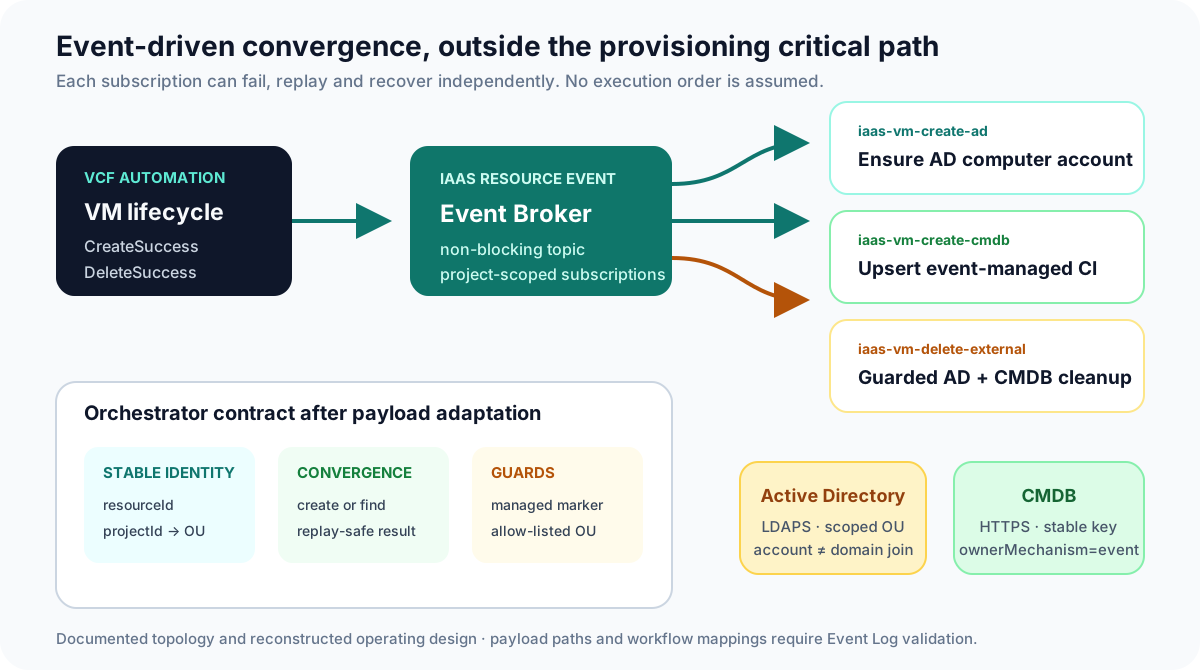
Broadcom lists IaaS resource event among the VCF Automation All Apps event topics. The topic is non-blocking. That property prevents an AD or CMDB outage from turning a VM deployment into a platform failure, but it also means there is no transaction that rolls both sides back and no ordering guarantee between subscriptions. Reliability must come from replay-safe convergence, correlation and an operator-visible retry path.
The three subscriptions are:
| Subscription | Trigger | Responsibility |
|---|---|---|
iaas-vm-create-ad |
VM CreateSuccess |
ensure one managed computer account in the mapped OU |
iaas-vm-create-cmdb |
VM CreateSuccess |
upsert one CI marked ownerMechanism=event |
iaas-vm-delete-external |
VM DeleteSuccess |
attempt guarded AD and CMDB retirement as independent branches |
The CMDB writer is intentionally temporary. The CMDB Custom Resource article will give Custom.CMDB.CI ownership of Create, Read and Destroy. Before that cutover, test deployments must be cleaned up and iaas-vm-create-cmdb disabled. Two writers must never own the same CI lifecycle.
Establish trust, least privilege and project scope
In VCF Operations Orchestrator, register the AD server using the supported integration workflow and a dedicated service account. Delegate only the operations required inside the WebShop lab OU: read, create, move or disable/delete computer accounts according to the approved lifecycle. Domain Admin is neither required nor acceptable for this experiment.
Use LDAPS with hostname and certificate-chain validation. Import the appropriate chain into the platform truststore and fix trust errors at their source; never disable TLS verification to get a demonstration working. Apply the same standard to the CMDB endpoint over HTTPS. Credentials belong in the configured integration or secret mechanism, not in the Blueprint, event condition, workflow logs or custom properties.
Broadcom KB 393273 provides an Active Directory automation example based on Orchestrator and a project-to-OU association. Reuse the principle, not unexplored assumptions from another environment. The attached package targets earlier guidance and its import, actions and input types need validation on the exact 9.1 instance.
Externalize the mapping in an Orchestrator configuration element:
PROJECT_TO_OU = {
  "OBSERVED_PROJECT_ID": "OU=WebShop-DEV,OU=VCFA,DC=corp,DC=example"
}
ALLOWED_OUS = {
  "OU=WebShop-DEV,OU=VCFA,DC=corp,DC=example"
}
Use the immutable project identifier observed in the event, not the project’s display name. A missing mapping must produce a controlled rejection and a useful audit record. It must not silently send the computer account to a default OU.
Observe the event before writing its adapter
The subscription management documentation documents access through event.data and describes the event envelope. It does not promise that every target build exposes project ID, resource ID and VM name under a universal business-object path.
Create a diagnostic subscription scoped only to prj-webshop-dev, deploy a disposable VM, then inspect its CreateSuccess record in Event Log. Redact sensitive values before keeping the sample. Record:
- the event and correlation identifiers;
- the organization, project and deployment identifiers;
- the VM’s displayed name and a stable resource identifier;
kindandreasonexactly as received;- the object passed to the Orchestrator run;
- what remains available on
DeleteSuccess.
Then write one adapter, fromIaasResourceEvent(), that translates the observed payload into an internal contract. Business workflows should consume this stable contract rather than duplicate fragile payload paths.
VmLifecycleContext:
  eventId: string
  correlationId: string
  organizationId: string
  projectId: string
  deploymentId: string
  resourceId: string
  vmName: string
  eventReason: CreateSuccess | DeleteSuccess
  observedAt: ISO-8601
These property names are internal design choices, not a representation of Broadcom’s event schema. Keep anonymized event fixtures and test the adapter against them. If a platform update changes a path, only the adapter and its tests should need to change.
Make AD and CMDB convergence replay-safe
The AD workflow receives VmLifecycleContext, resolves the OU through the configuration element, and searches for an object carrying the stable resourceId marker. A second execution must return unchanged, not create another account.
The WebShop VM name can exceed the traditional 15-character NetBIOS limit. Simple truncation is unsafe because two long names can collapse to the same value. A reasonable design candidate is wsd- plus the first 11 hexadecimal characters of a SHA-256 hash of resourceId. That yields 15 deterministic characters, but the convention and collision policy still require approval from the AD owners.
assert context.eventReason == CreateSuccess
ou = projectToOu.lookup(context.projectId)
assert ou is in ALLOWED_OUS

computerName = "wsd-" + sha256(context.resourceId).hex[0:11]
computer = ad.findByManagedResourceId(context.resourceId)

if computer is absent:
    computer = ad.createComputer(computerName, ou)
    ad.setManagedResourceId(computer, context.resourceId)
else if computer.ou differs and computer.ou is managed:
    ad.move(computer, ou)

return created | moved | unchanged
The CMDB workflow follows the same shape: search by stable identity, create when absent, update only changed values, and return the current record. It sets ownerMechanism=event as an internal constant, never as a requester-controlled input.
On deletion, locate objects by the stable marker. If an AD account is outside an allow-listed OU or its marker does not match, return manual-review. If the object is absent, return already-absent successfully. The CMDB branch may retire only a CI whose owner mechanism is event. Both branches must be attempted even if one fails, with separate results and a final aggregate status.
Configure the three project-scoped subscriptions
Use the documented New Subscription path to select the topic, condition, Orchestrator workflow, project scope and enabled state. Broadcom’s Create an Event Subscription page is the UI reference.
The following create filter is the starting condition described by the 9.1 topic guidance:
event.data.object.involvedObject.kind == 'VirtualMachine' &&
event.data.object.reason == 'CreateSuccess'
Use it for iaas-vm-create-ad and iaas-vm-create-cmdb, each pointing to its own workflow. The delete subscription begins with:
event.data.object.involvedObject.kind == 'VirtualMachine' &&
event.data.object.reason == 'DeleteSuccess'
Even though these condition properties are documented, validate them against the diagnostic event before activation. Scope all three subscriptions to prj-webshop-dev. Do not use Any Project until every eligible project has an explicit OU and CMDB policy. Add descriptions that state the non-blocking failure policy and mark the CMDB subscription as transitional.
Activate one subscription at a time. First prove AD creation and replay. Then prove CMDB upsert and replay. Finally enable deletion, create a fresh VM, and verify both retirement branches. Sequential activation is a test strategy; it does not create a runtime ordering contract.
Operate failures and plan the CMDB cutover
Test failure is part of the design:
- Run a nominal create and correlate the event, Orchestrator run, AD account and CMDB CI.
- Replay the same input and prove that no duplicate appears.
- Use a project with no OU mapping and expect a controlled rejection.
- Test a long VM name and verify the deterministic account-name rule.
- Make AD, then CMDB, unavailable and prove each integration can be retried without changing the VM.
- Delete a VM after one external object has already been removed; expect
already-absent. - Move a managed AD object outside the allow-listed OU and prove cleanup requests manual review.
- Generate or inspect
CreateFailureand prove the create workflows do not run.
The run history is not a reconciliation queue by itself. Define who receives failures, how an operator retries with the original normalized context, and how the result is audited. The next Day-2 article can expose a controlled resynchronization action, but the workflow must already be safe enough to call twice.
Before introducing the CMDB Custom Resource later in the series, stop new test requests, delete the test deployments to exercise normal cleanup, process any residual CIs marked ownerMechanism=event, verify the results, disable iaas-vm-create-cmdb, and wait for its active runs to finish. Only then publish the Blueprint containing Custom.CMDB.CI. The delete workflow must skip CIs marked custom-resource; their Destroy action owns their lifecycle.
Pitfalls & things to watch
An AD account is not a domain-joined guest
Prove the computer object and the guest membership separately. Reporting domain join after seeing only an AD object creates a dangerous blind spot: the machine may still be in a workgroup and never have used the account.
- Do not map fields that have not been captured in Event Log on the target 9.1 build.
- Do not assume non-blocking subscriptions run in a particular order.
- Do not use a privileged domain-wide account when an OU-scoped delegation is sufficient.
- Do not log event payloads or integration errors without checking them for credentials and sensitive identifiers.
- Do not delete an AD account or CI by a derived name alone; require stable identity, managed ownership and scope guards.
- Do not keep the event writer enabled after the Custom Resource becomes the CMDB owner.
Conclusion
The WebShop service now has an enterprise lifecycle without turning AD and CMDB into provisioning dependencies. Event Broker provides the asynchronous signal; Orchestrator adapters isolate the observed event schema; idempotent workflows converge each external system; project mappings and managed markers constrain the blast radius.
The next article will make this operating model usable by a platform consumer and support team. Day-2 actions will expose a controlled resynchronization path, and policies will decide who can invoke it and against which resources.
Observe
Capture and anonymize a real event before mapping any business field.
Converge
Stable identity and managed markers make retries safe and cleanup guarded.
Decouple
Independent subscriptions preserve the VM while external integrations recover.
Get the next one by email
New articles and series, sent when they are published. No other mail.