The upgrade is complete, the VM Apps organization is still healthy, and it is tempting to create All Apps on the same resources “just to see.” That is exactly when an architecture decision should replace an improvised trial: sharing vCenter and NSX does not automatically mean sharing one cluster, and it certainly does not create a new security boundary.
This article turns the WebShop scenario into an Architecture Decision Record. It compares three topologies, preserves the configuration order documented by Broadcom, and defines the network, capacity, and security evidence required before a pilot. The goal is not to sell Mixed Tenancy as a permanent destination. It is to design a bridge whose exit is written before anyone steps onto it.
Evidence boundary
This is a reconstructed design study based on the Broadcom 9.1 documentation and KB articles linked below. It does not claim laboratory or production results. The WebShop names, flows, and decisions are working examples; the exact build, roles, cross-visibility behavior, and capacity must be observed in the target environment.
TL;DR
- Decision: use Mixed Tenancy only when potential cross-visibility and a shared management plane are acceptable; otherwise, select dedicated All Apps infrastructure.
- The costly trade-off: separate clusters isolate workload capacity, but they do not separate vCenter, NSX, or their API load.
- Monday morning: record the existing object order, baseline the management plane, and obtain a signed exit condition before enabling the feature flag.
Resource sharing is not isolation
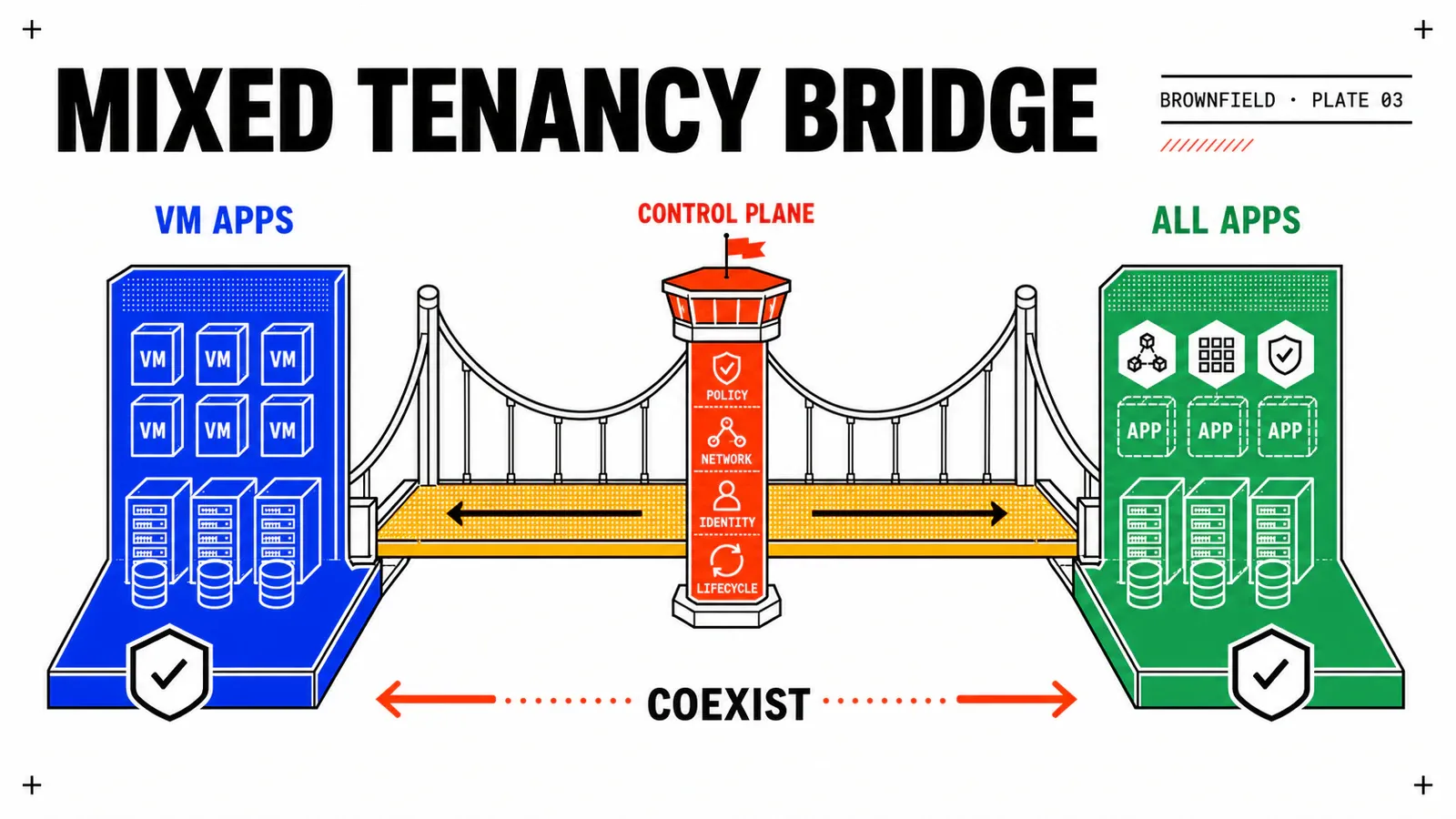
Starting with VCF Automation 9.1, Broadcom documents a bimodal design in which a VM Apps organization and an All Apps organization can use the same vCenter and NSX Local Manager pair. The vCenter needs a Supervisor with VPC Networking, and the Mixed Tenancy Mode feature flag enables the sharing model. KB 444058 adds a critical constraint: VM Apps and its cloud accounts must be configured before the All Apps Region that uses the same pair.
The feature addresses a brownfield transition. It does not merge the consumption models: VM Apps retains its historical allocations and networks, while All Apps consumes a Region, Namespaces, and VPCs. Nor does it promise strong isolation between organizations at the management-plane level. Broadcom’s design guidance asks architects to accept the visibility and contention implications that accompany shared infrastructure.
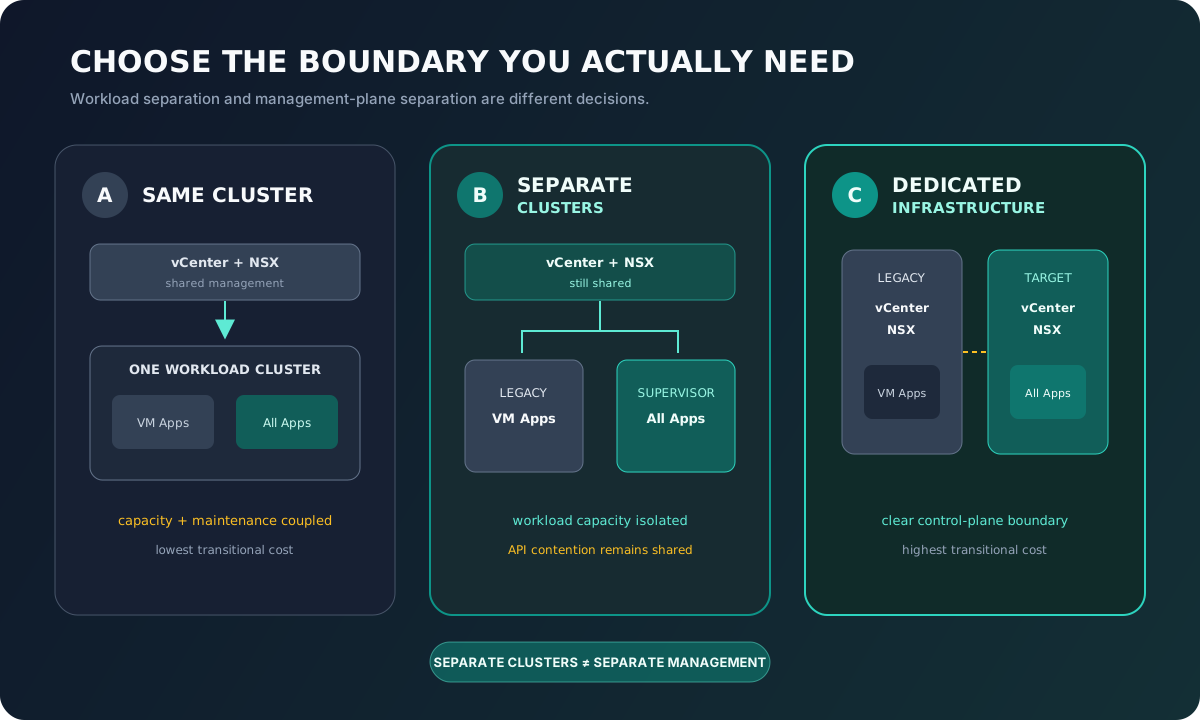
Original diagram derived from Broadcom’s bimodal consumption concepts; no product screenshot is reproduced.
A · Same cluster
Legacy and Supervisor share capacity, maintenance, and blast radius. Economical for a pilot, but exposed to noisy-neighbor effects.
B · Separate clusters
Workloads gain a capacity boundary, while vCenter, NSX, and their APIs remain shared.
C · Dedicated infrastructure
The management plane is separated too. Cost rises, but the boundary becomes explicit.
The decision is therefore more nuanced than “shared or not.” You must decide which layers may be common: compute, storage, management plane, networking, operations, and visibility. One option can be appropriate for WebShop non-production while remaining prohibited for a regulated application in the same migration program.
| Question | Same cluster | Separate clusters | Dedicated infrastructure |
|---|---|---|---|
| Workload capacity | shared | separate | separate |
| Cluster maintenance | coupled | independent | independent |
| vCenter/NSX | shared | shared | separate |
| Management API load | shared | shared | separate |
| Transitional cost | low | medium | high |
| Security boundary | weakest | stronger for workloads | clearest |
| Sensible use | focused lab/pilot | controlled migration | critical or strict isolation |
This table is a decision aid, not a universal support matrix. Compatibility depends on the exact build and the VCF Bill of Materials; validate both against the current documentation at change time.
Preserve the supported order before building the target
The sequence is not cosmetic. KB 443541 describes the failure seen when an All Apps organization already uses the vCenter/NSX pair and someone later tries to add the VM Apps cloud account. For a shared path, Broadcom requires the following direction:
- stabilize
acme-vmapps-legacyand verify its cloud accounts; - confirm the actual vCenter, NSX Local Manager, and clusters associated with it;
- enable Mixed Tenancy Mode in the Provider Management portal;
- prepare the Supervisor with VPC Networking;
- create the Region and verify the consistency of the capabilities it advertises;
- create
acme-all-apps, assign its Region Quota, and build the landing zone.
If the real order is reversed, do not mutate internal fields to force the desired state. Freeze the attempt, collect the build and object chronology, and compare the case with the KB and Broadcom Support. A workaround that makes the UI green without restoring a supported state creates hidden debt for the next upgrade.
The scenario that should stop the change
An All Apps Region already exists on the shared pair, then adding the VM Apps cloud account fails. This matches the reverse sequence documented as unsupported. The response is not repeated experimentation: preserve the evidence and revisit the topology with Support.
Write the ADR before enabling the flag
For WebShop, option B is a reasonable hypothesis: a legacy cluster remains dedicated to VM Apps, a Supervisor cluster hosts All Apps, and vCenter/NSX remain shared during migration. The choice must nevertheless remain proposed until security and capacity reviews produce evidence.
architecture_decision:
  id: ADR-VCFA-MIG-001
  status: proposed
  workload_topology: separate-clusters
  shared_vcenter: true
  shared_nsx_local_manager: true
  mixed_tenancy_mode: true
  source_organization: acme-vmapps-legacy
  target_organization: acme-all-apps
  security_boundary: workload-cluster-only
  required_approvals:
    - platform-capacity
    - network-security
    - application-owner
  exit_condition: all-services-decided-and-shared-rail-drained
  execution_status: not-executed
The most important field is security_boundary. “Separate clusters” must never be translated as “fully isolated environments.” The second is exit_condition. A date alone can slip; a condition alone can remain open forever. A useful ADR combines a review milestone with measurable criteria: no new VM Apps request, every application classified, exceptions moved to a durable platform, and transitional dependencies removed.
Creating the All Apps organization deserves a separate review. Create a VCF Automation Organization for All Applications makes the Region and its quota structural choices. The program should validate the Supervisor, VM Classes, Storage Classes, external connectivity, and IP blocks before assignment rather than pushing those differences into every Blueprint.
Connect the networks without pretending to convert them
The VM Apps network remains brownfield: existing VLANs or NSX segments, historical addresses, rules, and external services. All Apps introduces VPCs and subnets. Coexistence connects those models through explicit flows; it does not turn a legacy segment into a VPC.
During the stateless WebShop wave, the target web and application VMs may still need the legacy PostgreSQL database. The temporary rule must have an owner and its own end of life:
transitional_flow:
  id: webshop-app-aa-to-db-legacy
  source: snet-app
  destination: webshop-db-01
  protocol: tcp
  port: 5432
  purpose: wave-2-temporary-database-access
  owner_role: network-owner
  evidence: firewall-log-and-application-test
  expires_when: database-wave-accepted
Put the DNS/LB path, routes, distributed firewall rules, certificates, and observability in the same register. A connection that succeeds as a provider administrator does not prove that the consumer, service account, or on-call operator has the required access.
For the prj-webshop-modern landing zone, start with a pilot Namespace, one VPC, and conservative quotas. Keep the catalog closed to general consumers until create, Day‑2, and delete paths have been exercised. This prevents unmanaged deployments from making the pilot harder to remove than it was to create.
Baseline the management plane and test visibility
Mixed Tenancy adds load to components already serving the legacy estate. Before the pilot, record a representative baseline, then watch the same signals during All Apps operations:
| Domain | Before-pilot measure | Stop signal |
|---|---|---|
| vCenter | API latency, errors, tasks, queues | persistent degradation from baseline |
| NSX | API latency, manager/edge health, errors | timeout or growing configuration debt |
| Cluster | CPU, memory, datastore, contention | margin below the locally approved threshold |
| Supervisor | health, services, provisioning | unstable state or non-deterministic operation |
| Access | inventory visible to each non-admin role | exposure rejected by Security |
There is no magic threshold to copy. Acceptable values depend on management-plane size, automation volume, backup windows, and service objectives. The change record must name the authority that can pause the pilot when the baseline deteriorates.
Run visibility checks with several personas: provider administrator, VM Apps administrator, VM Apps project user, All Apps administrator, and All Apps consumer. Check inventory, search, actions, and exposed data. A read-only observation must neither be minimized nor inflated, without evidence, into an ability to modify resources.
Design rollback and exit together
At this stage rollback moves no workload: it stops target construction. Retain the ADR, events, and results; block new All Apps requests; remove only exclusive objects whose dependencies are known; leave VM Apps unchanged. If a shared state no longer matches the documentation, open a support case before deleting anything.
The bridge exit criteria should be visible at the first governance meeting:
- every application has a
retain,retire,rebuild,repackage, ormodernizedecision; - no new VM Apps catalog item is accepted without a formal exception;
- temporary flows have been removed or given a durable target;
- retained applications have a platform and owner beyond the program;
- identity, operations, and rollback evidence is archived;
- Security and Capacity approve the end of sharing, or trigger an earlier move to dedicated infrastructure.
Mixed Tenancy then becomes a governed mechanism: its activation, consumers, and closure can all be audited.
Pitfalls & things to watch
The temporary bridge that became the default architecture
The symptom is not an immediate outage: both organizations work, but nobody owns flow removal, the legacy catalog keeps growing, and the management plane slowly saturates. Prevent this by linking every exception to an owner, evidence, and an expiry condition, then reviewing the ADR at every wave.
- Do not confuse a feature flag with a security control.
- Do not infer isolation from a test performed only with the provider role.
- Do not treat a separate cluster as a separate vCenter or NSX.
- Do not create the Region before verifying the VM Apps chronology on the shared pair.
- Do not promise an SLA before comparing target activity with real legacy behavior.
Official sources
- Broadcom TechDocs — Bimodal Consumption Design for VM Apps and All Apps Workloads
- Broadcom TechDocs — Managing Regions in VCF Automation
- Broadcom TechDocs — Create an All Apps Organization
- Broadcom KB 444058 — Configuring a Shared vCenter and NSX Manager
- Broadcom KB 443541 — Reverse Deployment Sequence Is Unsupported
Conclusion
The right design is not the one that shares the most components; it is the one that accurately describes the boundaries it creates. For WebShop, separate clusters can provide an economical bridge if the organization accepts the shared management plane, measures its load, and plans its exit. A strict-isolation requirement leads directly to dedicated infrastructure.
Sequence
VM Apps and its cloud accounts precede the All Apps Region on the shared pair.
Evidence
Non-admin roles, API metrics, and network flows validate the design; the diagram alone does not.
Exit
Mixed Tenancy without a closure criterion is not a controlled transition.
Next: inventory the legacy estate and decide what to migrate, retain, or retire.
Get the next one by email
New articles and series, sent when they are published. No other mail.