
TOP has moved the service desk and checked the deliveries. He is about to throw away the old key: “The platform is on 9.1.1 now, so this lock is obsolete?” The first user arrives and still signs in through vIDM. The new sign does not change the entrance they use.

After upgrade acceptance, our VM Apps organization retains its catalog and historical deployments. It may also retain VMware Identity Manager. This episode prepares the move away from vIDM, the use of VCF Identity Broker (vIDB), and the conditional retirement of Aria Suite Lifecycle. Services can keep running in VM Apps during this identity change.
Sources checked on October 25, 2026; this is a documented procedure and proposed change plan, not a report of an identity migration performed in our lab. Check the labels and available options on your installed build.
Two doors, two configurations
The SSO migration guide distinguishes Provider Management, which must be integrated with vIDB/VCF SSO, from the organization portal, which has its own identity connection. An upgraded VM Apps organization initially uses its vIDM OIDC connection. Configuring the Provider does not replace that connection.
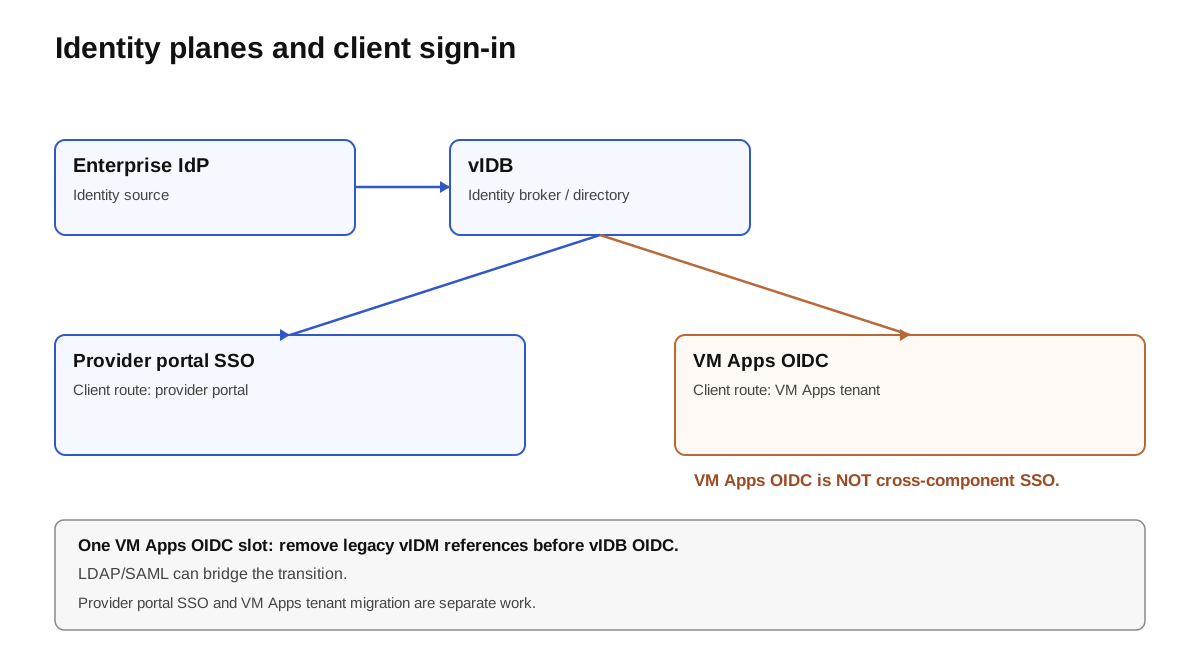
Two separate procedures: Provider SSO and VM Apps authentication.
KB 429467 documents vIDB as an OIDC provider for VM Apps, and specifies that this does not provide SSO from the VM Apps tenant to other VCF components. Using vIDB and getting the same SSO everywhere are different requirements.
Prepare identities and recovery
Our register lists users, groups, roles, projects, owned objects, and technical clients. For each identity, record its source: an external directory behind vIDM, a local account created in vIDM, or a local Automation account. Two accounts with the same name can have different identifiers.
The official path requires vIDM and vIDB to use the same upstream identity provider. Check the UPN, domains, attributes, groups, and synchronizations actually in use. An email displayed on a profile does not prove membership in the right group. Also check DNS, time, TLS, and vIDB availability and capacity, including concurrent connections.
Before cutover, capture the result for an administrator, a consumer, and an unauthorized user. Add a useful request, Day-2 action, and machine call. Keep the IDs and results, with secrets in the operations vault.
1. Make the Provider independent
Follow the Provider configuration: integrate Identity Broker/VCF SSO, then import Provider users and groups into System. In a fresh private session, verify organization administration and a denial for a user without that role. Signing in to VM Apps does not validate this portal.
2. Create and test the First User
From System → Organizations → VM Apps organization → First User, create the planned local account as described in the First User guide. Assign all four roles: Assembler Administrator, Orchestrator Administrator, Organization Owner, Service Broker Administrator. The guide warns that an incomplete set can cause loss of administrative access during migration.
Test this account separately and keep its access in the vault. It provides organization administration while external authentication is in transition.
One OIDC slot: plan the transition
The new identity provider guide uses an LDAP or SAML connection during the transition. For the LDAP path, use LDAPS with verified trust, test attributes, then synchronize. This documented bridge lets you move identities off the old connection before removing it. It can remain the final configuration if that meets the requirement; the vIDB OIDC target adds the steps below.
3. Migrate access and accounts
For each old group, import its counterpart from the new identity provider and reassign its roles: groups do not switch automatically. The group guide requires at least Organization Member. Also check project roles and the permissions actually exercised.
The user procedure distinguishes accounts backed by the identity provider, which can be handled by the documented bulk update feature, from local vIDM accounts, which must be recreated in the new identity provider and then imported. The bulk update does not recreate these local accounts. Do not generalize this LDAP procedure into a promise that identities are automatically preserved during a separate switch to OIDC.
Test access to existing deployments, object ownership, approvals, and permitted actions. A user who can sign in but cannot find their resources has not passed acceptance.
4. Remove references to the old connection
After all users and groups have been validated, the official removal procedure follows this order: old vIDM groups, old accounts still referenced in projects and the organization, then the vIDM OIDC connection. Groups and accounts are disabled before deletion; owned objects must be transferred to avoid orphans. Deactivate the OIDC connection, then delete it last. These deletions are not a reversible trial.
5. Configure VM Apps with vIDB OIDC
With the slot free and the First User working, follow KB 429467. Retrieve the Redirect URI from VM Apps, then create the client in VCF Operations → Fleet Management → Identity & Access → VCF Other Components. Keep the issuer, client ID, and secret in the vault. Configure VM Apps with those values and the issuer + /.well-known/openid-configuration endpoint.
The documented scopes are openid, profile, email, group, the acct Subject claim, and the group_names Groups claim. Import users and groups in UPN format, then verify entitlements. The KB does not guarantee that roles or ownership are retained from an intermediate LDAP connection: reconcile identities and objects against the register, then repeat acceptance before opening access to consumers. Keep the validated recovery path available during this work.
| Check | Before: reference | After: evidence |
|---|---|---|
| Provider / VM Apps | Two access paths identified | Two fresh sign-ins through the expected paths |
| Groups / projects | Roles and scopes recorded | Required access retained; out-of-scope access denied |
| Deployments | Owners and requests known | Objects found; approval and Day-2 work |
| Technical clients | Endpoint, token, expiry, and owner | New token, renewal, and useful operation |
| vIDM unavailable | Dependencies inventoried | No use of the old issuer during the exercise |
| Recovery | First User tested | Access retained and recovery prepared |
Can vIDM and LCM be removed? Two separate proofs
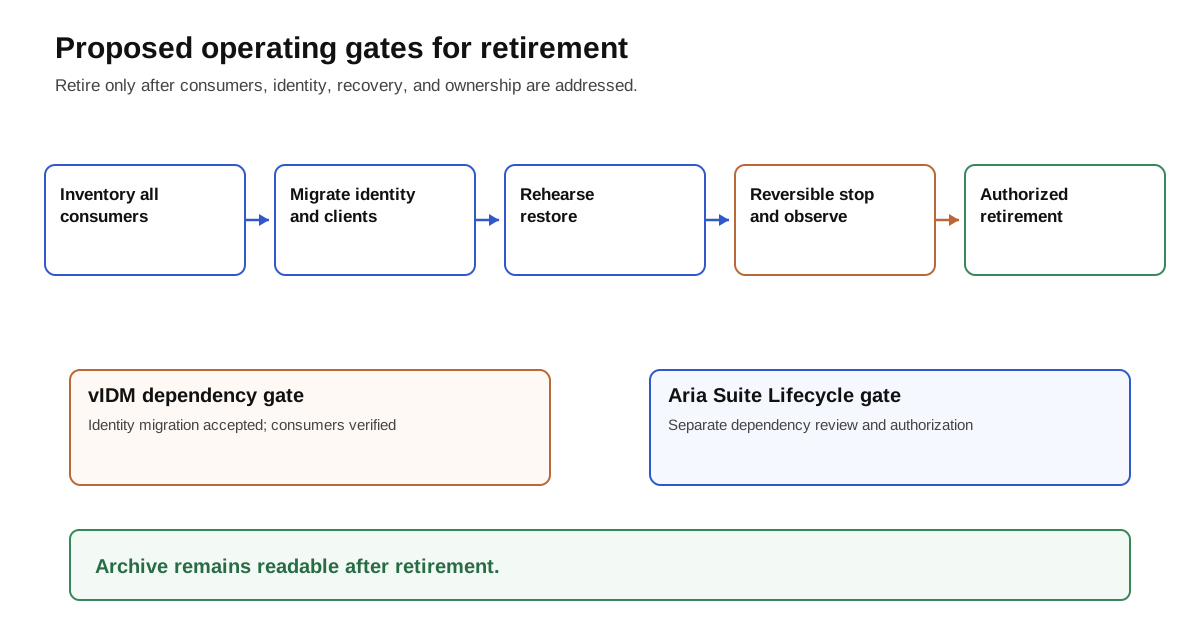
These gates are our proposed operating process; the observation period depends on usage and its schedule.
The documentation states that after the identity procedures, vIDM and Aria Suite Lifecycle are no longer required for Automation to function. This does not cover their other consumers. Here, “LCM” means Aria Suite Lifecycle 8.x, not Fleet Lifecycle/VCF Management Services, which remain necessary to VCF.
For vIDM, also inventory other federated applications, directories, tasks, certificates, and machine clients. For Aria Suite Lifecycle, check other managed products, their Day-N operations, backups, depots, and secrets. Any remaining dependency blocks retirement even if VM Apps works.
After a usable backup and owner agreement, perform a reversible stop and observe reconnects, token expiry, scheduled tasks, and operational procedures. If a dependency appears, restore the component according to the plan and correct the inventory before any permanent deletion. Do not promise that deleting identities can be rolled back simply by powering a VM back on.
“Every trace removed” means no remaining active dependency: revoke legacy clients and secrets after migration, remove integrations through supported interfaces, and update DNS, network rules, active backups, and monitoring at the right time. Keep logs and audit archives. A mention of the old tenant name does not prove a dependency. Identity mappings remain readable without restarting legacy systems; no improvised SQL cleanup is proposed.
Your turn: test without the old key
Record the authentication path, group, and business operation. Also verify the expected denial and recovery access. Prepare the same demonstration for operations that actually depend on Aria Suite Lifecycle before retiring it. Identity can leave the legacy environment while services continue in VM Apps. The fifth episode plans their progressive rewrite for All Apps.
Sources and acknowledgments
Thanks to the Broadcom teams for the SSO migration TechDocs and to the authors of KB 429467 for the OIDC settings and limitations. The TOP diagrams and operating gates are original. The deep dive by Mohammed Aakhil, with Arun Nukula, Iyaz Khan, and Owen Sheehy, provides upgrade context; it does not prove identity retirement in our environment.
Get the next one by email
New articles and series, sent when they are published. No other mail.