
TOP arrives with three address plates and a comforting plan: replace the Aria sign with VCF and restart. At the building site, a new control room is waiting. His address book still describes the old office.
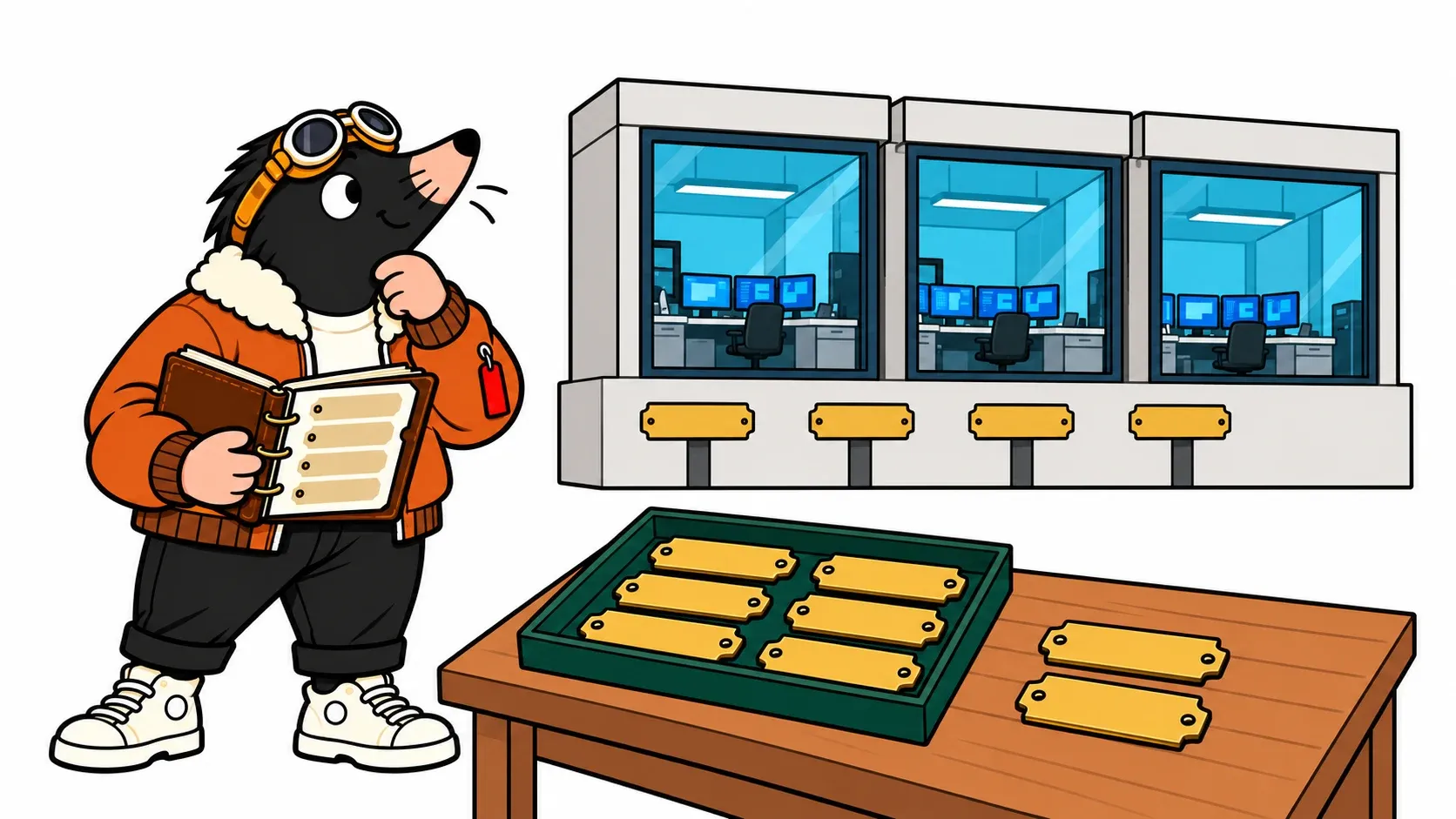
The change affects where services run, how they are maintained and what their addresses represent. Users can keep the same familiar name while the machines behind it change. Before selecting Upgrade, we need to draw that transition.
This series targets VCF Automation 9.1.1, including material differences between builds. Sources were checked on 25 October 2026. This is a documented operational walkthrough, not an upgrade executed in our lab. Addresses are fictional. Upgrading the control platform is also a separate project from moving VM Apps services to All Apps.
Three questions before moving
- Who hosts what?Separate the two service runtimes.
- What does each address do?Distinguish nodes, VIPs and the runtime endpoint.
- What overlaps?Check management allocations and internal networking.
Two service rooms, different responsibilities
The VCF Services Runtime hosts containerized services. Automation has a dedicated instance, separate from the runtime hosting VCF Management Services. Fleet Lifecycle orchestrates operations through VCF Operations; the dedicated runtime hosts Automation. Their node allocations and runtime FQDNs must be distinct. Official procedure.
People sometimes call both things “Automation management services.” Write dedicated Automation runtime in the change plan instead. Otherwise, two teams might reserve the same addresses for different components. This runtime is not a CI/CD runner to install for the upgrade.
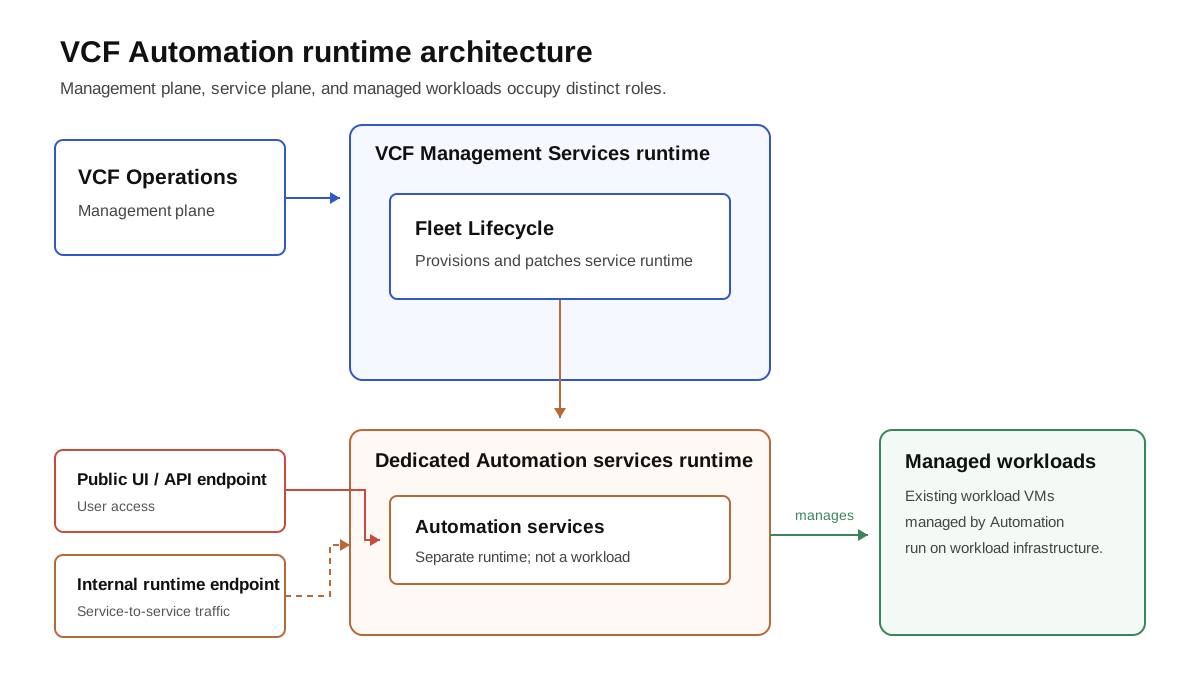
Logical responsibilities, not a VM sizing diagram. Keep the Automation runtime, Management Services runtime and workload clusters separate in the plan.
TOP imagines a dispatch office. Moving the room that receives orders does not automatically move every warehouse it manages. Existing VMs and applications are not all redeployed because the control plane changes. A broken integration can nevertheless prevent a new request or an action on an existing VM. Acceptance testing must cover both.
Same public name, different role for the old addresses
The source version determines what happens to old node addresses. The upgrade guide preserves the public Automation FQDN and describes two different outcomes:
| Migration source | Old node addresses after upgrade |
|---|---|
| Aria Automation 8.18.x | Automatically assigned as VIPs for the new instance |
| VCF Automation 9.0.x | Released after the upgrade |
New nodes are deployed on the same network as the source nodes. For an existing external load balancer, the guide requires no load balancer configuration change. Migration architecture.
In our fictional three-node Aria environment, TOP has 10.60.20.21, .22 and .23. After migration these become virtual service addresses. New VMs receive addresses from the new node pool. Copying the old addresses into the new VMs’ network settings would misinterpret what “reuse” means.
A VIP is a service address presented by the platform. It is not an extra VM to build manually. Automation’s public FQDN, the load balancer VIP and the first node address are different objects. Broadcom documents an incorrect Primary VIP with an internal load balancer in KB 444108. Record the actual topology before filling in the upgrade plan.
Why reserve more addresses?
The target runtime must exist during the transition, and future maintenance needs spare capacity. The documented node allocation is five addresses: three assigned and two reserved for node replacement or rolling updates. Early 9.1 targets required an eight-address /29; later versions allow five individual addresses subject to the workflow prerequisites. KB 448617 identifies the required Fleet/SDDC Lifecycle/runtime versions for that change.
TOP therefore draws three immediate allocations and two replacement opportunities, rather than five mandatory active VMs. Giving the spare addresses to unrelated devices consumes the maintenance margin. A successful initial deployment would not prove that later replacement operations have the room they need.
The Automation runtime FQDN needs another address outside the node pool. This name is distinct from the user-facing Automation name and serves component communication. KB 443199 explains the distinction. Reusing the Automation name for its runtime can break post-upgrade inventory synchronization: KB 457537.
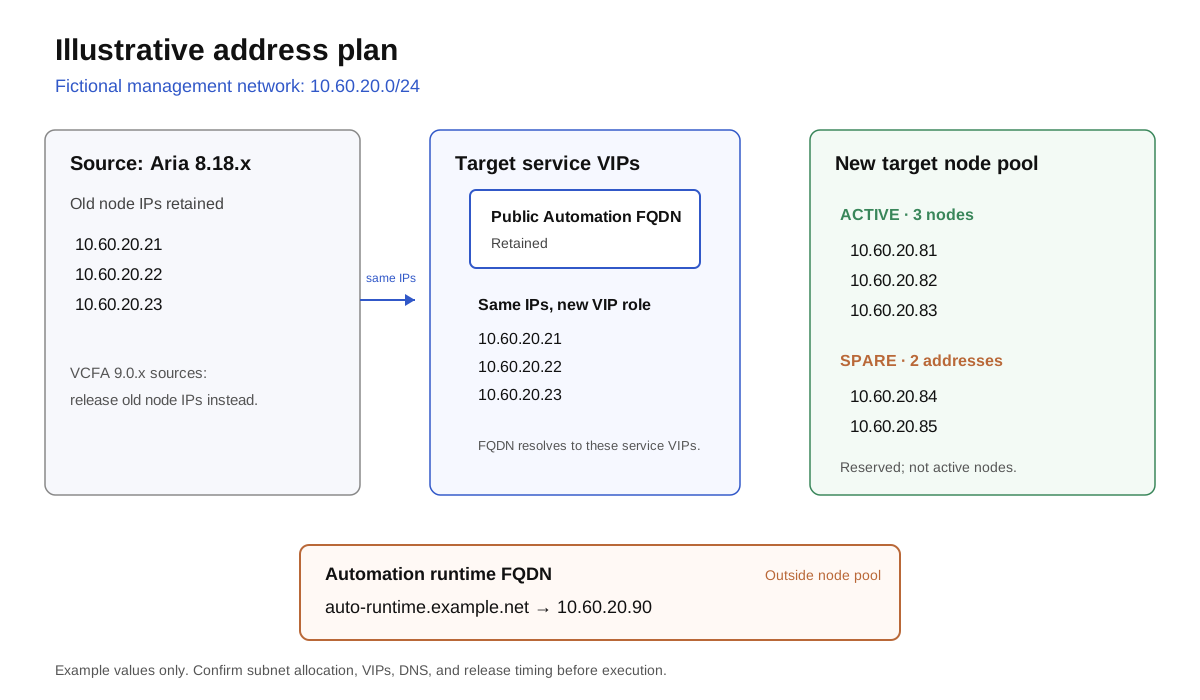
Educational example on fictional management network 10.60.20.0/24. This is neither an appliance configuration to paste nor an address allocation for your environment.
| Object | Example IPAM reservation | Evidence to collect |
|---|---|---|
| Old Aria node IPs | .21, .22, .23 |
Retained for VIP reuse; not reassigned elsewhere |
| New node pool | .81 through .85 |
Five available addresses on the source network |
| Automation runtime | auto-runtime.example.net → .90 |
Matching A/PTR records, outside the pool |
| User access | Existing Automation name | Resolution, certificate and LB path before/after |
| Management Services runtime | Separate allocation, outside this diagram | No reuse of Automation’s pool or name |
A CIDR does not necessarily mean a new VLAN
10.60.20.80/29 is an aligned block of eight values, .80 through .87. It does not mean “eight addresses starting at .81.” Our table uses five individual addresses; it does not submit this /29 to the wizard.
A CIDR used to allocate addresses inside an existing network does not automatically create a new subnet, gateway or VLAN. Nor does it instruct you to put /29 masks on the new node interfaces. An actual IPv4 /29 subnet also has network and broadcast constraints. A product’s allocation field and the routed network design answer different questions. KB 445718 describes the older contiguous-eight-address requirement on the management network.
The runtime also has an internal CIDR, 198.18.0.0/15 by default. It does not replace the management node pool. Broadcom documents 240.0.0.0/15 and 250.0.0.0/15 as alternatives for overlap and permits isolated runtime instances to share an internal network range; that does not permit duplicate management IPs. Internal network configuration.
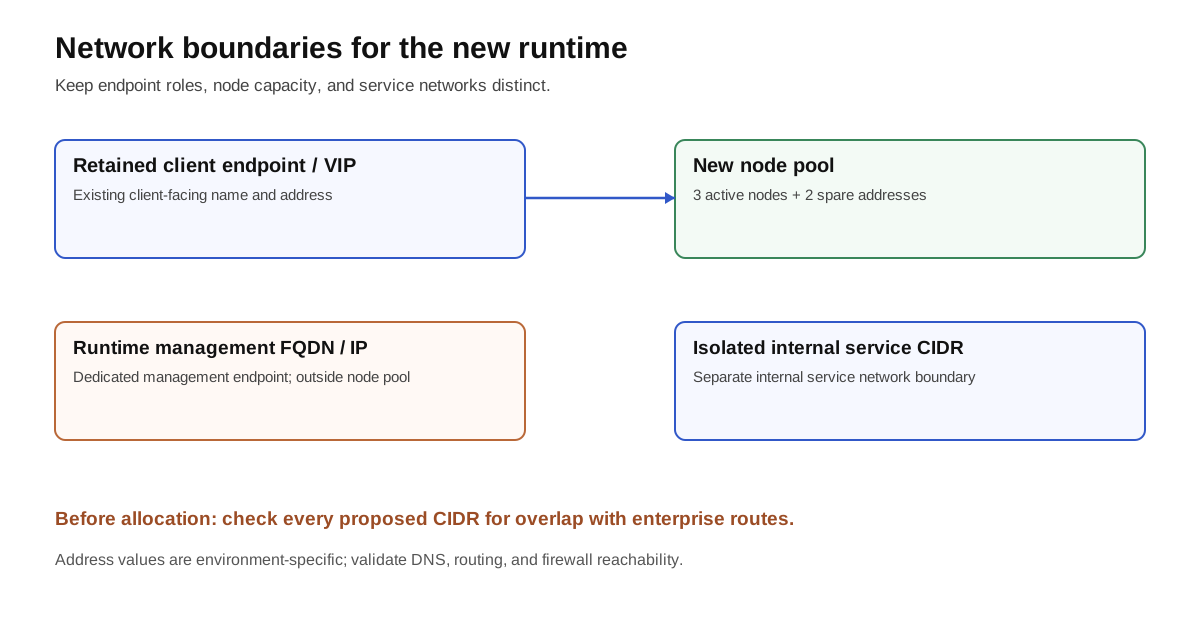
Keeping the client endpoint does not remove the need for new addresses and an internal CIDR overlap check.
Certificates during the move
TOP keeps the sign on the front door, then discovers that the new control room has its own service badges. These are two certificate lifecycles.
The Aria Automation 8.18 → VCF Automation 9.1.x workflow retains and reuses Aria’s existing certificate, including one signed by an internal or public certificate authority (CA). A product rename does not require replacing a compliant certificate. Before upgrading, check expiry and the guide’s required SANs: every Automation node’s FQDN/IP and the LB/VIP’s FQDN/IP. Use the source product’s supported replacement procedure if it is non-compliant. Upgrade guide.
For the Service Runtime’s internal service certificates, the platform handles issuance and renewal through cert-manager. In the normal deployment workflow, you do not manually create a certificate and copy Aria’s private key into each internal service. Broadcom documents automated rotation both for Automation services and for runtime lifecycle services. KB 450789, KB 448618.
| Certificate or trust relationship | What the upgrade changes | What the operator checks |
|---|---|---|
| Historic Automation access endpoint | Reuses the Aria certificate in the migration described above | Expected SANs, issuer, expiry and certificate served through the actual LB/TLS path |
| Internal services on the dedicated runtime | Platform-managed issuance and renewal via cert-manager |
Certificate readiness, expiry/renewal health and working service calls |
| Trust in vCenter, NSX and other external integrations | Separate from retaining the access certificate | Explicit endpoint certificate records and successful validated connections |
A customized runtime ingress certificate remains a separate configuration for the runtime’s own FQDN. Automated internal issuance does not mean your historic certificate automatically covers that new name, that cert-manager renews your retained CA-issued access certificate, or that every private CA is trusted everywhere. If you customize a serving certificate, validate the relevant trust chain too; KB 420053 illustrates the platform trust-bundle requirement for VKS integrations.
The less visible migration trap is outgoing trust. An Aria endpoint can work through implicit trust in a shared or public CA without its certificate being recorded in the provisioning database. That trust store is not migrated. Follow KB 425489 on the applicable source, with its backup prerequisite, then rerun the endpoint certificate precheck. A retained browser certificate does not prove vCenter or NSX connections will remain trusted.
Certificate clarification and linked sources checked on 26 October 2026; the other research date above is unchanged.
Observe it: make the address book prove its answers
Before the window, record every object’s address, FQDN, role, owner, reservation source and expected role after migration. Have the network and platform teams review it together. A silent ping does not prove an address is free: check IPAM, reservations and inactive equipment too.
Collect DNS and TLS evidence from an administration host and from the component communication paths. These read-only commands use fictional names:
dig +short auto-runtime.example.net A
dig +short -x 10.60.20.90
openssl s_client -connect automation.example.net:443 \
  -servername automation.example.net -verify_hostname automation.example.net \
  -verify_return_error </dev/null
The A response must match the reservation; the PTR must return the intended name. -servername sends the TLS server name; -verify_hostname also checks that identity. For a private CA, add -CAfile organisation-ca-bundle.pem with the approved CA bundle; keep -verify_return_error so a validation error fails the test. Check the chain, SANs and expiry against the correct trust store. OpenSSL options.
Before the window, save the presented certificate’s subject/SANs, issuer, serial number, SHA-256 fingerprint, expiry and chain, and record where TLS terminates. Afterward, repeat through the historic Automation name and compare with the expected retained certificate or a documented replacement. Test the runtime endpoint separately and validate the vCenter/NSX integrations actually used, inventory synchronization and one representative service request.
For an operator with the supported administrative access and Kubernetes context on the dedicated Automation runtime, the following is a read-only check of two internal certificates documented in KB 450789:
kubectl -n prelude get certificate services-internal tenant-managerCheck their Ready state and inspect expiry/renewal status when needed. A newly issued certificate alone does not prove every consuming service is using it: include service health and actual TLS connections in acceptance. HTTPS working on your laptop does not prove the runtime can reach an IPAM service, directory or vCenter.
Before migration, retain the address table, network rules and observed certificate. Afterward, verify new VM addresses, expected VIPs, access through the historic name and the two spare addresses. Do not power on old nodes just to test the reused addresses. They can conflict with the target’s VIPs.
Continue with paths and prechecks and cutover and acceptance.
Sources and acknowledgements
Thank you to Mohammed Aakhil for his Aria 8.18.1 → VCF Automation 9.1 technical deep dive, and to the contributors he credits: Arun Nukula, Iyaz Khan and Owen Sheehy. His article inspired this topic; its 9.1 scope does not establish every 9.1.1 prerequisite. Linked TechDocs and KBs support the version distinctions. TOP scenes, diagrams and examples are original.
Get the next one by email
New articles and series, sent when they are published. No other mail.