TOP has finished his address book. He puts a sealed box beside three routes: Aria 8.18, Automation 9.0 and Automation 9.1. “They all reach the same place. Shall we take the shortest?” The destination is 9.1.1, but the bridge depends on the starting point.

The first episode separated the Automation runtime, reused VIPs and new node addresses. Here we turn that drawing into a plan for an exact source version, backed by evidence that supports a start or stop decision.
Sources were checked on 25 October 2026. This is not an upgrade executed in our lab. Our fictional platform delivers a VM catalog service, an IPAM reservation and an account-creation workflow. We want that whole service back, rather than just a newer version displayed in a console.
Choose the route before loading the box
- Identify the sourceFull version, topology and integrations.
- Prepare the destinationMatching dependencies, binaries and addresses.
- Authorize the windowUsable backup, prechecks and a functional baseline.
One destination: 9.1.1. Three starting versions.
“Upgrade” covers both migration to a new runtime and patching a platform already using that architecture. Recording “VCF 9” is insufficient.
Cases 1, 2 and 3 describe the version you run before the window. All three target VCF Automation 9.1.1, at the selected supported patch level. They are source-based alternatives, not target releases or mandatory intermediate hops. Choose one row.
| Source before the window | Common target after the window | Workflow to prepare | Important distinction |
|---|---|---|---|
| Case 1: Aria Automation 8.18.1 (or eligible 8.18.x) | VCF Automation 9.1.1 | Import into VCF Operations, then an Automation migration plan | INSTALL Automation and Migration Service Engine binaries; old node IPs become VIPs |
| Case 2: Eligible VCF Automation 9.0.x | VCF Automation 9.1.1 | Automation upgrade plan for the target runtime | UPGRADE Automation and INSTALL Migration Service Engine binaries; old node IPs are released afterward |
| Case 3: VCF Automation 9.1.0.x | VCF Automation 9.1.1 | Patch workflow to 9.1.1.x | Fleet Lifecycle first, then component dependencies; not a fresh Aria migration |
The first two binary choices come from the official Automation procedure. Downloading a binary does not establish upgrade order. Having the Migration Service Engine package ready does not mean patching it before Automation.
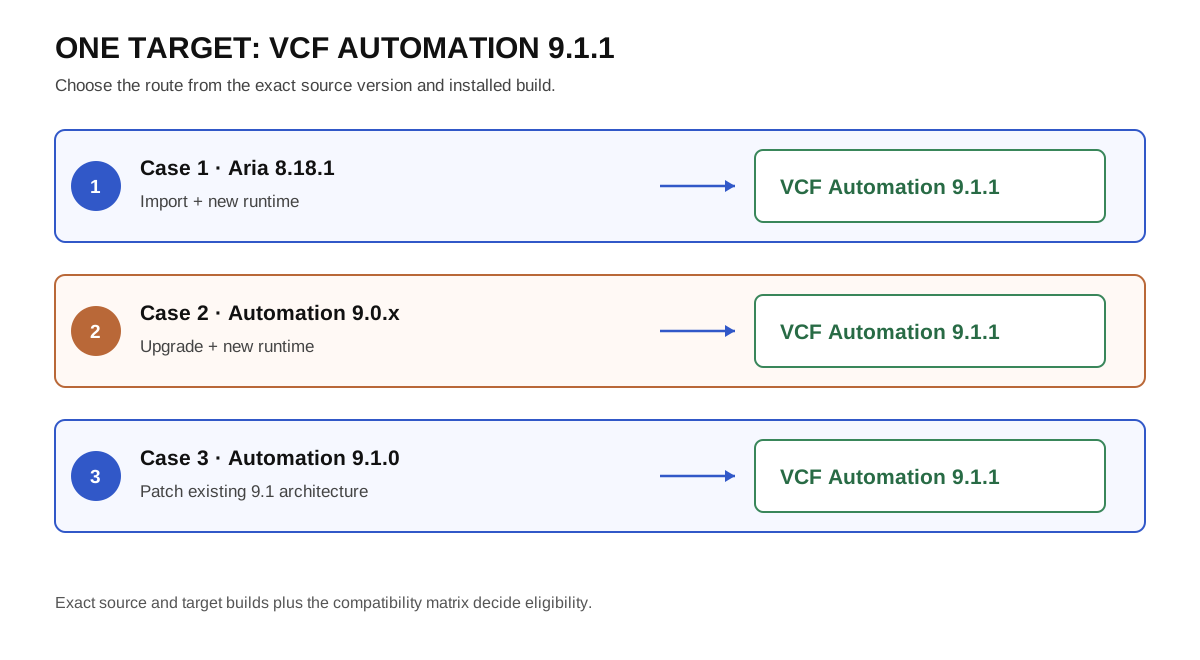
These are workflow families. The supported build pair and calculated plan determine the actual route.
Record the full version and build, then verify the path in the Broadcom upgrade matrix and target release notes. A source released after the target can raise a back-in-time upgrade question: comparing version numbers alone is not compatibility evidence. Do not add a mandatory 9.0 or 9.1.0 stop without checking.
For a VCF 5.2.x or 9.0.x fleet, the VCF 9.1.1 release notes describe direct arrival at 9.1.1 and beginning the upgrade with VCF Operations. An existing vSphere/Aria assembly without a prepared VCF fleet also needs its convergence route qualified. Installing a separate new Automation environment does not import and upgrade the old one. KB 440630 distinguishes these starting environments.
Case 1 — Aria Automation 8.18.1 → VCF Automation 9.1.1
The imported source must be at least 8.18.1, with a supported exact source/target pair. Before importing, verify credentials, expiry and node access. KB 443723 documents SSH precheck failure after an import using expired or corrupted credentials. An imported inventory object does not prove its access is usable.
Record node count, sizing, load balancer and storage. For an extra-large single-node Aria source, the guide requires scaling to three nodes first. That exception does not mean every single-node source has the same prerequisite.
An instance on a non-primary datastore is another specific case. The current guide supports that placement from 9.1.1.0200, provided Fleet Lifecycle, SDDC Lifecycle and SDDC Manager are also 9.1.1.0200 or later. A procedure targeting 9.1.1 GA does not automatically cover it. Check the selected build before moving appliances merely to bypass a constraint. Topology and datastore requirements.
Aria Suite Lifecycle no longer manages the upgraded Automation instance. VMware Identity Manager may still provide authentication, however. Retain it and its lifecycle management until the SSO transition is deliberately prepared. Upgrading Automation and switching to Identity Broker are separate decisions.
Case 2 — VCF Automation 9.0.x → VCF Automation 9.1.1
VCF is already in the product name, but moving to the 9.1 runtime is still an architectural change. Reuse the inventory method, not the Aria IP mapping. KB 451147 requires removing custom profiles from affected 9.0.1, 9.0.2.x and 9.1.0.x sources before upgrading. These are Synthetic Checker service-configuration overrides, not catalog network, image or flavor profiles. Follow the KB backup and removal procedure; it specifies an additional 15–30 minutes of source-service redeployment downtime. Reserve this time before cutover. Version 9.0.0.0 has no such custom profiles.
Compare Automation’s target build with the runtime selected by the plan. Similar-looking numbers do not establish support. KB 449628 explains a runtime compatibility precheck and the requirement for the exact expected runtime INSTALL binary. Correct the plan and depot rather than disabling the validation.
TOP puts two separate records into his box: the service being upgraded and the compatible platform hosting it. Each has its own version, even when the interface presents one overarching workflow.
Case 3 — VCF Automation 9.1.0 → VCF Automation 9.1.1
Start with Fleet Lifecycle, then follow the dependencies for the target build and installed components. In the documented 9.1.1 case, Automation precedes Migration Service Engine. KB 455559 describes the ordering failure and its fix in 9.1.1.0100. Release notes require dependencies to be satisfied before selecting Upgrade All. This button is not a way to discover the order during the window.
Data Services Manager, Salt or a software depot being patched can introduce additional dependencies. Read the graph for your fleet instead of treating the Automation/engine pair as the universal order for every product. For a disconnected environment, prepare metadata, packages and dependencies through the supported offline depot workflow before maintenance. Verify package availability, not merely the existence of a downloaded file.
Integration checks can change the decision
A successful precheck does not replace a functional inventory. Our VM could be created while its ownership-registration workflow fails. The delivery ticket looks complete, but the requested service is not.
Certificates, FIPS and directories
The guide requires integration channels compatible with FIPS mode and highlights IPAM with certificate verification disabled, the Aria Operations integration and unencrypted LDAP. It also states that the source trust store is not migrated, although Automation’s certificate is retained. Inventory the certificate being presented separately from the CAs needed to trust dependencies. KB 447667, KB 425489.
For each endpoint, record name, port, protocol, account, CA, expiry, connection evidence and an acceptance transaction. Check certificate SANs against the guide, including nodes and VIP/LB. Replacing a hostname with an IP to “fix TLS” does not establish that the certificate covers that identity.
Removed integrations need a real transition plan. The precheck KB 389563 flags NSX-V and NSX-T Manager Mode. Deleting an endpoint to make a precheck green can break actions on existing deployments. Qualify the scenario with support. For other capabilities listed in the KB, verify the target version rather than applying a 9.0 restriction indiscriminately to all releases.
The 9.1.1 public-cloud case
Native AWS/Azure/GCP management is deprecated and disabled by default in 9.1.1, including upgraded environments. Catalog items may remain visible while requests and actions involving public-cloud resources are blocked. If you use these capabilities, prepare the decision and validation for KB 448993, following the Automation product notes.
For an Aria 8.18.x source, reenablement can be applied after the upgrade; for 9.0/9.1, before or after. This does not mean every Terraform use is removed: custom providers executing in the user’s Kubernetes environment are a separate case.
Departure checklist: evidence, owner, stop condition
This is our proposed operational checklist. Local acceptance controls complement product prechecks; they are not additional vendor-mandated steps for every deployment.
| Before maintenance | Evidence retained and owner | Do not start if… |
|---|---|---|
| Builds and route | Matrix and component versions; platform owner | Source/target pair is unconfirmed |
| Capacity and placement | CPU/RAM, free storage, network, topology; vSphere | Target and migration headroom cannot be accommodated |
| Addressing and DNS | Episode 1 address book, reservations, A/PTR; network | Address conflict, overlap or ambiguous runtime name |
| Identity and TLS | User login, recovery account, CA/SAN, endpoint access; IAM | Authentication or trust remains unverified |
| Depot and order | Required packages available, dependency plan; lifecycle | Incompatible runtime or missing binary |
| Representative services | Baseline test IDs and results; service owners | Unexplained preexisting failure |
| Recovery | Successful backup, restore procedure, access and secrets; operations | Backup unusable or recovery unprepared |
| Window | Request/automation freeze, decision maker, deadline; change lead | Concurrent lifecycle task or insufficient recovery time |
An upgrade-created snapshot does not replace a backup and a known restore procedure. Verify destination, access and decryption requirements against the VCF backup documentation. The useful evidence is a usable backup result and, ideally, a restore rehearsed in an appropriate environment.
Observe it: rehearse one complete service
In an authorized non-production project, request a minimal service exercising the dependencies you actually need: IP allocation, DNS registration and a workflow when these belong to the service. Record the time, request ID, deployment, inputs and outcomes. Perform a reversible action supported by that service, then remove the deployment and verify its reservations were released. Do not use a production service as the experiment.
On the day, review the checklist, run prechecks for the selected plan and retain their results. Any material parameter or integration correction warrants another run. If a dependency is still failing, the successful outcome of preparation is a justified stop, not a forced upgrade.
Continue with cutover and acceptance. TOP now knows his route and the conditions that prevent departure.
Sources and acknowledgements
Thank you to Mohammed Aakhil, and the contributors he credits—Arun Nukula, Iyaz Khan and Owen Sheehy—for the 9.1 migration deep dive. The linked official sources establish 9.1.1 procedures and limits. Our checklists, examples and illustrations are original and do not replace the support matrix for your environment.
Get the next one by email
New articles and series, sent when they are published. No other mail.