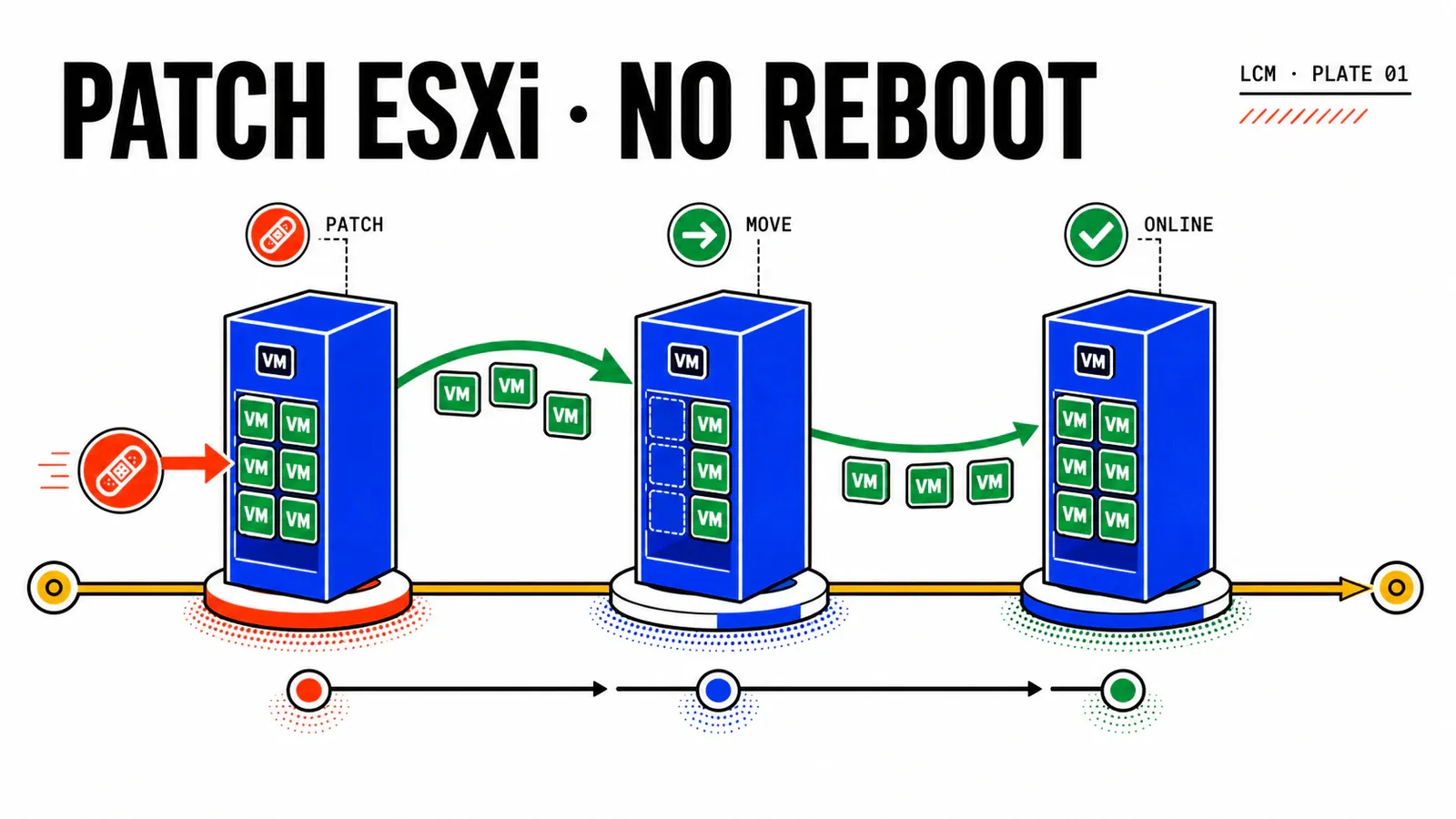
“Can this ESX patch land without rebooting the host?” The answer is neither “yes, because we run VCF 9.1” nor “no, because ESXi has always rebooted.” Live patching is a property of the patch and the cluster. Both must qualify before you open the change.
This article follows Nordwind Logistics, a fictional organization operating vcf-par-01. The goal is to split change CHG-2026-0742 into two piles: fixes that can be applied in memory, then exceptions that must follow the vSAN ESA rolling path.
Evidence contract
No VCF 9.1 lab was executed for this series. That limitation does not block the guide: its templates identify information to collect from the target instance, and results marked RÉSULTAT_ATTENDU are never presented as observations. Assertions that depend on build or hardware must be verified on a test platform.
TL;DR
- The patch release notes decide:
Live Patchable,Host Reboot Required, andVirtual Machine Migration or Shutdown Requiredare the routing fields. - The cluster must qualify too: vLCM image, minimum versions, DRS enabled, parallel remediation disabled, no host already in maintenance mode, and no DPU.
- Monday-morning action: archive those three fields, run the per-host precheck, and remove every exception from the live batch before remediation.
Eligibility is a two-gate decision
Two ESX 9.1 security patches can carry opposite impact contracts. The 9.1.0.0100 release notes describe a live patch with no reboot and no VM migration. The 9.1.0.0200 notes say the opposite. “Security only image” is not enough: only the three explicit release-note fields can route the change safely.
| Field to archive | Why it matters | Decision |
|---|---|---|
Live Patchable |
confirms that this patch has a live variant | Yes opens the cluster check |
Host Reboot Required |
translates the host impact | Yes routes to rolling remediation |
Virtual Machine Migration or Shutdown Required |
translates the workload impact | Yes consumes an application window |
triage:
  change_reference: CHG-2026-0742
  cve: collect_from_release_notes
  severity: collect_from_release_notes
  patch_release: collect_from_release_notes
  release_notes_url: archive_with_change
  read_from_release_notes:
    live_patchable: confirm_yes_or_no
    host_reboot_required: confirm_yes_or_no
    vm_migration_or_shutdown_required: confirm_yes_or_no
HYPOTHÈSE_DE_DESIGN
Nordwind assumes a fourteen-day target for critical CVEs and a single shutdown night per quarter. Live patching does not remove change governance: it separates fixes that can leave the outage budget from those that must remain in it.
The second gate is the cluster’s real state. A patch marked live cannot force an ineligible host to qualify. On cl-fret-prod-01, the preflight must cumulatively verify that:
- the cluster is managed by one vLCM image;
- vCenter is at least 9.0 and ESX at least 8.0 Update 3;
- DRS is enabled — fully automated remains the cautious operating choice;
- parallel remediation is disabled;
- no host is already in maintenance mode;
- a live variant exists for the base image;
- a TPM-enabled host runs at least ESX 9.1;
- no DPU host is included in the batch.
preflight:
  cluster: cl-fret-prod-01
  current_esx_build: collect_from_cluster
  gates:
    image_managed: true
    drs_enabled: true
    parallel_remediation: false
    hosts_in_maintenance: 0
    live_variant_present: confirm_yes_or_no
    tpm_requires_esx_9_1: true
    dpu_hosts_in_scope: 0
The remediation precheck then provides the strongest answer: for each host, it reports whether a reboot or maintenance mode is required. That answer incorporates the server’s real state, while the release notes only describe the patch capability.
Live Patch, Quick Boot, and reboot are different contracts
The word “live” creates an expensive ambiguity. All three mechanisms reduce impact, but they do not promise the same outcome.
| Live Patch | Quick Boot | Maintenance mode + reboot | |
|---|---|---|---|
| Host restarts | no | yes, without hardware initialization | yes, full cycle |
| Host state | partial maintenance mode | maintenance mode | maintenance mode |
| VMs evacuated | no | yes, or suspended in memory | yes |
| Direct VM interaction | FSR when vmx is touched |
suspend/resume or vMotion | vMotion |
| Version upgrade | no | possible, but not with suspend-to-memory | yes |
| Evidence status | DOCUMENTÉ | DOCUMENTÉ | DOCUMENTÉ |
Live Patch applies fixes in memory to the vmkernel, user-space daemons, selected NSX components, and the vmx runtime. Restarting a daemon can make the host briefly appear disconnected from vCenter without stopping its VMs. When vmx is involved, Fast-Suspend-Resume performs a local in-memory suspend and resume without vMotion.
Quick Boot remains a reboot: it skips the BIOS or UEFI hardware sequence, but reloads the hypervisor and places the host in maintenance mode. Suspend-to-memory is unavailable for a version upgrade. This shortcut never turns rolling remediation into a live operation.
À_VALIDER_EN_LAB — default setting
An official VCF 9.1 post says Live Patch is enabled by default with automatic fallback to reboot. A KB and the vSphere 9.0 documentation describe the setting as disabled by default. On a cluster built before 9.1 and later upgraded, inspect both the global setting and any cluster override.
FSR exceptions do not block the whole batch
Some VMs do not support Fast-Suspend-Resume: Fault Tolerance, DirectPath I/O, vSphere Pods, or shared-disk clustering. Their presence does not block live patching for the cluster. The compliance scan must identify them and explain why; they may remain on the previous code after remediation.
| Nordwind case | Proposed treatment | Status |
|---|---|---|
| fleet-tracking FT VM | schedule a separate application cycle | HYPOTHÈSE_DE_DESIGN |
| shared-disk SQL FCI | schedule a targeted vMotion | HYPOTHÈSE_DE_DESIGN |
| vSphere Pods | do not promise 100% live compliance | HYPOTHÈSE_DE_DESIGN |
| Enhanced DirectPath GPU VM | qualify the actual configuration | À_VALIDER_EN_LAB |
The tracking unit is therefore no longer just the cluster. The change record must preserve the incompatible VM list, its owners, and the action that will bring each VM onto the target image. An aggregate green badge does not remove this residual debt.
Runbook: decide, apply, prove
The operating flow has six steps.
- Read the release notes. Archive the three impact fields with the patch ID and CVE.
- Run the preflight. Reject the live batch when a cluster condition is missing; do not expect the orchestrator to work around it.
- Run the per-host precheck. Its reboot and maintenance-mode requirements are authoritative for the environment.
- Resolve FSR-incompatible VMs. Name them before the change and assign an action to each service owner.
- Remediate sequentially. The first host is a natural canary because parallel remediation is incompatible with Live Patch.
- Compare the result with the image. Route ineligible hosts to the vSAN rolling runbook and orchestration failures to the LCM recovery guide.
Pitfalls
Do not infer eligibility from CVE severity. Do not call Quick Boot “no reboot.” Do not enable parallel remediation for the live batch. Do not make an FSR-incompatible VM disappear from the report: turn it into a tracked action.
Evidence that closes the change
Useful evidence has four layers. Stopping at the first proves that a patch exists, not that it was applied.
| Layer | Evidence | Status |
|---|---|---|
| Decision | archived release-note fields | DOCUMENTÉ |
| Environment | per-host precheck showing reboot or maintenance need | DOCUMENTÉ |
| Execution | no maintenance-mode or vMotion task; unchanged uptime |
RÉSULTAT_ATTENDU |
| Compliance | hosts compliant with the image; residual state explained by FSR-incompatible VMs | RÉSULTAT_ATTENDU / À_VALIDER_EN_LAB |
A host can be Compliant, Non-Compliant, Incompatible, or Unknown. Preserve the per-host detail: Unknown does not mean compliant, and Incompatible is not a transient failure to retry.
À_VALIDER_EN_LAB — binary evidence
The reviewed sources document image compliance, but not the exact host marker that proves which binary content is active in memory after Live Patch. If a security audit requires a build number per host, define and test that evidence before publishing the runbook.
Conclusion
The patch decides
The security category is not enough. The three release-note fields are the impact contract.
The cluster confirms
The per-host precheck turns theoretical capability into an operating decision.
Evidence closes
Execution, compliance, and FSR exceptions must describe exactly the same state.
The live pile can now leave the outage budget. The reboot pile, DPU hosts, and other exceptions feed the next step: roll vSAN ESA without confusing availability with redundancy.
Primary sources: vLCM Live Patch configuration, requirements in KB 419942, ESX 9.1.0.0100 release notes, ESX 9.1.0.0200 release notes, and what is new with vSphere in VCF 9.1.
Get the next one by email
New articles and series, sent when they are published. No other mail.