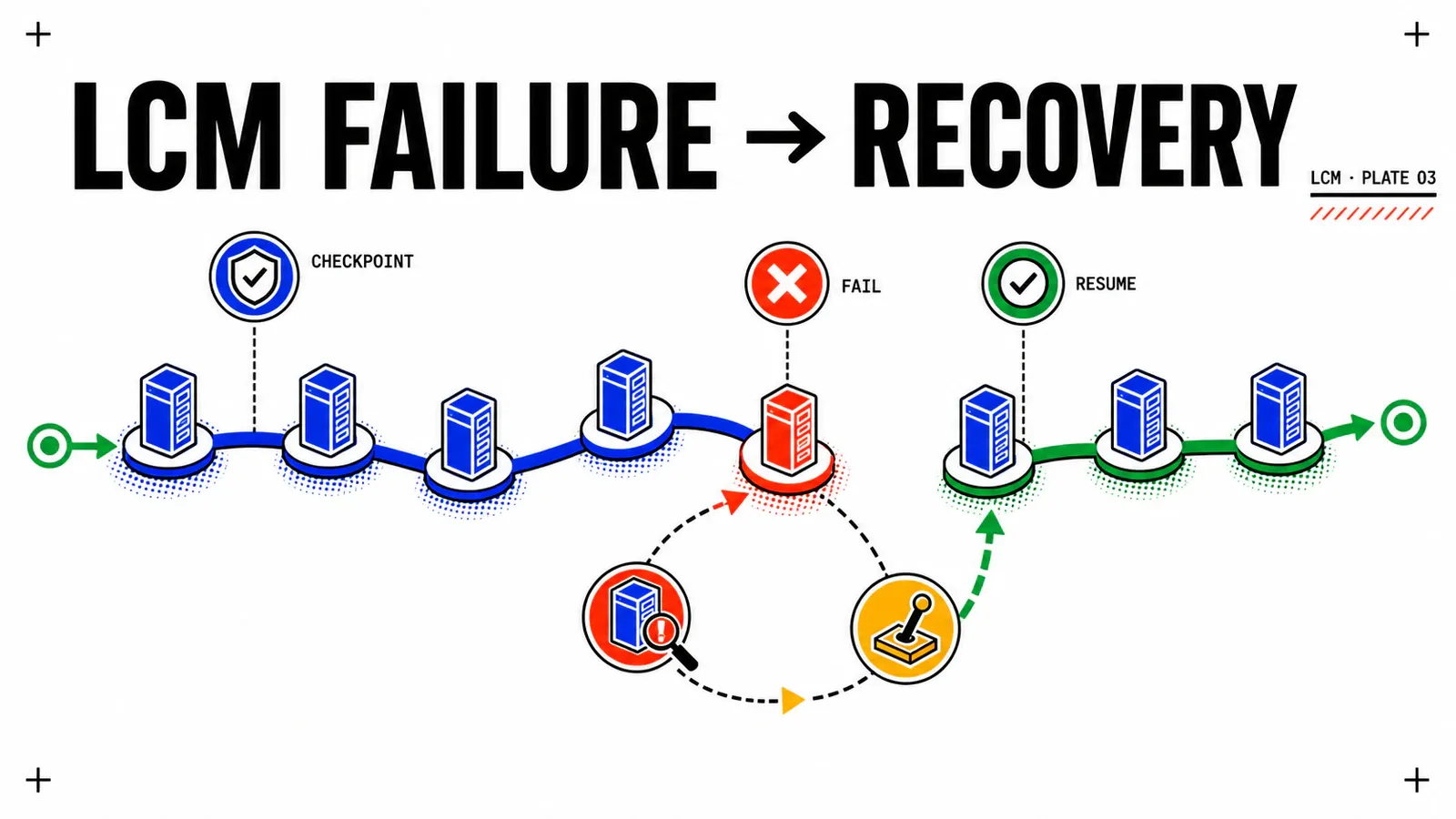
An LCM batch stops halfway through CHG-2026-0742. The wrong reflex is to click Retry. The right one starts with a colder question: what actually changed in the estate? Until the answer is established per component and per task, retrying turns a readable incident into a composite state.
This article consumes the outputs of ESX Live Patch and vSAN ESA rolling remediation. The vcf-par-01 estate may be partially patched, some hosts may have been excluded, and the orchestrator must resume at the correct level.
Evidence contract
There is no single VCF 9.1 TechDocs guide dedicated to LCM troubleshooting. This recovery tree combines the lifecycle model, published 9.1 known issues, and Broadcom resource-lock KBs. No lab was executed: that does not block the guide, but labels, states, and paths that depend on patch level must be verified on a test platform. No unsourced log path is invented.
TL;DR
- VCF 9.1 orchestrates a target version across two planes: management components at fleet level, core components at instance and domain level.
- A completed batch status can precede the end of resource tasks; Component Versions and active tasks are authoritative before any retry.
- Monday-morning action: settle three questions—did the batch start, which plane failed, and does displayed state match real resources?
The LCM model is declarative and split across two planes
The operator declares a target version; VCF Operations plans binaries, dependencies, and order. In 9.1, the standalone Fleet Management appliance has disappeared in favor of fleet lifecycle.
The software depot provides installation, upgrade, and patch binaries, OCI images, and compatibility data. It can operate connected, offline, or disconnected. Nordwind uses a fleet-level depot in offline mode.
| Plane | Components | Typical recovery |
|---|---|---|
| Fleet | VCF Operations, management services, VCF Automation, Identity Broker | component-specific precheck and resume |
| Instance | SDDC Manager, vCenter, NSX Manager | restore from pre-upgrade backup or snapshot, with support |
| Domain | clusters and ESX hosts | exclude targets, create another batch, apply retry policy |
change: CHG-2026-0742
window: MW-2026-Q3-01
instance: vcf-par-01
depot:
  scope: fleet-level
  mode: offline
  binaries_ready: confirm_target_version_in_depot
nature: classify_patch_or_maintenance_release
scope:
  fleet: mandatory
  management_domain: mgmt-par
  workload_domains:
    - name: wld-fret-prod
      mode: day-n
A maintenance release imposes component order and a new BOM. A patch is not synchronized across all components, does not require a new BOM, and can target only required components unless its own release notes impose an order.
| Patch | Maintenance release | |
|---|---|---|
| Synchronized across components | no | yes |
| New BOM | no | yes |
| Component selection | possible | coherent target sequence |
| Order | business need unless patch notes instruct otherwise | published lifecycle order |
| Evidence status | DOCUMENTÉ | DOCUMENTÉ |
Travel is one-way
VCF accepts only a target version released after the current version. Declaring an older target is not a rollback strategy. The change plan must settle its restore posture before execution.
Prechecks validate the plan, not the whole execution
VCF 9.1 relies more heavily on native component prechecks. Results can be exported to CSV; that export belongs with the change and should be compared with the post-remediation run.
Published cases show what checks can detect: BOM incompatibility, a third-party component outside the matrix, NetFlow configuration blocking a vCenter upgrade, or host hardware compatibility. Known issues also expose blind spots:
Run Prechecks (ALL)can fail because an input specification remains after a component upgrade; the workaround is to run checks component by component;- fleet lifecycle does not support the Log Management 9.x to 9.1 precheck even though the option appears available;
- a successful precheck says nothing about active vSAN resynchronization, a host without a DRS evacuation path, or a lock left by an earlier task.
RECONSTITUTION
The precheck snapshots control-plane state at time T: versions, interoperability, configuration, and hardware. The previous articles showed that incidents often occur lower down—in evacuation, data placement, or resource execution.
Nordwind therefore runs checks, fixes errors, exports CSV, reruns component by component, and keeps the second export. Reducing scope before this comparison would hide a defect that returns in the next batch.
Read real state before retrying
The Component Versions tab centralizes current and target versions for managed components. It is the first view that answers “what actually completed?”
It is not sufficient. A published vSphere 9.1 known issue says aggregate bundle status may be complete while host upgrades remain active. The operating conclusion is firm: resource tasks take precedence over the batch badge.
state_read:
  target_version: collect_from_lifecycle_plan
  component_versions:
    fleet: collect_from_component_versions
    instance: collect_from_component_versions
    domain: collect_from_component_versions
  active_resource_tasks: collect_from_resource_tasks
  aggregate_batch_status: collect_from_batch
  states_match: confirm_yes_or_no
RÉSULTAT_ATTENDU: every component shows current version equal to target version, no resource task is active, and inventory lists every expected component. Capture these outputs on the real instance; they were not observed during research.
À_VALIDER_EN_LAB — labels and logs
Exact labels can change with the 9.1 patch level. No fleet-lifecycle or SDDC-lifecycle log path on VCF Operations was verified. The only sourced path in this guide is /var/log/vmware/vcf/lcm/lcm-debug.log on SDDC Manager for the lock case.
Diagnose in the right order
Three questions progressively close the search space.
1. Did the batch start?
A workflow that becomes CANCELLED almost immediately may have failed to acquire the deployment lock. An earlier failed task left a resource lock; no component in the new batch has been modified yet.
The published read-only check is:
curl localhost/locks | jqRetrying before releasing the lock only reproduces the failure. Editing the lock table directly is a separate decision covered below.
2. Which plane failed?
A fleet failure, a partially upgraded core appliance, and an ESX host left in maintenance mode have different blast radii and recovery paths. Locate the plane before looking for a command.
3. Is displayed state real?
Compare aggregate status, Component Versions, and resource tasks. A lifecycle page that loads forever is not necessarily a stuck workflow: after some SDDC Manager upgrades, browser cache causes the symptom; a private window separates it from a server-side incident.
| Symptom | First check | Recovery |
|---|---|---|
immediate CANCELLED |
resource locks | release lock, then replay |
Run Prechecks (ALL) fails |
component-by-component precheck | preserve CSV, fix the cause |
| completed badge, active tasks | resource-task list | wait; do not retry |
| host stuck in maintenance | DRS and VM evacuation | manual vMotion or planned shutdown |
| component missing from inventory | VCF Operations inventory, SSL proxy | apply published workaround |
| Lifecycle page spins forever | private browsing session | distinguish cache from real incident |
Recover according to the affected plane
| Scope | Documented mechanism | Limit |
|---|---|---|
| lock before work | release, then replay | does not fix the initial failure |
| fleet | precheck and resume the component | one operation at a time |
| instance | pre-upgrade backup or snapshot | no generic rollback procedure |
| domain | exclude hosts, create batch, use retry policy | does not reconcile a host in maintenance mode |
At domain level, a failed cluster does not necessarily stop the rest. Failed clusters or standalone hosts can feed a new batch, even before the original batch finishes. Hosts can be explicitly skipped, and a retry policy can absorb transient errors.
Parallelism applies to clusters, not hosts inside a vSAN cluster. Within each cluster, the ESA rolling rule remains one host in maintenance mode at a time.
recovery:
  lock_cleared: confirm_yes_or_no
  component_prechecks_replayed: confirm_yes_or_no
  excluded_targets: record_target_list
  retry_batch: record_batch_id
  excluded_target_batch: record_batch_id
Pitfalls
Do not retry from aggregate status alone. Do not create a patch plan while an upgrade plan exists. Do not confuse cluster parallelism with vSAN host parallelism. Do not restore one appliance without considering inventory consistency while the rest of the estate moved forward.
Rollback, locks, and window closure
The documentation does not publish a generic procedure for rolling back an already-upgraded VCF component. It does publish safeguards before the operation: component backup, snapshots of VCF Operations nodes, backup of custom content, then snapshot removal after success.
For hosts, the documented path moves forward: exclusion, a new batch, and retry policy. For appliances, partial restore raises an open inventory-consistency question. À_VALIDER_EN_LAB: until consistency is proven, open a support case before restoring one isolated component.
Broadcom KBs diverge on lock release. One KB covering VCF Operations 9.x and SDDC Manager 9.x says to contact support. Others publish direct database work after a snapshot, but their version coverage is inconsistent. HYPOTHÈSE_DE_DESIGN: read locks independently; write the database only with support.
Close the window only when:
- patch or maintenance nature and its order are archived;
- initial and replayed precheck CSV exports are retained;
- no resource lock or task remains;
- Component Versions aligns with the target;
- no host remains in maintenance mode;
- VCF Operations inventory contains every expected component;
- temporary snapshots are removed and a new backup exists.
Conclusion
Read before retry
Component versions and resource tasks outrank the aggregate batch badge.
Locate the plane
Fleet, instance, and domain failures have different blast radii and recovery paths.
Recover forward
Exclusion, new batches, and retry policy are documented; generic rollback is not.
The quarterly loop is complete: apply in memory what can be live-patched, roll the rest host by host, then resume orchestration exactly where it failed. The underlying model remains detailed in VCF 9 architecture explained.
Primary sources: VCF 9.1 lifecycle model, lifecycle management of VCF components, VCF Operations 9.1 known issues, ESX upgrade in VCF 9.1, and KB 418563 on resource locks.
Get the next one by email
New articles and series, sent when they are published. No other mail.