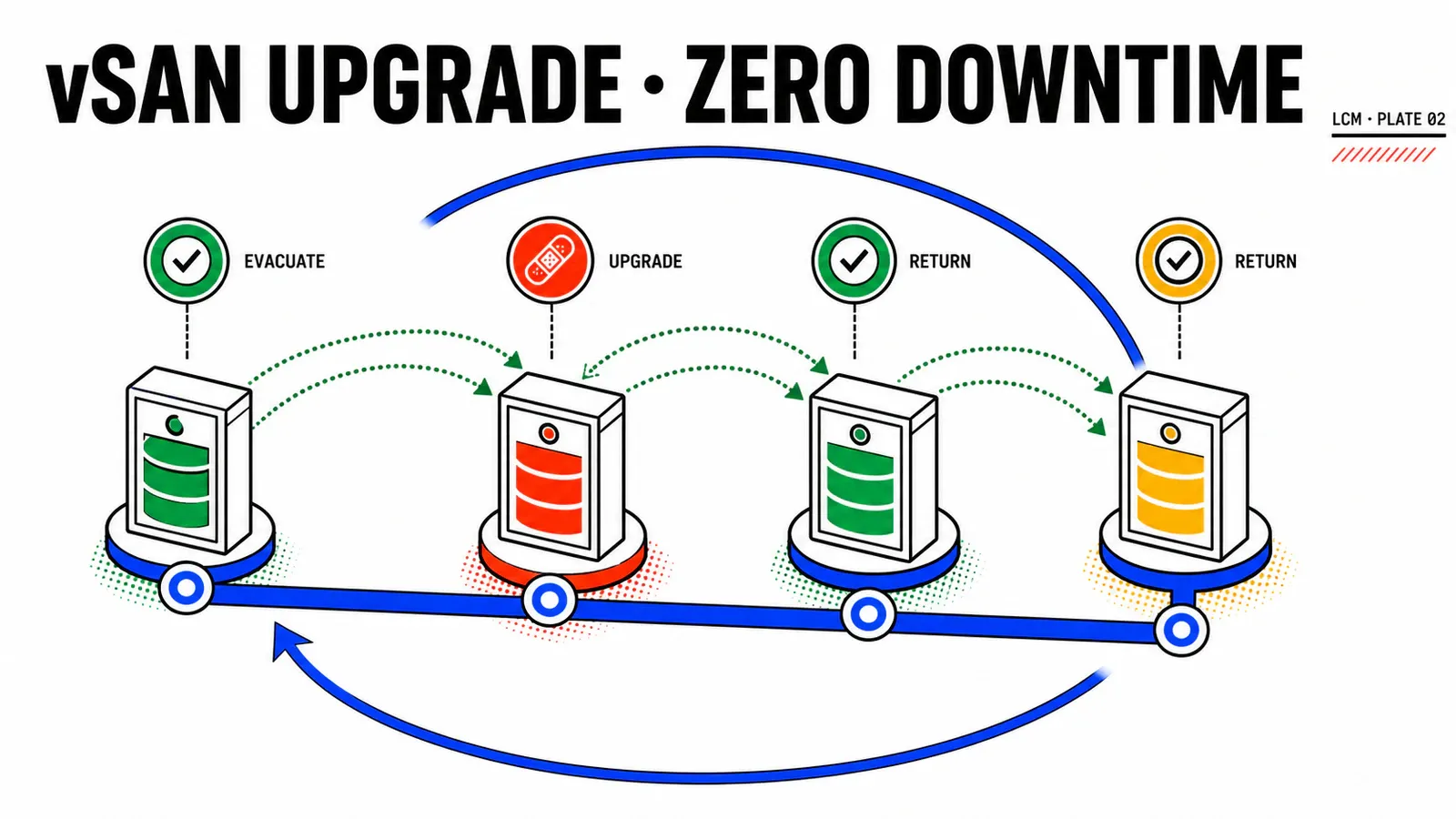
ESX Live Patch separated fixes that can land in memory from those that require a reboot. This article handles the second pile. On vSAN, “rolling” does not mean automatic or risk-free: it means one host at a time, while protecting redundancy, capacity, and data placement at every step.
The Nordwind Logistics thread continues. CHG-2026-0742 crosses three ESA clusters: a four-host edge cluster, an eight-host production cluster split across four fault domains, then a Paris–Lille stretched cluster with a witness.
Evidence contract
The reviewed documentation does not describe an ESA rolling procedure distinct from OSA. It documents the vSAN procedure and, separately, ESA architecture. No lab measured duration or observed witness behavior. This does not block the runbook: platform-dependent points are marked and must be verified in a test environment before execution.
TL;DR
- vLCM remediates a vSAN cluster sequentially with one host in maintenance mode; fault domains and then sites determine the order.
Ensure accessibilitypreserves access but reduces redundancy;Full data migrationpreserves object compliance at the cost of full evacuation and can fail when margin is insufficient.- Monday-morning action: run Data Migration Pre-check for every host and evacuation mode, then write the stop gate between hosts before opening the window.
Rolling remediation depends on three layers
The workflow does not always fail in the layer you are watching. Three independent constraints stack up.
- vSphere Lifecycle Manager enforces sequential remediation on vSAN. With fault domains, it handles every host in one domain before moving to the next. On a stretched cluster, it handles the preferred site before the secondary site.
- vSAN decides what happens to data components when the host enters maintenance mode.
- Actual placement decides whether evacuation is possible: FTT policy, effective RAID, available fault domains, and free capacity.
The vSAN upgrade procedure adds a strict timeline: vCenter first, ESX hosts second, on-disk format last. The documentation warns that changing this order exposes the cluster to data loss and failure. If vCenter is not at the target, rolling remediation does not begin.
change: CHG-2026-0742
window: MW-2026-Q3-01
instance: vcf-par-01
target_version: collect_from_release_plan
current_esx_build: collect_from_cluster
target_esx_build: collect_from_release_plan
scope:
  - cl-fret-edge-01
  - cl-fret-prod-01
  - cl-fret-dr-01
RECONSTITUTION — ESA has no separate runbook
The published mechanics do not distinguish ESA from OSA. ESA uses one storage pool per host, but no reviewed source promises faster evacuation or special rolling behavior. Measure timing on the actual estate instead of inferring it from architecture.
Choose the evacuation mode deliberately
The three vSAN modes serve different goals.
| Mode | Documented behavior | Debt created |
|---|---|---|
| Ensure accessibility | moves just enough data to keep every object accessible | reduced redundancy while the host is processed |
| Full data migration | evacuates all data and preserves object compliance | full traffic, capacity demand, possible failure |
| No data migration | moves no data | VMs may become inaccessible; outside the production path |
vLCM remediation uses Ensure accessibility by default. The word is exact: objects remain accessible, but a concurrent failure can make them unavailable until a host returns. “Available” therefore does not mean “protected.”
Full data migration preserves storage-policy compliance, but triggers resynchronization. If vSAN cannot place every component without violating policy, entry into maintenance mode fails because the cluster lacks nodes or disks. Changing the mode to save the window changes the accepted risk; record that decision.
| Cluster | Mode to qualify | Main risk | Decision |
|---|---|---|---|
cl-fret-edge-01, 4 hosts |
Ensure accessibility |
little margin while one host is absent | decide during change review |
cl-fret-prod-01, 8 hosts, 4 FDs |
Full data migration |
evacuation fails when capacity or placement is insufficient | decide during change review |
cl-fret-dr-01, stretched |
to be decided | automatic reserve unsupported, witness not qualified | decide during change review |
À_VALIDER_EN_LAB — RAID and topology
VCF 9.1 announces RAID-6 as the ESA default, while the documentation requires at least six fault domains for RAID-6. cl-fret-prod-01 declares only four. Read the effective policy before the window; it cannot be inferred from the product default.
Reject the window before scheduling it
Rolling remediation without margin fails on the first host or, more dangerously, leaves a host that cannot exit maintenance mode. Three read-only checks precede the calendar.
- Real free capacity. Read physically consumed capacity, free space, and reserves—not only the datastore’s logical size.
- Residual resynchronization. Non-zero operations usage means the cluster opens the window with active debt.
- Health and compatibility. The vSAN remediation precheck includes health and hardware-compatibility checks.
HYPOTHÈSE_DE_DESIGN
If any of these checks is not green, Nordwind cancels the window instead of shrinking its scope. This is an operating decision, not a Broadcom prescription.
Data Migration Pre-check then answers the exact question: what would each mode do to the candidate host? It exposes objects that may have issues, the before/after capacity impact, and predicted health changes. The research found no bulk export or verified 9.1 automation path; the cautious workflow remains host by host.
before_window:
  capacity_margin: collect_before_window
  operations_usage: collect_before_window
  resyncing_objects: collect_before_window
  vsan_health: collect_before_window
  hardware_compatibility: collect_before_window
data_migration_precheck:
  host: evaluate_each_host
  mode: evaluate_each_mode
  objects_at_risk: collect_from_precheck
Process one host, then decide on the next
Quick Boot can shorten a reboot by skipping BIOS or UEFI initialization. It removes neither maintenance mode nor evacuation. Suspend-to-memory is for patching and cannot be used for a version upgrade; several infrastructure VMs, including vSAN witness VMs, are excluded.
À_VALIDER_EN_LAB — stretched witness
The sources describe progress from preferred to secondary site, but not how wit-fret-01 is treated during that cycle. Do not invent a witness procedure. Collect the behavior from the target environment.
Between host N and host N+1, Nordwind uses a stricter gate than the orchestrator documentation requires:
gate_between_hosts:
  - condition: "host N compliant with its image"
    evidence: DOCUMENTÉ
  - condition: "bytes left to resync = 0"
    evidence: HYPOTHÈSE_DE_DESIGN
  - condition: "no new vSAN health alert"
    evidence: HYPOTHÈSE_DE_DESIGN
Image compliance says the software is aligned. It does not say that objects comply with their storage policies. Conversely, completed resynchronization does not prove that the host reached the target image. Both forms of evidence are required.
RÉSULTAT_ATTENDU: Bytes left to resync decreases between hosts and returns to zero before work resumes. A sustained plateau is a stop signal. No Broadcom source makes this threshold mandatory; it is an operating rule to validate in the lab.
Finish with the on-disk format
On-disk format closes the chain after vCenter and all hosts. Its prerequisites are explicit: healthy disks, no component rebuild in progress, and no host in maintenance mode. Pre-check Upgrade evaluates hosts, disks, networking, and object state.
The operation is optional but recommended to use the current format. It can create temporary resynchronization traffic and consume extra space. Treat it as a second data operation, not an innocent final checkbox in an otherwise successful workflow.
Pitfalls
Do not use No data migration to save the schedule. Do not call Ensure accessibility compliant or redundant. Do not combine host rolling and on-disk format upgrade without rerunning capacity checks. Do not announce duration before measuring the real data set.
Incidents and evidence
| Symptom | First layer to inspect | Decision |
|---|---|---|
| host cannot enter maintenance mode | Data Migration Pre-check, objects, capacity | restore margin or reconsider the mode |
| host does not evacuate | DRS and the VM evacuation path | manual vMotion or planned shutdown |
| host cannot exit maintenance mode | health, policies, and vSAN components | stop before the next host |
| resynchronization plateaus | network, capacity, concurrent rebuild | suspend progress |
| host is Incompatible | image and hardware compatibility | remove the host from the batch |
Final evidence must cover four planes: migration precheck with no at-risk object, one host in maintenance mode at a time, host returned as Compliant, then compliant objects with completed resynchronization. After an aborted window, no host may remain in maintenance mode, and untreated targets must feed the LCM recovery runbook.
Conclusion
One host at a time
vSAN sequencing is not a performance option. It is the safety boundary of rolling remediation.
The mode carries risk
Accessibility and compliance are not synonyms; record the trade-off in the change.
Two kinds of compliance
The image proves software state; objects prove placement. One view cannot close the window.
Rolling remediation is complete or explicitly stopped. Either way, the next step is to read the estate’s real state before any retry: VCF LCM end-to-end workflows and failure recovery.
Primary sources: vSAN cluster remediation specifics, Data Migration Pre-check, vSAN maintenance modes, resynchronization monitoring, and on-disk format upgrade.
Get the next one by email
New articles and series, sent when they are published. No other mail.