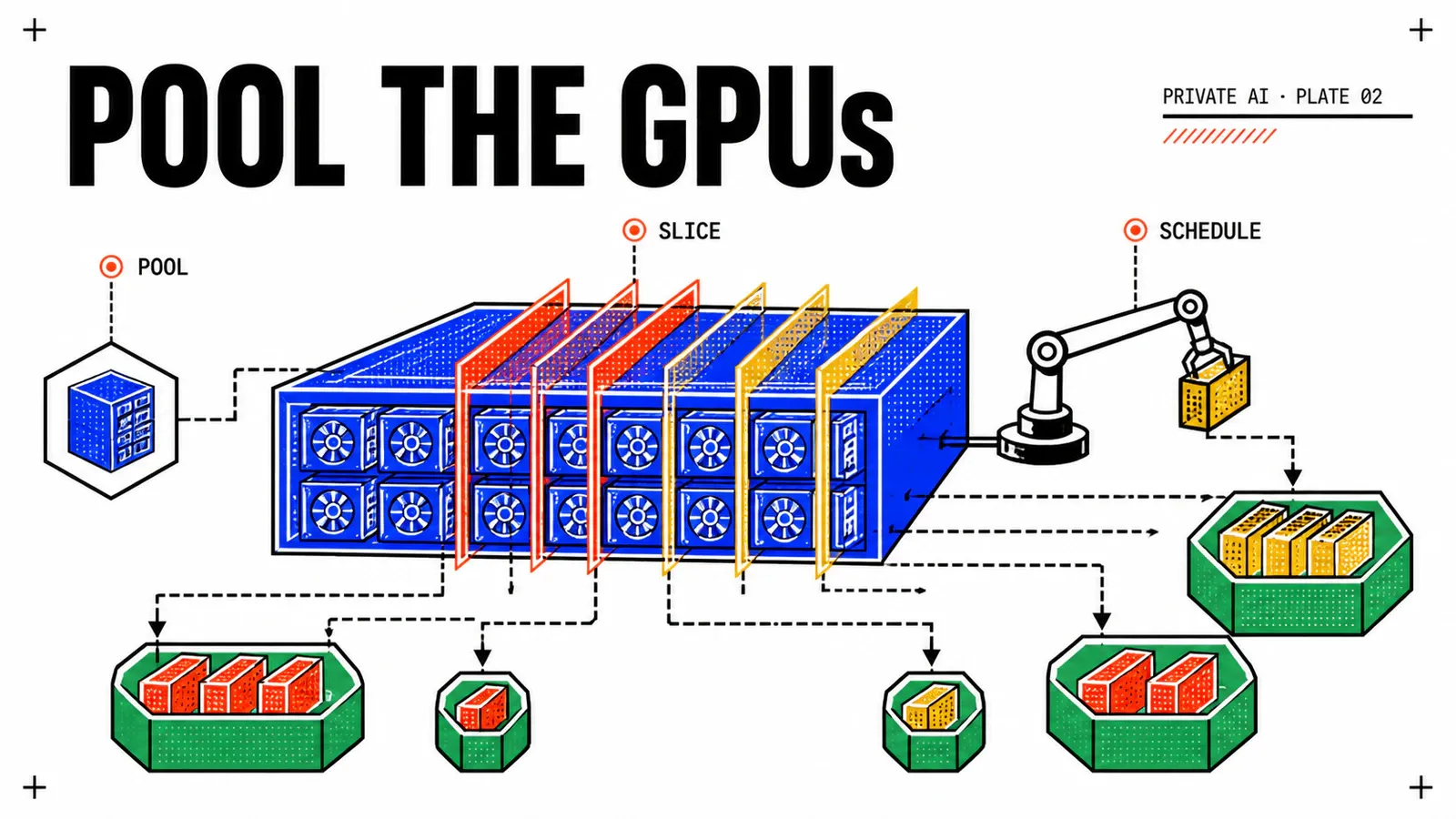
A single H100 costs more than a small fleet of CPU servers. If only one tenant ever gets to touch it at a time, your private AI economics fall apart on day one. GPU pooling is what makes the math work — and Broadcom’s bet is on NVIDIA vGPU plus Multi-Instance GPU (MIG), exposed through VCF and VKS.
In this article we walk through what each pooling mode actually does, when vGPU profiles beat MIG slicing, and the failure modes that show up when training, inference and notebook workloads share the same physical card.
TL;DR
- vGPU and MIG are not the same thing — vGPU time-slices, MIG hard-partitions silicon.
- VCF exposes GPU pooling via vSphere host pools and consumes it from VKS nodes.
- Mixed-workload scheduling (training + inference + notebooks) needs explicit policy or it tail-latencies badly.
vGPU profiles vs MIG slices: what is actually shared
Both let several tenants use one card. They fail differently, and the difference only becomes visible under load.
vGPU time-slices the whole card. The host driver on ESXi presents virtual GPUs to virtual machines. Framebuffer memory is partitioned statically by profile: pick a 20 GB profile on an 80 GB card and you get four VMs, each with a hard ceiling nobody else can cross. Compute is not partitioned. Each vGPU takes turns on the full SM array, and the vGPU scheduling policy decides how those turns are handed out. Best-effort lets an active VM consume the whole card while its neighbours idle. Equal share divides among currently active vGPUs. Fixed share hands each vGPU a constant slice whether or not the others are doing anything.
That choice is the entire trade-off in one setting. Best-effort maximises utilisation and destroys predictability. Fixed share buys predictability and burns capacity on idle tenants.
MIG hard-partitions the silicon. On MIG-capable data-center GPUs, the card is carved into GPU instances that own their SM slices, their portion of L2 cache, and their own memory paths. Profiles are named by compute and memory — patterns like 1g.10gb, 2g.20gb, 3g.40gb up to a full-card instance — and the exact catalogue depends on the card generation and memory size, so read the profile list off the hardware you actually bought rather than off a blog. Up to seven instances per GPU. To CUDA, an instance looks like a small, independent GPU.
Here is the consequence that matters operationally: under MIG, a neighbour saturating memory bandwidth does not steal yours. Under time-sliced vGPU, it does. Even with fixed-share scheduling, vGPUs on the same card contend for L2 cache, memory bandwidth and copy engines — the scheduler divides time, not the memory subsystem. “We set fixed share, so the tenants are isolated” is one of the more expensive misconceptions you can carry into a private AI platform.
MIG’s price is rigidity. Geometry is set per card, and changing it requires the GPU to be free of running work, so a re-partition is a drain-and-reconfigure operation rather than a live knob. Instances do not peer over NVLink and a single job cannot span two of them, which makes MIG structurally wrong for multi-GPU training. And a small instance is genuinely small: if the model plus its KV cache does not fit in the instance memory, no amount of partitioning cleverness will save you.
| Time-sliced vGPU | MIG | |
|---|---|---|
| Memory | hard split by profile | hard split by instance |
| Compute | shared in time, full array per turn | physically partitioned SMs |
| L2 cache and bandwidth | shared across the card | partitioned per instance |
| Noisy neighbour | real, lands in your p99 | largely contained |
| Burst above your share | possible with best-effort | never |
| Reconfiguration | profile changes at VM power-on | drain the GPU, re-partition |
| Multi-GPU jobs | supported | not supported |
They are not mutually exclusive
MIG-backed vGPU profiles hand a single MIG instance to a VM. You get hardware-level isolation and keep the VM lifecycle vSphere already knows how to manage. In the deployments I have seen, that is the shape most VCF platforms converge on for their inference tier, with plain passthrough or full-card profiles reserved for training.
How VCF exposes pooled GPUs to VKS
There is a chain of custody between a card bolted into an ESXi host and a pod that says nvidia.com/gpu: 1. Four links, and each one can break independently.
On the host. The NVIDIA vGPU host driver is installed as a VIB on every ESXi host that carries cards. Every GPU host in the cluster should run the same driver version — a mismatch does not fail loudly at install time, it fails later when a VM refuses to power on where DRS wanted to put it.
In vSphere. The GPU becomes a device you attach to a VM Class. That class is your real allocation unit: vCPU, memory, and a named vGPU profile bundled together. VM classes are then bound to a vSphere Namespace alongside a storage policy and quotas, and the namespace is your tenancy boundary. If a team can see a GPU VM class in its namespace, it can consume that hardware.
In VKS. A node pool references the VM class. Everything else is standard Cluster API — the GPU-ness of the pool lives entirely in the class name.
workers:
  machineDeployments:
    - class: node-pool
      name: gpu-inference
      replicas: 3
      variables:
        overrides:
          - name: vmClass
            value: gpu-mig-1x-20gb      # VM class carrying the vGPU profile
          - name: nodePoolLabels
            value:
              - key: accelerator.local/profile
                value: mig-20gb
          - name: nodePoolTaints
            value:
              - key: accelerator.local/gpu
                value: "true"
                effect: NoSchedule
In the guest. The NVIDIA GPU Operator installs the guest driver, the container toolkit, the device plugin and the DCGM exporter. The device plugin is what advertises capacity to the Kubernetes scheduler. Under MIG, its mig.strategy setting decides whether the node advertises a generic nvidia.com/gpu count (single strategy) or per-profile resources such as nvidia.com/mig-1g.10gb (mixed strategy). Mixed is what lets the scheduler tell a small instance from a large one. Choose deliberately: switching later rewrites every workload manifest that requests a GPU.
Two dependencies deserve more respect than they usually get. First, licensing: vGPU requires an entitlement served by the NVIDIA License System, either the cloud service or a local delegated appliance. A GPU node that cannot reach it does not fail cleanly — it degrades. Treat that appliance as a production dependency with the same availability expectations as DNS, because a node pool that rolls at 2am will find it before you do. Second, mobility: vGPU-backed VMs can be migrated, but the framebuffer has to move with them, so stun time scales with profile size. Do not let DRS shuffle GPU nodes on its own judgement; set the automation level explicitly and treat a GPU node move as a change, not a background event. If node pools and VM classes are new territory, the first VKS cluster walkthrough covers the plumbing underneath.
Scheduling training, inference and notebooks together
Start from the constraint that surprises most Kubernetes people: GPU requests are integral. A pod asks for one unit of nvidia.com/gpu, or two. There is no fractional request, no bin-packing by tenths. All the fractioning happened lower down, when someone chose a vGPU profile or a MIG geometry for that node pool. Sharing policy is therefore decided at node-pool build time, not at scheduling time — which is exactly why an accelerator platform needs design, not just a device plugin.
Three workload shapes want incompatible things:
Put them on one time-sliced pool and the utilisation dashboard will look wonderful while your inference p99 quietly triples. The mechanism is simple: a training kernel that runs for tens of milliseconds holds the card for that whole turn, so the vGPU time-slice granularity becomes the jitter floor of every request queued behind it. Mean latency barely moves, which is why nobody catches it in a load test that reports averages. The tail is what users feel.
The policy set that actually works:
- Separate node pools per shape. This is the first move and it is not negotiable. Inference on MIG instances or dedicated cards; training on whole-card profiles where NVLink is intact; notebooks on time-sliced capacity with best-effort scheduling.
- Taints and labels. Taint every GPU node so CPU workloads cannot drift onto expensive hardware, and label nodes with their profile so manifests target a shape rather than a hostname.
- Priority and preemption. A high, non-preemptible
PriorityClassfor inference; a preemptible class for batch training; the lowest for notebooks. Preemption only works if the preempted job can resume, so this is a contract with the data science team, not a scheduler setting. - Quotas. A
ResourceQuotaper namespace on GPU counts is the only thing standing between one enthusiastic team and the whole pool. - Idle culling for notebooks. Highest-yield single policy in the entire platform. A notebook still holding a card three weeks after the demo is the most common way private AI capacity disappears.
- Gang scheduling for multi-GPU jobs. Kueue or Volcano. Without it, two eight-GPU jobs each acquire five cards and neither ever starts.
Finally, instrument honestly. The headline “GPU utilization” counter is closer to a busy flag than to occupancy: a kernel using a fraction of the SMs still reports the card as busy. Prefer the DCGM profiling counters for SM activity and memory bandwidth, and put them next to your latency SLOs rather than on a separate dashboard — the Prometheus and Grafana setup for VKS is the right place to land them.
| Workload | Placement | Sharing mode | Key control |
|---|---|---|---|
| Production inference | dedicated pool | MIG instance or whole card | non-preemptible priority, per-tenant quota |
| Batch training | dedicated pool | whole card, NVLink intact | preemptible class, gang scheduling, checkpoints |
| Notebooks and dev | shared pool | time-sliced vGPU, best-effort | idle culling, lowest priority, hard quota |
Capacity sizing and the spare-GPU rule
Everything you know about sizing CPU clusters underestimates the cost of losing a GPU node.
The failure domain is much bigger. A GPU host may carry four or eight cards. Losing one host does not remove two percent of the pool the way a CPU node does — it removes a visible fraction of your entire accelerator estate in one event.
There is no overflow valve. CPU capacity spills onto other clusters, or onto cheap cloud instances, without much ceremony. GPU capacity does not: bursting means paying public-cloud accelerator rates and, worse, moving the data that you built a private AI platform specifically to keep in your own DC.
Replacement is slow. Almost nobody keeps a spare GPU chassis on the floor, and procurement lead times for accelerator hardware have been long and volatile for years. Plan as if a dead host stays dead for weeks.
Ready is not the same as serving. When a replacement node joins, the guest driver has to load, the runtime has to initialise, and model weights measured in tens of gigabytes have to be pulled and pushed into VRAM. Time-to-first-token after a node replacement is a number worth measuring on your own stack, because it is minutes rather than seconds and it lands entirely inside your incident window.
Drivers are version-coupled. A rebuilt host has to come back with the same host driver the guests expect. Rebuilding a GPU host from an old image is a quiet way to create nodes that look healthy and cannot start a single accelerated pod.
The spare-GPU rule
For anything under an SLO, reserve headroom at the host level, not the GPU level. The failure domain is the chassis, so N+1 on cards inside one host protects you from nothing. Then budget maintenance headroom separately: rolling driver and VKr upgrades drain nodes one at a time, and without spare capacity a routine upgrade becomes a planned outage. The day-2 lifecycle article covers what those rollouts look like in practice.
Two more habits are worth building early. Do not plan the SLO-bearing pool for high steady-state utilisation — accelerator queues behave like any other queueing system, and wait time climbs sharply as you approach saturation. Where the knee sits depends entirely on your job size distribution, so derive it from your own queue metrics instead of adopting someone else’s target. And make the reserved capacity productive rather than idle: point preemptible batch work at it, verify that those jobs genuinely checkpoint and resume by killing them on purpose in a game day, and you get insurance that pays for itself between incidents.
For chargeback, account in GPU-hours per profile rather than per card. A tenant on a small MIG instance and a tenant holding a whole card are not consuming the same thing, and a flat per-card model quietly subsidises the wasteful ones.
Conclusion
GPU pooling on VCF is less about picking the clever option and more about matching the sharing mechanism to the workload shape, then defending that match with scheduling policy and honest capacity headroom.
Isolation is hardware or it is nothing
Time-sliced vGPU splits memory and time but shares cache and bandwidth. MIG partitions the silicon. Choose per tier, not per platform.
Policy beats utilisation
Separate node pools, priority classes, quotas and notebook culling. A busy dashboard with a broken p99 is not a well-run pool.
Keep a host in reserve
GPU hosts fail as a block, replace slowly and warm up slowly. Reserve at the chassis level and let preemptible batch keep the reserve busy.
Next in the series. With compute pooled and scheduled, the bottleneck moves to data. The next article looks at vector databases on VCF: where embeddings live, how retrieval latency interacts with the inference tier you just sized, and what it costs to keep an index fresh.
Get the next one by email
New articles and series, sent when they are published. No other mail.