
The stage manager opens the running-order app to check the next changeover. Nothing loads. The rehearsal is about to start, the schedule is needed by the crew, and the application was working moments ago. At the edge of the control desk, TOP Infra stops short: “The workloads are up. What changed around them?”
The two of them know the system and the festival routine. They do not guess at the cause. A recent isolation change may have closed more than the intended path, so they agree to test name resolution and application traffic separately. This episode turns that moment into a controlled exercise: the festival is fictional, and the manifests and procedure are downloadable. The target is a disposable kind cluster with Cilium, not VKS or a production environment.
Write the contract before closing the door
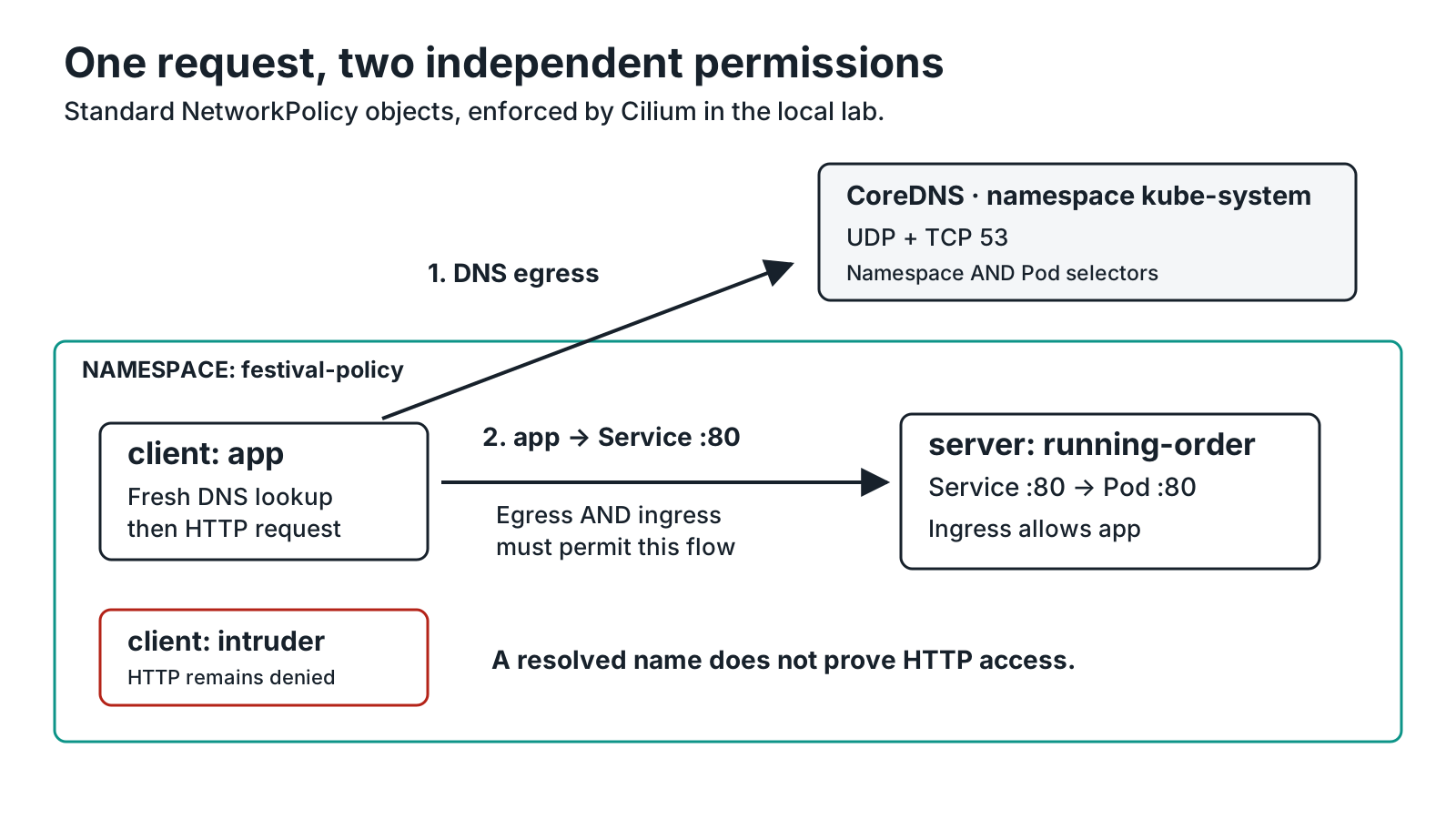
The lab has one namespace, festival-policy, an HTTP server Deployment and Service named running-order, two clients, app and intruder, each managed by a Deployment. The latter is a negative control, not a claim about an attacker. If it can retrieve the running order after the intended application path is allowed, the isolation has not been demonstrated.
The Service listens on TCP 80 and forwards to the server Pod on TCP 80. Clients use running-order.festival-policy.svc.cluster.local. In this cluster, DNS comes from CoreDNS Pods in kube-system, identified by k8s-app=kube-dns. These are lab choices. Another cluster may use a different domain or NodeLocal DNSCache and need a different policy.
The isolation objects are standard Kubernetes NetworkPolicy resources. Cilium enforces them in this lab: we configure no L7 rules, toFQDNs, or CNI migration. Keep the NetworkPolicy and Cilium guide nearby for capability differences and VKS boundaries. Reference: policy resources supported by Cilium.
Download the complete lab bundle. Scripts, manifests and English/French instructions are also readable in the README. Pinned versions and digests are recorded in setup.sh and cluster.yaml. Read them rather than silently replacing an image with latest.
Validation boundary
This article describes a local lab procedure. “What was actually verified” links to the validation account and distinguishes executed results from expected behaviour. Resource creation alone does not prove filtering, and a kind test does not validate VKS.
Observe before applying default-deny
Before changing policy, TOP and the stage manager establish a baseline. They verify that the Service has endpoints, resolve its full name, and send a fresh HTTP request from both clients. This order matters: an image pull failure, wrong label, missing endpoint or stopped server could otherwise look like successful filtering. The bundle keeps names and labels direct enough to inspect without guessing.
On a lab machine with Docker running, kind, kubectl and Helm, extract the archive, read the scripts, then run:
chmod +x setup.sh verify.sh cleanup.sh
./setup.sh
./verify.sh
setup.sh prepares a dedicated cluster called top-cilium with a separate kubeconfig. verify.sh walks the scenario and keeps timestamped output. Read where its files go before sharing traces: they should not contain identifiers from another cluster or secrets. Do not change your terminal’s context to work around a guard that refused a command.
With no policy, the expected result is a fresh DNS lookup and a successful HTTP response from both app and intruder. The server returns the fixture text “Festival running order: soundcheck, doors, opening set”. If either request fails at baseline, the pair pauses and checks service endpoints and server readiness before proceeding. A broken starting point cannot tell them what the isolation rule did.
Service DNS names provide discovery, not network permission. A name can resolve while access to its destination remains blocked. Reference: DNS for Services and Pods.
Reveal the denial, then restore DNS
The manifest 10-default-deny.yaml selects every Pod in the namespace in both directions:
apiVersion: networking.k8s.io/v1
kind: NetworkPolicy
metadata:
  name: default-deny
  namespace: festival-policy
spec:
  podSelector: {}
  policyTypes:
    - Ingress
    - Egress
There is no deny: true field to find. This manifest selects Pods without adding allowed flows. Permissions granted by other policies would still matter, which is why the exercise starts in a fresh namespace. A connection between two isolated Pods needs the relevant policies on both sides to allow it. Reference: the NetworkPolicy model.
They rerun bounded tests. At this stage, DNS and HTTP to the known ClusterIP are expected to fail. Testing the known address avoids confusing “cannot resolve the name” with “HTTP would have been permitted”. The running-order app remains unreachable; now the pair has a concrete denial to investigate rather than a general outage.

20-allow-dns.yaml permits egress to CoreDNS on UDP and TCP 53. Its namespaceSelector and podSelector are in the same destination entry: both the namespace and Pod label must match. Splitting them into two entries would broaden the destinations.
This permission restores name resolution; it does not permit the running-order app. The expected state becomes DNS works, HTTP remains blocked. That is more useful evidence than a general “the network works again”. DNS is a path to a resolver, not filtering of requested domain names. This lab also does not prove that an ingress-isolated CoreDNS Pod would accept these packets: the application default-deny does not isolate the system namespace. On another DNS deployment, identify the resolver actually in use first. Kubernetes DNS troubleshooting procedure.
Permit the application path, then check the control
The manifest 30-allow-app-to-running-order.yaml supplies two halves of the path: egress from client app to the server Pod labelled app=running-order, and ingress to that Pod from app. The selectors stay within the lab namespace. The application destination is TCP 80, the Pod port behind Service TCP 80.
The intruder control retains DNS permission from the shared DNS rule but receives no HTTP permission. Two results must coexist: app retrieves the exact running-order fixture response, while intruder does not. One successful request never replaces that comparison.
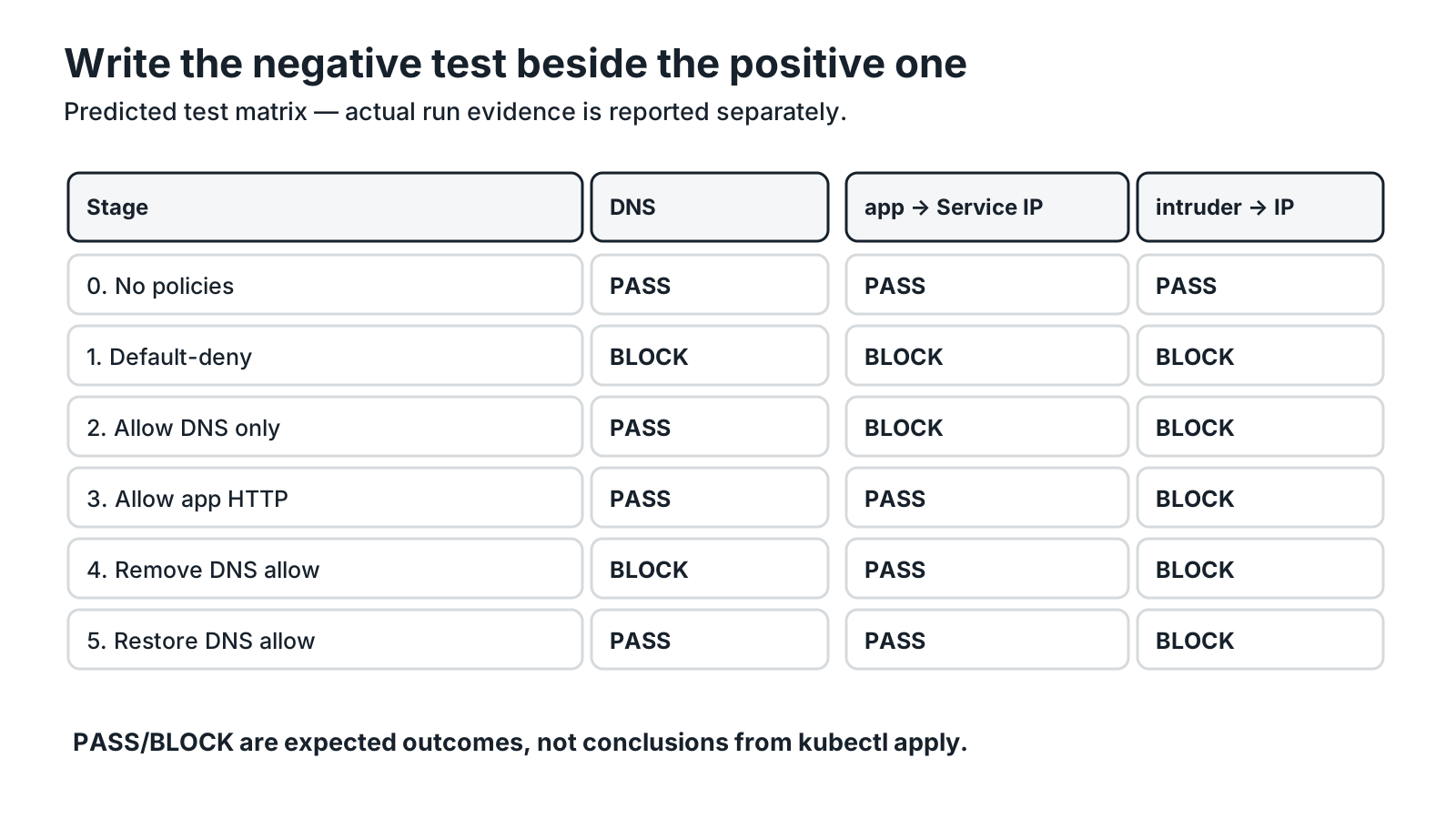
To finish the investigation, the script removes only the DNS permission. The client retains the Service address collected earlier. On fresh attempts, resolution is expected to fail while direct HTTP from app still works. The DNS rule is then restored and both checks are repeated. This final contrast shows why DNS and application access need separate observations.
The variation is deliberately narrow. Real applications may cache DNS answers, retain connections or use several resolvers. A negative test must therefore state its process, destination, timeout and fresh-connection conditions. This procedure measures no throughput, latency or attack resistance. A bounded timeout alone cannot establish the cause on an arbitrary cluster.
What was actually verified
The final festival bundle was installed from scratch on 2 November 2026 with kind 0.31.0, Kubernetes 1.35.0 and Cilium 1.20.4. Two runs each passed 16 assertions across six phases, including the reset of an existing lab namespace. DNS-only access left HTTP blocked; app-only HTTP kept the intruder blocked; removing DNS left direct-IP HTTP working for app. The dedicated cluster was deleted after verification.
The downloadable bundle includes a validation report at VALIDATION.md, with detailed results, evidence and limits. It records the local procedure and the outcomes that were observed; the scenario descriptions above label other outcomes as expected. No simulated output is presented as a Cilium result.
The scope stays local: no VKS deployment executed, no CNI replaced on an existing platform, no assumed Hubble log and no performance result. Other policies or Cilium settings require new observations in that context. Cilium enforcement modes belong in the configuration record.
Close the lab and keep the useful habit
Before deleting the cluster, keep versions, applied manifests, positive and negative results, and the changes made between each pair of tests. Then clean up only this lab:
./cleanup.shThe cleanup script targets top-cilium. It is not a namespace-removal procedure for a shared platform. Do not replace its guard with your normal context or copy destructive commands into a production runbook.

With the checks written down, the pair can name the permitted flow, the flow that remains denied and the test that distinguishes them. The next outage can start with that small matrix rather than a broader rule. Continue with the VKS networking episode for DNS, Services and endpoints, or the deployment with a broken selector for a different failure that should not be confused with a network policy.
Get the next one by email
New articles and series, sent when they are published. No other mail.